Compare commits
2 Commits
dependabot
...
snyk-upgra
| Author | SHA1 | Date | |
|---|---|---|---|

|
59195e6379 | ||

|
3a820c56a9 |
@@ -96,26 +96,6 @@
|
||||
"test",
|
||||
"review"
|
||||
]
|
||||
},
|
||||
{
|
||||
"login": "rudvfaden",
|
||||
"name": "Rud Faden",
|
||||
"avatar_url": "https://avatars.githubusercontent.com/u/2445577?v=4",
|
||||
"profile": "http://rudvfaden.github.io/",
|
||||
"contributions": [
|
||||
"userTesting",
|
||||
"doc"
|
||||
]
|
||||
},
|
||||
{
|
||||
"login": "saramartinelli1992",
|
||||
"name": "Sara",
|
||||
"avatar_url": "https://avatars.githubusercontent.com/u/100193908?v=4",
|
||||
"profile": "https://github.com/saramartinelli1992",
|
||||
"contributions": [
|
||||
"userTesting",
|
||||
"platform"
|
||||
]
|
||||
}
|
||||
],
|
||||
"contributorsPerLine": 7,
|
||||
|
||||
@@ -1,12 +0,0 @@
|
||||
#!/bin/sh
|
||||
|
||||
# Using `--silent` helps for showing any errs in the first line of the response
|
||||
# The first line is picked up by the VS Code GIT UI popup when rc is not 0
|
||||
|
||||
if npm run --silent lint:silent ; then
|
||||
exit 0
|
||||
else
|
||||
npm run --silent lint:fix
|
||||
echo "❌ Prettier check failed! We ran lint:fix for you. Please add & commit again."
|
||||
exit 1
|
||||
fi
|
||||
8
.github/dependabot.yml
vendored
@@ -1,7 +1,7 @@
|
||||
version: 2
|
||||
updates:
|
||||
- package-ecosystem: "npm"
|
||||
directory: "/"
|
||||
- package-ecosystem: npm
|
||||
directory: '/'
|
||||
schedule:
|
||||
interval: "monthly"
|
||||
open-pull-requests-limit: 1
|
||||
interval: monthly
|
||||
open-pull-requests-limit: 2
|
||||
|
||||
12
.github/issue_template.md
vendored
@@ -1,12 +0,0 @@
|
||||
## Expected behaviour
|
||||
*Describe what should be happening*
|
||||
|
||||
## Current behaviour
|
||||
*Describe what is actually happening*
|
||||
|
||||
## Environment info
|
||||
**Client tech stack**: *Angular, React, Vue, VanillaJS, NodeJS etc.*
|
||||
**Server type**: SASJS|SASVIYA|SAS9
|
||||
**Login mechanism**: Default|Redirected
|
||||
**Debug**: true|false
|
||||
**Use Compute Api (relevant only on VIYA)**: true|false
|
||||
4
.github/reviewer-lottery.yml
vendored
@@ -5,3 +5,7 @@ groups:
|
||||
- YuryShkoda
|
||||
- medjedovicm
|
||||
- sabhas
|
||||
- name: SASjs QA
|
||||
reviewers: 1
|
||||
usernames:
|
||||
- VladislavParhomchik
|
||||
|
||||
27
.github/vpn/config.ovpn
vendored
@@ -1,27 +0,0 @@
|
||||
# Client
|
||||
client
|
||||
tls-client
|
||||
dev tun
|
||||
# this will connect with whatever proto DNS tells us (https://community.openvpn.net/openvpn/ticket/934)
|
||||
proto udp
|
||||
remote vpn.4gl.io 7194
|
||||
resolv-retry infinite
|
||||
# this will fallback from udp6 to udp4 as well
|
||||
connect-timeout 5
|
||||
data-ciphers AES-256-CBC:AES-256-GCM
|
||||
auth SHA256
|
||||
script-security 2
|
||||
keepalive 10 120
|
||||
remote-cert-tls server
|
||||
|
||||
# Keys
|
||||
ca ca.crt
|
||||
cert user.crt
|
||||
key user.key
|
||||
tls-auth tls.key 1
|
||||
|
||||
# Security
|
||||
nobind
|
||||
persist-key
|
||||
persist-tun
|
||||
verb 3
|
||||
2
.github/workflows/assign-reviewer.yml
vendored
@@ -10,4 +10,4 @@ jobs:
|
||||
- uses: actions/checkout@v2
|
||||
- uses: uesteibar/reviewer-lottery@v1
|
||||
with:
|
||||
repo-token: ${{ secrets.GITHUB_TOKEN }}
|
||||
repo-token: ${{ secrets.GH_TOKEN }}
|
||||
|
||||
@@ -1,18 +1,19 @@
|
||||
# This workflow will do a clean install of node dependencies, build the source code and run tests across different versions of node
|
||||
# For more information see: https://help.github.com/actions/language-and-framework-guides/using-nodejs-with-github-actions
|
||||
|
||||
name: SASjs Build and Unit Test
|
||||
name: SASjs Build
|
||||
|
||||
on:
|
||||
push:
|
||||
pull_request:
|
||||
|
||||
jobs:
|
||||
build:
|
||||
runs-on: ubuntu-22.04
|
||||
runs-on: ubuntu-latest
|
||||
|
||||
strategy:
|
||||
matrix:
|
||||
node-version: [lts/hydrogen]
|
||||
node-version: [lts/fermium]
|
||||
|
||||
steps:
|
||||
- uses: actions/checkout@v2
|
||||
@@ -20,39 +21,20 @@ jobs:
|
||||
uses: actions/setup-node@v2
|
||||
with:
|
||||
node-version: ${{ matrix.node-version }}
|
||||
|
||||
# 2. Restore npm cache manually
|
||||
- name: Restore npm cache
|
||||
uses: actions/cache@v3
|
||||
id: npm-cache
|
||||
with:
|
||||
path: ~/.npm
|
||||
key: ${{ runner.os }}-node-${{ hashFiles('**/package-lock.json') }}
|
||||
restore-keys: |
|
||||
${{ runner.os }}-node-
|
||||
|
||||
cache: npm
|
||||
- name: Check npm audit
|
||||
run: npm audit --production --audit-level=low
|
||||
|
||||
- name: Install Dependencies
|
||||
run: npm ci
|
||||
|
||||
- name: Install Rimraf
|
||||
run: npm i rimraf
|
||||
|
||||
- name: Check code style
|
||||
run: npm run lint
|
||||
|
||||
- name: Run unit tests
|
||||
run: npm test
|
||||
|
||||
- name: Build Package
|
||||
run: npm run package:lib
|
||||
env:
|
||||
CI: true
|
||||
|
||||
# For some reason if coverage report action is run before other commands, those commands can't access the directories and files on which they depend on
|
||||
- name: Generate coverage report
|
||||
uses: artiomtr/jest-coverage-report-action@v2.0-rc.2
|
||||
with:
|
||||
github-token: ${{ secrets.GITHUB_TOKEN }}
|
||||
- name: Build Package
|
||||
run: npm run package:lib
|
||||
env:
|
||||
CI: true
|
||||
53
.github/workflows/generateDocs.yml
vendored
@@ -1,53 +0,0 @@
|
||||
name: Generate docs and Push to docs Branch
|
||||
|
||||
on:
|
||||
push:
|
||||
branches:
|
||||
- master
|
||||
|
||||
jobs:
|
||||
generate_and_push_docs:
|
||||
runs-on: ubuntu-latest
|
||||
|
||||
strategy:
|
||||
matrix:
|
||||
node-version: [lts/hydrogen]
|
||||
|
||||
steps:
|
||||
- name: Checkout
|
||||
uses: actions/checkout@v2
|
||||
|
||||
- name: Setup Node
|
||||
uses: actions/setup-node@v2
|
||||
with:
|
||||
node-version: ${{ matrix.node-version }}
|
||||
|
||||
# 2. Restore npm cache manually
|
||||
- name: Restore npm cache
|
||||
uses: actions/cache@v3
|
||||
id: npm-cache
|
||||
with:
|
||||
path: ~/.npm
|
||||
key: ${{ runner.os }}-node-${{ hashFiles('**/package-lock.json') }}
|
||||
restore-keys: |
|
||||
${{ runner.os }}-node-
|
||||
|
||||
- name: Install Dependencies
|
||||
run: npm ci
|
||||
|
||||
- name: Ensure docs folder exists
|
||||
run: |
|
||||
rm -rf docs || true # avoid error if docs folder does not exist
|
||||
mkdir docs
|
||||
|
||||
- name: Generate Docs
|
||||
run: npm run typedoc
|
||||
|
||||
- name: Push generated docs
|
||||
uses: peaceiris/actions-gh-pages@v3
|
||||
with:
|
||||
github_token: ${{ secrets.GITHUB_TOKEN }}
|
||||
publish_branch: gh-pages
|
||||
publish_dir: ./docs
|
||||
cname: adapter.sasjs.io
|
||||
|
||||
35
.github/workflows/npmpublish.yml
vendored
@@ -11,42 +11,19 @@ on:
|
||||
jobs:
|
||||
build:
|
||||
runs-on: ubuntu-latest
|
||||
|
||||
strategy:
|
||||
matrix:
|
||||
node-version: [lts/hydrogen]
|
||||
|
||||
steps:
|
||||
- uses: actions/checkout@v2
|
||||
- name: Use Node.js ${{ matrix.node-version }}
|
||||
uses: actions/setup-node@v2
|
||||
with:
|
||||
node-version: ${{ matrix.node-version }}
|
||||
|
||||
# 2. Restore npm cache manually
|
||||
- name: Restore npm cache
|
||||
uses: actions/cache@v3
|
||||
id: npm-cache
|
||||
with:
|
||||
path: ~/.npm
|
||||
key: ${{ runner.os }}-node-${{ hashFiles('**/package-lock.json') }}
|
||||
restore-keys: |
|
||||
${{ runner.os }}-node-
|
||||
|
||||
- name: Checkout
|
||||
uses: actions/checkout@v2
|
||||
- name: Install Dependencies
|
||||
run: npm ci
|
||||
|
||||
- name: Check code style
|
||||
run: npm run lint
|
||||
|
||||
- name: Build Project
|
||||
run: npm run build
|
||||
|
||||
- name: Semantic Release
|
||||
uses: cycjimmy/semantic-release-action@v3
|
||||
uses: cycjimmy/semantic-release-action@v2
|
||||
env:
|
||||
GITHUB_TOKEN: ${{ secrets.GITHUB_TOKEN }}
|
||||
GITHUB_TOKEN: ${{ secrets.GH_TOKEN }}
|
||||
NPM_TOKEN: ${{ secrets.NPM_TOKEN }}
|
||||
|
||||
- name: Send Matrix message
|
||||
run: curl -XPOST -d "{\"msgtype\":\"m.text\", \"body\":\"New version of @sasjs/adapter has been released! \n Please deploy and run 'dctests' with new adapter to make sure everything is still in place.\"}" https://matrix.4gl.io/_matrix/client/r0/rooms/!jRebyiGmHZlpfDwYXN:4gl.io/send/m.room.message?access_token=${{ secrets.MATRIX_TOKEN }}
|
||||
- name: Send Slack message
|
||||
run: curl -X POST --data-urlencode "payload={\"channel\":\"#sasjs\", \"username\":\"GitHub CI\", \"text\":\"New version of @sasjs/adapter has been released! \n Please deploy and run `dctests` with new adapter to make sure everything is still in place.\", \"icon_emoji\":\":rocket:\"}" ${{ secrets.SLACK_WEBHOOK }}
|
||||
|
||||
107
.github/workflows/server-tests.yml
vendored
@@ -1,107 +0,0 @@
|
||||
# This workflow will do a clean install of node dependencies, build the source code and run tests across different versions of node
|
||||
# For more information see: https://help.github.com/actions/language-and-framework-guides/using-nodejs-with-github-actions
|
||||
|
||||
name: SASjs Build and Server Tests
|
||||
|
||||
on:
|
||||
pull_request:
|
||||
|
||||
jobs:
|
||||
test:
|
||||
runs-on: ubuntu-22.04
|
||||
|
||||
strategy:
|
||||
matrix:
|
||||
node-version: [lts/hydrogen]
|
||||
|
||||
steps:
|
||||
- uses: actions/checkout@v2
|
||||
- name: Use Node.js ${{ matrix.node-version }}
|
||||
uses: actions/setup-node@v2
|
||||
with:
|
||||
node-version: ${{ matrix.node-version }}
|
||||
|
||||
# 2. Restore npm cache manually
|
||||
- name: Restore npm cache
|
||||
uses: actions/cache@v3
|
||||
id: npm-cache
|
||||
with:
|
||||
path: ~/.npm
|
||||
key: ${{ runner.os }}-node-${{ hashFiles('**/package-lock.json') }}
|
||||
restore-keys: |
|
||||
${{ runner.os }}-node-
|
||||
|
||||
- name: Install Dependencies
|
||||
run: npm ci
|
||||
|
||||
- name: Install Rimraf
|
||||
run: npm i rimraf
|
||||
|
||||
- name: Build Package
|
||||
run: npm run package:lib
|
||||
env:
|
||||
CI: true
|
||||
|
||||
- name: Write VPN Files
|
||||
run: |
|
||||
echo "$CA_CRT" > .github/vpn/ca.crt
|
||||
echo "$USER_CRT" > .github/vpn/user.crt
|
||||
echo "$USER_KEY" > .github/vpn/user.key
|
||||
echo "$TLS_KEY" > .github/vpn/tls.key
|
||||
shell: bash
|
||||
env:
|
||||
CA_CRT: ${{ secrets.CA_CRT}}
|
||||
USER_CRT: ${{ secrets.USER_CRT }}
|
||||
USER_KEY: ${{ secrets.USER_KEY }}
|
||||
TLS_KEY: ${{ secrets.TLS_KEY }}
|
||||
|
||||
- name: Chmod VPN files
|
||||
run: |
|
||||
chmod 600 .github/vpn/ca.crt .github/vpn/user.crt .github/vpn/user.key .github/vpn/tls.key
|
||||
|
||||
- name: Install Open VPN
|
||||
run: |
|
||||
sudo apt install apt-transport-https
|
||||
sudo wget https://swupdate.openvpn.net/repos/openvpn-repo-pkg-key.pub
|
||||
sudo apt-key add openvpn-repo-pkg-key.pub
|
||||
sudo wget -O /etc/apt/sources.list.d/openvpn3.list https://swupdate.openvpn.net/community/openvpn3/repos/openvpn3-jammy.list
|
||||
sudo apt update
|
||||
sudo apt install openvpn3=17~betaUb22042+jammy
|
||||
|
||||
- name: Start Open VPN 3
|
||||
run: openvpn3 session-start --config .github/vpn/config.ovpn
|
||||
|
||||
- name: install pm2
|
||||
run: npm i -g pm2
|
||||
|
||||
- name: Fetch SASJS server
|
||||
run: curl ${{ secrets.SASJS_SERVER_URL }}/SASjsApi/info
|
||||
|
||||
- name: Deploy sasjs-tests
|
||||
run: |
|
||||
npm install -g replace-in-files-cli
|
||||
cd sasjs-tests
|
||||
replace-in-files --regex='"@sasjs/adapter".*' --replacement='"@sasjs/adapter":"latest",' ./package.json
|
||||
npm i
|
||||
replace-in-files --regex='"serverUrl".*' --replacement='"serverUrl":"${{ secrets.SASJS_SERVER_URL }}",' ./public/config.json
|
||||
replace-in-files --regex='"userName".*' --replacement='"userName":"${{ secrets.SASJS_USERNAME }}",' ./public/config.json
|
||||
replace-in-files --regex='"serverType".*' --replacement='"serverType":"SASJS",' ./public/config.json
|
||||
replace-in-files --regex='"password".*' --replacement='"password":"${{ secrets.SASJS_PASSWORD }}",' ./public/config.json
|
||||
cat ./public/config.json
|
||||
|
||||
npm run update:adapter
|
||||
pm2 start --name sasjs-test npm -- start
|
||||
|
||||
- name: Sleep for 10 seconds
|
||||
run: sleep 10s
|
||||
shell: bash
|
||||
|
||||
- name: Run cypress on sasjs
|
||||
run: |
|
||||
replace-in-files --regex='"sasjsTestsUrl".*' --replacement='"sasjsTestsUrl":"http://localhost:3000",' ./cypress.json
|
||||
replace-in-files --regex='"username".*' --replacement='"username":"${{ secrets.SASJS_USERNAME }}",' ./cypress.json
|
||||
replace-in-files --regex='"password".*' --replacement='"password":"${{ secrets.SASJS_PASSWORD }}",' ./cypress.json
|
||||
cat ./cypress.json
|
||||
echo "SASJS_USERNAME=${{ secrets.SASJS_USERNAME }}"
|
||||
|
||||
sh ./sasjs-tests/sasjs-cypress-run.sh ${{ secrets.MATRIX_TOKEN }} https://github.com/${{github.repository}}/actions/runs/${{github.run_id}}
|
||||
4
.gitignore
vendored
@@ -1,10 +1,8 @@
|
||||
node_modules
|
||||
build
|
||||
|
||||
docs
|
||||
|
||||
.env
|
||||
|
||||
/coverage
|
||||
|
||||
.DS_Store
|
||||
.DS_Store
|
||||
|
||||
10
.npmignore
@@ -4,13 +4,3 @@ docs/
|
||||
*.md
|
||||
*.spec.ts
|
||||
.all-contributorsrc
|
||||
cypress/
|
||||
.gitpod.yml
|
||||
.prettierrc
|
||||
cypress.json
|
||||
jest.config.js
|
||||
sasjs-cypress-run.sh
|
||||
tsconfig.json
|
||||
tslint.json
|
||||
typedoc.json
|
||||
webpack.config.js
|
||||
|
||||
3
.vscode/settings.json
vendored
@@ -1,3 +0,0 @@
|
||||
{
|
||||
"cSpell.words": ["SASVIYA"]
|
||||
}
|
||||
@@ -14,7 +14,7 @@ What code changes have been made to achieve the intent.
|
||||
|
||||
No PR (that involves a non-trivial code change) should be merged, unless all items below are confirmed! If an urgent fix is needed - use a tar file.
|
||||
|
||||
- [ ] Unit tests coverage has been increased and a new threshold is set.
|
||||
|
||||
- [ ] All `sasjs-cli` unit tests are passing (`npm test`).
|
||||
- (CI Runs this) All `sasjs-tests` are passing. If you want to run it manually (instructions available [here](https://github.com/sasjs/adapter/blob/master/sasjs-tests/README.md)).
|
||||
- [ ] All `sasjs-tests` are passing (instructions available [here](https://github.com/sasjs/adapter/blob/master/sasjs-tests/README.md)).
|
||||
- [ ] [Data Controller](https://datacontroller.io) builds and is functional on both SAS 9 and Viya
|
||||
271
README.md
@@ -2,23 +2,27 @@
|
||||
|
||||
[![npm package][npm-image]][npm-url]
|
||||
[![Github Workflow][githubworkflow-image]][githubworkflow-url]
|
||||
[![Dependency Status][dependency-image]][dependency-url]
|
||||
[]()
|
||||

|
||||

|
||||
[](/LICENSE)
|
||||

|
||||

|
||||
[](https://gitpod.io/#https://github.com/sasjs/adapter)
|
||||
|
||||
[npm-image]: https://img.shields.io/npm/v/@sasjs/adapter.svg
|
||||
[npm-url]: http://npmjs.org/package/@sasjs/adapter
|
||||
[githubworkflow-image]: https://github.com/sasjs/adapter/actions/workflows/build-unit-tests.yml/badge.svg
|
||||
[githubworkflow-url]: https://github.com/sasjs/adapter/blob/main/.github/workflows/build.yml
|
||||
[dependency-image]: https://david-dm.org/sasjs/adapter.svg
|
||||
|
||||
[npm-image]:https://img.shields.io/npm/v/@sasjs/adapter.svg
|
||||
[npm-url]:http://npmjs.org/package/@sasjs/adapter
|
||||
[githubworkflow-image]:https://github.com/sasjs/adapter/actions/workflows/build.yml/badge.svg
|
||||
[githubworkflow-url]:https://github.com/sasjs/adapter/blob/main/.github/workflows/build.yml
|
||||
[dependency-image]:https://david-dm.org/sasjs/adapter.svg
|
||||
[dependency-url]:https://github.com/sasjs/adapter/blob/main/package.json
|
||||
|
||||
SASjs is a open-source framework for building Web Apps on SAS® platforms. You can use as much or as little of it as you like. This repository contains the JS adapter, the part that handles the to/from SAS communication on the client side. There are 3 ways to install it:
|
||||
|
||||
1 - `npm install @sasjs/adapter` - for use in a nodeJS project (recommended)
|
||||
|
||||
2 - [Download](https://cdn.jsdelivr.net/npm/@sasjs/adapter@4/index.min.js) and use a copy of the latest JS file
|
||||
2 - [Download](https://cdn.jsdelivr.net/npm/@sasjs/adapter@3/index.min.js) and use a copy of the latest JS file
|
||||
|
||||
3 - Reference directly from the CDN - in which case click [here](https://www.jsdelivr.com/package/npm/@sasjs/adapter?tab=collection) and select "SRI" to get the script tag with the integrity hash.
|
||||
|
||||
@@ -28,7 +32,7 @@ For more information on building web apps with SAS, check out [sasjs.io](https:/
|
||||
|
||||
## None of this makes sense. How do I build an app with it?
|
||||
|
||||
Ok ok. Deploy this [example.html](https://raw.githubusercontent.com/sasjs/adapter/master/example.html) file to your web server, and update `servertype` to `SAS9`, `SASVIYA`, or `SASJS` depending on your backend.
|
||||
Ok ok. Deploy this [example.html](https://raw.githubusercontent.com/sasjs/adapter/master/example.html) file to your web server, and update `servertype` to `SAS9` or `SASVIYA` depending on your backend.
|
||||
|
||||
The backend part can be deployed as follows:
|
||||
|
||||
@@ -48,7 +52,7 @@ parmcards4;
|
||||
%webout(OBJ,areas)
|
||||
%webout(CLOSE)
|
||||
;;;;
|
||||
%mx_createwebservice(path=&appLoc/common,name=getdata)
|
||||
%mp_createwebservice(path=&appLoc/common,name=getdata)
|
||||
```
|
||||
|
||||
You now have a simple web app with a backend service!
|
||||
@@ -67,27 +71,24 @@ There are three parts to consider:
|
||||
|
||||
To install the library you can simply run `npm i @sasjs/adapter` or include a `<script>` tag with a reference to our [CDN](https://www.jsdelivr.com/package/npm/@sasjs/adapter).
|
||||
|
||||
Full technical documentation is available [here](https://adapter.sasjs.io). The main parts are:
|
||||
Full technical documentation is available [here](https://adapter.sasjs.io). The main parts are:
|
||||
|
||||
### Instantiation
|
||||
|
||||
The following code will instantiate an instance of the adapter:
|
||||
|
||||
```javascript
|
||||
let sasJs = new SASjs.default({
|
||||
appLoc: '/Your/SAS/Folder',
|
||||
serverType: 'SAS9'
|
||||
})
|
||||
let sasJs = new SASjs.default(
|
||||
{
|
||||
appLoc: "/Your/SAS/Folder",
|
||||
serverType:"SAS9"
|
||||
}
|
||||
);
|
||||
```
|
||||
|
||||
If you've installed it via NPM, you can import it as a default import like so:
|
||||
|
||||
```js
|
||||
import SASjs from '@sasjs/adapter'
|
||||
import SASjs from '@sasjs/adapter';
|
||||
```
|
||||
|
||||
You can then instantiate it with:
|
||||
|
||||
```js
|
||||
const sasJs = new SASjs({your config})
|
||||
```
|
||||
@@ -95,11 +96,10 @@ const sasJs = new SASjs({your config})
|
||||
More on the config later.
|
||||
|
||||
### SAS Logon
|
||||
All authentication from the adapter is done against SASLogon. There are two approaches that can be taken, which are configured using the `LoginMechanism` attribute of the sasJs config object (above):
|
||||
|
||||
All authentication from the adapter is done against SASLogon. There are two approaches that can be taken, which are configured using the `loginMechanism` attribute of the sasJs config object (above):
|
||||
|
||||
- `loginMechanism:'Redirected'` - this approach enables authentication through a SASLogon window, supporting complex authentication flows (such as 2FA) and avoids the need to handle passwords in the application itself. The styling of the window can be modified using CSS.
|
||||
- `loginMechanism:'Default'` - this approach requires that the username and password are captured, and used within the `.login()` method. This can be helpful for development, or automated testing.
|
||||
* `LoginMechanism:'Redirected'` - this approach enables authentication through a SASLogon window, supporting complex authentication flows (such as 2FA) and avoids the need to handle passwords in the application itself. The styling of the window can be modified using CSS.
|
||||
* `LoginMechanism:'Default'` - this approach requires that the username and password are captured, and used within the `.login()` method. This can be helpful for development, or automated testing.
|
||||
|
||||
Sample code for logging in with the `Default` approach:
|
||||
|
||||
@@ -116,106 +116,82 @@ sasJs.logIn('USERNAME','PASSWORD'
|
||||
|
||||
More examples of using authentication, and more, can be found in the [SASjs Seed Apps](https://github.com/search?q=topic%3Asasjs-app+org%3Asasjs+fork%3Atrue) on github.
|
||||
|
||||
### Request / Response
|
||||
|
||||
### Request / Response
|
||||
A simple request can be sent to SAS in the following fashion:
|
||||
|
||||
```javascript
|
||||
sasJs.request('/path/to/my/service', dataObject).then((response) => {
|
||||
// all tables are in the response object, eg:
|
||||
console.log(response.tablewith2cols1row[0].COL1.value)
|
||||
})
|
||||
sasJs.request("/path/to/my/service", dataObject)
|
||||
.then((response) => {
|
||||
// all tables are in the response object, eg:
|
||||
console.log(response.tablewith2cols1row[0].COL1.value)
|
||||
})
|
||||
```
|
||||
|
||||
We supply the path to the SAS service, and a data object.
|
||||
|
||||
If the path starts with a `/` then it should be a full path to the service. If there is no leading `/` then it is relative to the `appLoc`.
|
||||
|
||||
The data object can be null (for services with no input), or can contain one or more "tables" in the following format:
|
||||
We supply the path to the SAS service, and a data object. The data object can be null (for services with no input), or can contain one or more tables in the following format:
|
||||
|
||||
```javascript
|
||||
let dataObject = {
|
||||
tablewith2cols1row: [
|
||||
{
|
||||
col1: 'val1',
|
||||
col2: 42
|
||||
}
|
||||
],
|
||||
tablewith1col2rows: [
|
||||
{
|
||||
col: 'row1'
|
||||
},
|
||||
{
|
||||
col: 'row2'
|
||||
}
|
||||
]
|
||||
}
|
||||
let dataObject={
|
||||
"tablewith2cols1row": [{
|
||||
"col1": "val1",
|
||||
"col2": 42
|
||||
}],
|
||||
"tablewith1col2rows": [{
|
||||
"col": "row1"
|
||||
}, {
|
||||
"col": "row2"
|
||||
}]
|
||||
};
|
||||
```
|
||||
|
||||
These tables (`tablewith2cols1row` and `tablewith1col2rows`) will be created in SAS WORK after running `%webout(FETCH)` in your SAS service.
|
||||
There are optional parameters such as a config object and a callback login function.
|
||||
|
||||
The `request()` method also has optional parameters such as a config object and a callback login function.
|
||||
The response object will contain returned tables and columns. Table names are always lowercase, and column names uppercase.
|
||||
|
||||
The response object will contain returned tables and columns. Table names are always lowercase, and column names uppercase.
|
||||
|
||||
The adapter will also cache the logs (if debug enabled) and even the work tables. For performance, it is best to keep debug mode off.
|
||||
|
||||
### Verbose Mode
|
||||
|
||||
Set `verbose` to `true` to enable verbose mode that logs a summary of every HTTP response. Verbose mode can be disabled by calling `disableVerboseMode` method or enabled by `enableVerboseMode` method. Verbose mode also supports `bleached` mode that disables extra colors in req/res summary. To enable `bleached` verbose mode, pass `verbose` equal to `bleached` while instantiating an instance of `RequestClient` or to `setVerboseMode` method. Verbose mode can also be enabled/disabled by `startComputeJob` method.
|
||||
|
||||
### Session Manager
|
||||
|
||||
To execute a script on Viya a session has to be created first which is time-consuming (~15sec). That is why a Session Manager has been created which is implementing the following logic:
|
||||
|
||||
1. When the first session is requested, we also create one more session (hot session) for future requests. Please notice two pending POST requests to create a session within the same context: 
|
||||
2. When a subsequent request for a session is received and there is a hot session available (not expired), this session is returned and an asynchronous request to create another hot session is sent. Please notice that there is a pending POST request to create a new session while a job has been already finished execution (POST request with status 201): 
|
||||
3. When a subsequent request for a session is received and there is no available hot session, 2 requests are sent asynchronously to create a session. The first created session will be returned and another session will be reserved for future requests.
|
||||
The adapter will also cache the logs (if debug enabled) and even the work tables. For performance, it is best to keep debug mode off.
|
||||
|
||||
### Variable Types
|
||||
|
||||
The SAS type (char/numeric) of the values is determined according to a set of rules:
|
||||
|
||||
- If the values are numeric, the SAS type is numeric
|
||||
- If the values are all string, the SAS type is character
|
||||
- If the values contain a single character (a-Z + underscore + .) AND a numeric, then the SAS type is numeric (with special missing values).
|
||||
- `null` is set to either '.' or '' depending on the assigned or derived type per the above rules. If entire column is `null` then the type will be numeric.
|
||||
* If the values are numeric, the SAS type is numeric
|
||||
* If the values are all string, the SAS type is character
|
||||
* If the values contain a single character (a-Z + underscore) AND a numeric, then the SAS type is numeric (with special missing values).
|
||||
* `null` is set to either '.' or '' depending on the assigned or derived type per the above rules. If entire column is `null` then the type will be numeric.
|
||||
|
||||
The following table illustrates the formats applied to columns under various scenarios:
|
||||
|
||||
| JS Values | SAS Format |
|
||||
| ---------------- | ---------- |
|
||||
| 'a', 'a' | $char1. |
|
||||
| 0, '\_' | best. |
|
||||
| 'Z', 0 | best. |
|
||||
| 'a', 'aaa' | $char3. |
|
||||
| null, 'a', 'aaa' | $char3. |
|
||||
| null, 'a', 0 | best. |
|
||||
| null, null | best. |
|
||||
| null, '' | $char1. |
|
||||
| null, 'a' | $char1. |
|
||||
| 'a' | $char1. |
|
||||
| 'a', null | $char1. |
|
||||
| 'a', null, 0 | best. |
|
||||
|JS Values |SAS Format|
|
||||
|---|---|
|
||||
|'a', 'a' |$char1.|
|
||||
|0, '_' |best.|
|
||||
|'Z', 0 |best.|
|
||||
|'a', 'aaa' |$char3.|
|
||||
|null, 'a', 'aaa' | $char3.|
|
||||
|null, 'a', 0 | best.|
|
||||
|null, null | best.|
|
||||
|null, '' | $char1.|
|
||||
|null, 'a' | $char1.|
|
||||
|'a' | $char1.|
|
||||
|'a', null | $char1.|
|
||||
|'a', null, 0 | best.|
|
||||
|
||||
Validation is also performed on the values. The following combinations will throw errors:
|
||||
Validation is also performed on the values. The following combinations will throw errors:
|
||||
|
||||
| JS Values | SAS Format |
|
||||
| --------------- | ---------------------------------------------------------- |
|
||||
| null, 'aaaa', 0 | Error: mixed types. 'aaaa' is not a special missing value. |
|
||||
| 0, 'a', '!' | Error: mixed types. '!' is not a special missing value |
|
||||
| 1.1, '.', 0 | Error: mixed types. For regular nulls, use `null` |
|
||||
|JS Values |SAS Format|
|
||||
|---|---|
|
||||
|null, 'aaaa', 0 | Error: mixed types. 'aaaa' is not a special missing value.|
|
||||
|0, 'a', '!' | Error: mixed types. '!' is not a special missing value|
|
||||
|1.1, '.', 0| Error: mixed types. For regular nulls, use `null`|
|
||||
|
||||
### Variable Format Override
|
||||
|
||||
The auto-detect functionality above is thwarted in the following scenarios:
|
||||
|
||||
- A character column containing only `null` values (is considered numeric)
|
||||
- A numeric column containing only special missing values (is considered character)
|
||||
* A character column containing only `null` values (is considered numeric)
|
||||
* A numeric column containing only special missing values (is considered character)
|
||||
|
||||
To cater for these scenarios, an optional array of formats can be passed along with the data to ensure that SAS will read them in correctly.
|
||||
|
||||
To understand these formats, it should be noted that the JSON data is NOT passed directly (as JSON) to SAS. It is first converted into CSV, and the header row is actually an `infile` statement in disguise. It looks a bit like this:
|
||||
To understand these formats, it should be noted that the JSON data is NOT passed directly (as JSON) to SAS. It is first converted into CSV, and the header row is actually an `infile` statement in disguise. It looks a bit like this:
|
||||
|
||||
```csv
|
||||
CHARVAR1:$char4. CHARVAR2:$char1. NUMVAR:best.
|
||||
@@ -226,13 +202,14 @@ ABCD,X,.
|
||||
To provide overrides to this header row, the tables object can be constructed as follows (with a leading '$' in the table name):
|
||||
|
||||
```javascript
|
||||
let specialData = {
|
||||
tablewith2cols2rows: [
|
||||
{ col1: 'val1', specialMissingsCol: 'A' },
|
||||
{ col1: 'val2', specialMissingsCol: '_' }
|
||||
let specialData={
|
||||
"tablewith2cols2rows": [
|
||||
{"col1": "val1","specialMissingsCol": "A"},
|
||||
{"col1": "val2","specialMissingsCol": "_"}
|
||||
],
|
||||
$tablewith2cols2rows: { formats: { specialMissingsCol: 'best.' } }
|
||||
}
|
||||
"$tablewith2cols2rows":{"formats":{"specialMissingsCol":"best."}
|
||||
}
|
||||
};
|
||||
```
|
||||
|
||||
It is not necessary to provide formats for ALL the columns, only the ones that need to be overridden.
|
||||
@@ -244,7 +221,7 @@ The SAS side is handled by a number of macros in the [macro core](https://github
|
||||
The following snippet shows the process of SAS tables arriving / leaving:
|
||||
|
||||
```sas
|
||||
/* convert frontend input tables from into SASWORK datasets */
|
||||
/* fetch all input tables sent from frontend - they arrive as work tables */
|
||||
%webout(FETCH)
|
||||
|
||||
/* some sas code */
|
||||
@@ -256,46 +233,41 @@ run;
|
||||
%webout(OBJ,a) /* Rows in table `a` are objects (easy to use) */
|
||||
%webout(ARR,b) /* Rows in table `b` are arrays (compact) */
|
||||
%webout(OBJ,c,fmt=N) /* Table `c` is sent unformatted (raw) */
|
||||
%webout(OBJ,c,dslabel=d) /* Rename table as `d` in output JSON */
|
||||
%webout(OBJ,c,dslabel=e, maxobs=10) /* send only 10 rows back */
|
||||
%webout(OBJ,c,label=d) /* Rename as `d` on JS side */
|
||||
%webout(CLOSE) /* Close the JSON and add default variables */
|
||||
```
|
||||
|
||||
By default, special SAS numeric missings (\_a-Z) are converted to `null` in the JSON. If you'd like to preserve these, use the `missing=STRING` option as follows:
|
||||
By default, special SAS numeric missings (_a-Z) are converted to `null` in the JSON. If you'd like to preserve these, use the `missing=STRING` option as follows:
|
||||
|
||||
```sas
|
||||
%webout(OBJ,a,missing=STRING)
|
||||
```
|
||||
|
||||
In this case, special missings (such as `.a`, `.b`) are converted to javascript string values (`'A', 'B'`).
|
||||
|
||||
Where an entire column is made up of special missing numerics, there would be no way to distinguish it from a single-character column by looking at the values. To cater for this scenario, it is possible to export the variable types (and other attributes such as label and format) by adding a `showmeta` param to the `webout()` macro as follows:
|
||||
Where an entire column is made up of special missing numerics, there would be no way to distinguish it from a single-character column by looking at the values. To cater for this scenario, it is possible to export the variable types (and other attributes such as label and format) by adding a `showmeta` param to the `webout()` macro as follows:
|
||||
|
||||
```sas
|
||||
%webout(OBJ,a,missing=STRING,showmeta=YES)
|
||||
```
|
||||
|
||||
The `%webout()` macro itself is just a wrapper for the [mp_jsonout](https://core.sasjs.io/mp__jsonout_8sas.html) macro.
|
||||
|
||||
## Configuration
|
||||
|
||||
Configuration on the client side involves passing an object on startup, which can also be passed with each request. Technical documentation on the SASjsConfig class is available [here](https://github.com/sasjs/adapter/blob/master/src/types/SASjsConfig.ts). The main config items are:
|
||||
Configuration on the client side involves passing an object on startup, which can also be passed with each request. Technical documentation on the SASjsConfig class is available [here](https://adapter.sasjs.io/classes/types.sasjsconfig.html). The main config items are:
|
||||
|
||||
- `appLoc` - this is the folder (eg in metadata or SAS Drive) under which the SAS services are created.
|
||||
- `serverType` - either `SAS9`, `SASVIYA` or `SASJS`. The `SASJS` server type is for use with [sasjs/server](https://github.com/sasjs/server).
|
||||
- `serverUrl` - the location (including http protocol and port) of the SAS Server. Can be omitted, eg if serving directly from the SAS Web Server, or in streaming mode.
|
||||
- `debug` - if `true` then SAS Logs and extra debug information is returned.
|
||||
- `verbose` - optional, if `true` then a summary of every HTTP response is logged.
|
||||
- `loginMechanism` - either `Default` or `Redirected`. See [SAS Logon](#sas-logon) section.
|
||||
- `useComputeApi` - Only relevant when the serverType is `SASVIYA`. If `true` the [Compute API](#using-the-compute-api) is used. If `false` the [JES API](#using-the-jes-api) is used. If `null` or `undefined` the [Web](#using-jes-web-app) approach is used.
|
||||
- `contextName` - Compute context on which the requests will be called. If missing or not provided, defaults to `Job Execution Compute context`.
|
||||
- `requestHistoryLimit` - Request history limit. Increasing this limit may affect browser performance, especially with debug (logs) enabled. Default is 10.
|
||||
* `appLoc` - this is the folder (eg in metadata or SAS Drive) under which the SAS services are created.
|
||||
* `serverType` - either `SAS9`, `SASVIYA` or `SASJS`. The `SASJS` server type is for use with [sasjs/server](https://github.com/sasjs/server).
|
||||
* `serverUrl` - the location (including http protocol and port) of the SAS Server. Can be omitted, eg if serving directly from the SAS Web Server, or in streaming mode.
|
||||
* `debug` - if `true` then SAS Logs and extra debug information is returned.
|
||||
* `LoginMechanism` - either `Default` or `Redirected`. See [SAS Logon](#sas-logon) section.
|
||||
* `useComputeApi` - Only relevant when the serverType is `SASVIYA`. If `true` the [Compute API](#using-the-compute-api) is used. If `false` the [JES API](#using-the-jes-api) is used. If `null` or `undefined` the [Web](#using-jes-web-app) approach is used.
|
||||
* `contextName` - Compute context on which the requests will be called. If missing or not provided, defaults to `Job Execution Compute context`.
|
||||
* `requestHistoryLimit` - Request history limit. Increasing this limit may affect browser performance, especially with debug (logs) enabled. Default is 10.
|
||||
|
||||
The adapter supports a number of approaches for interfacing with Viya (`serverType` is `SASVIYA`). For maximum performance, be sure to [configure your compute context](https://sasjs.io/guide-viya/#shared-account-and-server-re-use) with `reuseServerProcesses` as `true` and a system account in `runServerAs`. This functionality is available since Viya 3.5. This configuration is supported when [creating contexts using the CLI](https://sasjs.io/sasjs-cli-context/#sasjs-context-create).
|
||||
The adapter supports a number of approaches for interfacing with Viya (`serverType` is `SASVIYA`). For maximum performance, be sure to [configure your compute context](https://sasjs.io/guide-viya/#shared-account-and-server-re-use) with `reuseServerProcesses` as `true` and a system account in `runServerAs`. This functionality is available since Viya 3.5. This configuration is supported when [creating contexts using the CLI](https://sasjs.io/sasjs-cli-context/#sasjs-context-create).
|
||||
|
||||
### Using JES Web App
|
||||
|
||||
In this setup, all requests are routed through the JES web app, at `YOURSERVER/SASJobExecution?_program=/your/program`. This is the most reliable method, and also the slowest. One request is made to the JES app, and remaining requests (getting job uri, session spawning, passing parameters, running the program, fetching the log) are handled by the SAS server inside the JES app.
|
||||
In this setup, all requests are routed through the JES web app, at `YOURSERVER/SASJobExecution?_program=/your/program`. This is the most reliable method, and also the slowest. One request is made to the JES app, and remaining requests (getting job uri, session spawning, passing parameters, running the program, fetching the log) are handled by the SAS server inside the JES app.
|
||||
|
||||
```
|
||||
{
|
||||
@@ -308,42 +280,42 @@ In this setup, all requests are routed through the JES web app, at `YOURSERVER/S
|
||||
Note - to use the web approach, the `useComputeApi` property must be `undefined` or `null`.
|
||||
|
||||
### Using the JES API
|
||||
|
||||
Here we are running Jobs using the Job Execution Service except this time we are making the requests directly using the REST API instead of through the JES Web App. This is helpful when we need to call web services outside of a browser (eg with the SASjs CLI or other commandline tools). To save one network request, the adapter prefetches the JOB URIs and passes them in the `__job` parameter. Depending on your network bandwidth, it may or may not be faster than the JES Web approach.
|
||||
Here we are running Jobs using the Job Execution Service except this time we are making the requests directly using the REST API instead of through the JES Web App. This is helpful when we need to call web services outside of a browser (eg with the SASjs CLI or other commandline tools). To save one network request, the adapter prefetches the JOB URIs and passes them in the `__job` parameter. Depending on your network bandwidth, it may or may not be faster than the JES Web approach.
|
||||
|
||||
This approach (`useComputeApi: false`) also ensures that jobs are displayed in Environment Manager.
|
||||
|
||||
```json
|
||||
{
|
||||
"appLoc": "/Your/Path",
|
||||
"serverType": "SASVIYA",
|
||||
"useComputeApi": false,
|
||||
"contextName": "yourComputeContext"
|
||||
appLoc:"/Your/Path",
|
||||
serverType:"SASVIYA",
|
||||
useComputeApi: false,
|
||||
contextName: 'yourComputeContext'
|
||||
}
|
||||
```
|
||||
|
||||
### Using the Compute API
|
||||
|
||||
This approach is by far the fastest, as a result of the optimisations we have built into the adapter. With this configuration, in the first sasjs request, we take a URI map of the services in the target folder, and create a session manager. This manager will spawn a additional session every time a request is made. Subsequent requests will use the existing 'hot' session, if it exists. Sessions are always deleted after every use, which actually makes this _less_ resource intensive than a typical JES web app, in which all sessions are kept alive by default for 15 minutes.
|
||||
This approach is by far the fastest, as a result of the optimisations we have built into the adapter. With this configuration, in the first sasjs request, we take a URI map of the services in the target folder, and create a session manager. This manager will spawn a additional session every time a request is made. Subsequent requests will use the existing 'hot' session, if it exists. Sessions are always deleted after every use, which actually makes this _less_ resource intensive than a typical JES web app, in which all sessions are kept alive by default for 15 minutes.
|
||||
|
||||
With this approach (`useComputeApi: true`), the requests/logs will _not_ appear in the list in Environment manager.
|
||||
|
||||
```json
|
||||
{
|
||||
"appLoc": "/Your/Path",
|
||||
"serverType": "SASVIYA",
|
||||
"useComputeApi": true,
|
||||
"contextName": "yourComputeContext"
|
||||
appLoc:"/Your/Path",
|
||||
serverType:"SASVIYA",
|
||||
useComputeApi: true,
|
||||
contextName: "yourComputeContext"
|
||||
}
|
||||
```
|
||||
|
||||
|
||||
# More resources
|
||||
|
||||
For more information and examples specific to this adapter you can check out the [user guide](https://sasjs.io/sasjs-adapter/) or the [technical](http://adapter.sasjs.io/) documentation.
|
||||
|
||||
For more information on building web apps in general, check out these [resources](https://sasjs.io/training/resources/) or contact the [author](https://www.linkedin.com/in/allanbowe/) directly.
|
||||
|
||||
As a SAS customer you can also request a copy of [Data Controller](https://datacontroller.io) - free for up to 5 users, this tool makes use of all parts of the SASjs framework.
|
||||
If you are a SAS 9 or SAS Viya customer you can also request a copy of [Data Controller](https://datacontroller.io) - free for up to 5 users, this tool makes use of all parts of the SASjs framework.
|
||||
|
||||
|
||||
## Star Gazing
|
||||
|
||||
@@ -352,11 +324,8 @@ If you find this library useful, help us grow our star graph!
|
||||
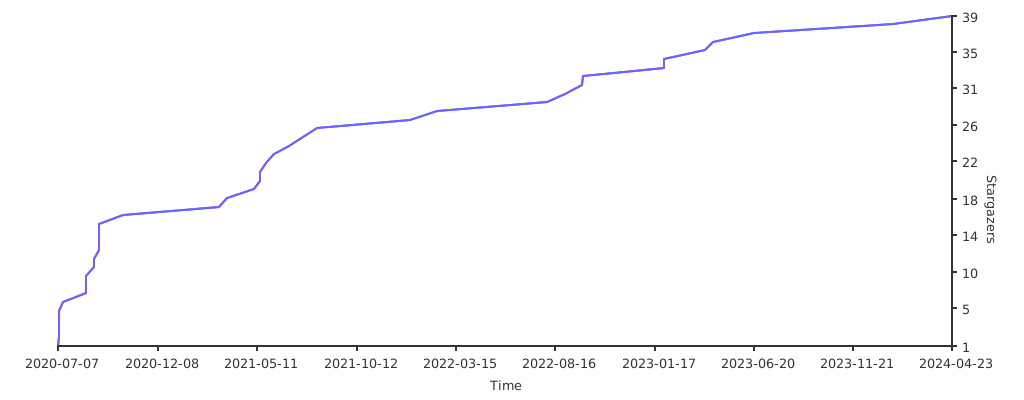
|
||||
|
||||
## Contributors ✨
|
||||
|
||||
<!-- ALL-CONTRIBUTORS-BADGE:START - Do not remove or modify this section -->
|
||||
|
||||
[](#contributors-)
|
||||
|
||||
[](#contributors-)
|
||||
<!-- ALL-CONTRIBUTORS-BADGE:END -->
|
||||
|
||||
Thanks goes to these wonderful people ([emoji key](https://allcontributors.org/docs/en/emoji-key)):
|
||||
@@ -365,21 +334,15 @@ Thanks goes to these wonderful people ([emoji key](https://allcontributors.org/d
|
||||
<!-- prettier-ignore-start -->
|
||||
<!-- markdownlint-disable -->
|
||||
<table>
|
||||
<tbody>
|
||||
<tr>
|
||||
<td align="center" valign="top" width="14.28%"><a href="https://krishna-acondy.io/"><img src="https://avatars.githubusercontent.com/u/2980428?v=4?s=100" width="100px;" alt="Krishna Acondy"/><br /><sub><b>Krishna Acondy</b></sub></a><br /><a href="https://github.com/sasjs/adapter/commits?author=krishna-acondy" title="Code">💻</a> <a href="#infra-krishna-acondy" title="Infrastructure (Hosting, Build-Tools, etc)">🚇</a> <a href="#blog-krishna-acondy" title="Blogposts">📝</a> <a href="#content-krishna-acondy" title="Content">🖋</a> <a href="#ideas-krishna-acondy" title="Ideas, Planning, & Feedback">🤔</a> <a href="#video-krishna-acondy" title="Videos">📹</a></td>
|
||||
<td align="center" valign="top" width="14.28%"><a href="https://www.erudicat.com/"><img src="https://avatars.githubusercontent.com/u/25773492?v=4?s=100" width="100px;" alt="Yury Shkoda"/><br /><sub><b>Yury Shkoda</b></sub></a><br /><a href="https://github.com/sasjs/adapter/commits?author=YuryShkoda" title="Code">💻</a> <a href="#infra-YuryShkoda" title="Infrastructure (Hosting, Build-Tools, etc)">🚇</a> <a href="#ideas-YuryShkoda" title="Ideas, Planning, & Feedback">🤔</a> <a href="https://github.com/sasjs/adapter/commits?author=YuryShkoda" title="Tests">⚠️</a> <a href="#video-YuryShkoda" title="Videos">📹</a></td>
|
||||
<td align="center" valign="top" width="14.28%"><a href="https://github.com/medjedovicm"><img src="https://avatars.githubusercontent.com/u/18329105?v=4?s=100" width="100px;" alt="Mihajlo Medjedovic"/><br /><sub><b>Mihajlo Medjedovic</b></sub></a><br /><a href="https://github.com/sasjs/adapter/commits?author=medjedovicm" title="Code">💻</a> <a href="#infra-medjedovicm" title="Infrastructure (Hosting, Build-Tools, etc)">🚇</a> <a href="https://github.com/sasjs/adapter/commits?author=medjedovicm" title="Tests">⚠️</a> <a href="https://github.com/sasjs/adapter/pulls?q=is%3Apr+reviewed-by%3Amedjedovicm" title="Reviewed Pull Requests">👀</a></td>
|
||||
<td align="center" valign="top" width="14.28%"><a href="https://github.com/allanbowe"><img src="https://avatars.githubusercontent.com/u/4420615?v=4?s=100" width="100px;" alt="Allan Bowe"/><br /><sub><b>Allan Bowe</b></sub></a><br /><a href="https://github.com/sasjs/adapter/commits?author=allanbowe" title="Code">💻</a> <a href="https://github.com/sasjs/adapter/pulls?q=is%3Apr+reviewed-by%3Aallanbowe" title="Reviewed Pull Requests">👀</a> <a href="https://github.com/sasjs/adapter/commits?author=allanbowe" title="Tests">⚠️</a> <a href="#mentoring-allanbowe" title="Mentoring">🧑🏫</a> <a href="#maintenance-allanbowe" title="Maintenance">🚧</a></td>
|
||||
<td align="center" valign="top" width="14.28%"><a href="https://github.com/saadjutt01"><img src="https://avatars.githubusercontent.com/u/8914650?v=4?s=100" width="100px;" alt="Muhammad Saad "/><br /><sub><b>Muhammad Saad </b></sub></a><br /><a href="https://github.com/sasjs/adapter/commits?author=saadjutt01" title="Code">💻</a> <a href="https://github.com/sasjs/adapter/pulls?q=is%3Apr+reviewed-by%3Asaadjutt01" title="Reviewed Pull Requests">👀</a> <a href="https://github.com/sasjs/adapter/commits?author=saadjutt01" title="Tests">⚠️</a> <a href="#mentoring-saadjutt01" title="Mentoring">🧑🏫</a> <a href="#infra-saadjutt01" title="Infrastructure (Hosting, Build-Tools, etc)">🚇</a></td>
|
||||
<td align="center" valign="top" width="14.28%"><a href="https://github.com/sabhas"><img src="https://avatars.githubusercontent.com/u/82647447?v=4?s=100" width="100px;" alt="Sabir Hassan"/><br /><sub><b>Sabir Hassan</b></sub></a><br /><a href="https://github.com/sasjs/adapter/commits?author=sabhas" title="Code">💻</a> <a href="https://github.com/sasjs/adapter/pulls?q=is%3Apr+reviewed-by%3Asabhas" title="Reviewed Pull Requests">👀</a> <a href="https://github.com/sasjs/adapter/commits?author=sabhas" title="Tests">⚠️</a> <a href="#ideas-sabhas" title="Ideas, Planning, & Feedback">🤔</a></td>
|
||||
<td align="center" valign="top" width="14.28%"><a href="https://github.com/VladislavParhomchik"><img src="https://avatars.githubusercontent.com/u/83717836?v=4?s=100" width="100px;" alt="VladislavParhomchik"/><br /><sub><b>VladislavParhomchik</b></sub></a><br /><a href="https://github.com/sasjs/adapter/commits?author=VladislavParhomchik" title="Tests">⚠️</a> <a href="https://github.com/sasjs/adapter/pulls?q=is%3Apr+reviewed-by%3AVladislavParhomchik" title="Reviewed Pull Requests">👀</a></td>
|
||||
</tr>
|
||||
<tr>
|
||||
<td align="center" valign="top" width="14.28%"><a href="http://rudvfaden.github.io/"><img src="https://avatars.githubusercontent.com/u/2445577?v=4?s=100" width="100px;" alt="Rud Faden"/><br /><sub><b>Rud Faden</b></sub></a><br /><a href="#userTesting-rudvfaden" title="User Testing">📓</a> <a href="https://github.com/sasjs/adapter/commits?author=rudvfaden" title="Documentation">📖</a></td>
|
||||
<td align="center" valign="top" width="14.28%"><a href="https://github.com/saramartinelli1992"><img src="https://avatars.githubusercontent.com/u/100193908?v=4?s=100" width="100px;" alt="Sara"/><br /><sub><b>Sara</b></sub></a><br /><a href="#userTesting-saramartinelli1992" title="User Testing">📓</a> <a href="#platform-saramartinelli1992" title="Packaging/porting to new platform">📦</a></td>
|
||||
</tr>
|
||||
</tbody>
|
||||
<tr>
|
||||
<td align="center"><a href="https://krishna-acondy.io/"><img src="https://avatars.githubusercontent.com/u/2980428?v=4?s=100" width="100px;" alt=""/><br /><sub><b>Krishna Acondy</b></sub></a><br /><a href="https://github.com/sasjs/adapter/commits?author=krishna-acondy" title="Code">💻</a> <a href="#infra-krishna-acondy" title="Infrastructure (Hosting, Build-Tools, etc)">🚇</a> <a href="#blog-krishna-acondy" title="Blogposts">📝</a> <a href="#content-krishna-acondy" title="Content">🖋</a> <a href="#ideas-krishna-acondy" title="Ideas, Planning, & Feedback">🤔</a> <a href="#video-krishna-acondy" title="Videos">📹</a></td>
|
||||
<td align="center"><a href="https://www.erudicat.com/"><img src="https://avatars.githubusercontent.com/u/25773492?v=4?s=100" width="100px;" alt=""/><br /><sub><b>Yury Shkoda</b></sub></a><br /><a href="https://github.com/sasjs/adapter/commits?author=YuryShkoda" title="Code">💻</a> <a href="#infra-YuryShkoda" title="Infrastructure (Hosting, Build-Tools, etc)">🚇</a> <a href="#ideas-YuryShkoda" title="Ideas, Planning, & Feedback">🤔</a> <a href="https://github.com/sasjs/adapter/commits?author=YuryShkoda" title="Tests">⚠️</a> <a href="#video-YuryShkoda" title="Videos">📹</a></td>
|
||||
<td align="center"><a href="https://github.com/medjedovicm"><img src="https://avatars.githubusercontent.com/u/18329105?v=4?s=100" width="100px;" alt=""/><br /><sub><b>Mihajlo Medjedovic</b></sub></a><br /><a href="https://github.com/sasjs/adapter/commits?author=medjedovicm" title="Code">💻</a> <a href="#infra-medjedovicm" title="Infrastructure (Hosting, Build-Tools, etc)">🚇</a> <a href="https://github.com/sasjs/adapter/commits?author=medjedovicm" title="Tests">⚠️</a> <a href="https://github.com/sasjs/adapter/pulls?q=is%3Apr+reviewed-by%3Amedjedovicm" title="Reviewed Pull Requests">👀</a></td>
|
||||
<td align="center"><a href="https://github.com/allanbowe"><img src="https://avatars.githubusercontent.com/u/4420615?v=4?s=100" width="100px;" alt=""/><br /><sub><b>Allan Bowe</b></sub></a><br /><a href="https://github.com/sasjs/adapter/commits?author=allanbowe" title="Code">💻</a> <a href="https://github.com/sasjs/adapter/pulls?q=is%3Apr+reviewed-by%3Aallanbowe" title="Reviewed Pull Requests">👀</a> <a href="https://github.com/sasjs/adapter/commits?author=allanbowe" title="Tests">⚠️</a> <a href="#mentoring-allanbowe" title="Mentoring">🧑🏫</a> <a href="#maintenance-allanbowe" title="Maintenance">🚧</a></td>
|
||||
<td align="center"><a href="https://github.com/saadjutt01"><img src="https://avatars.githubusercontent.com/u/8914650?v=4?s=100" width="100px;" alt=""/><br /><sub><b>Muhammad Saad </b></sub></a><br /><a href="https://github.com/sasjs/adapter/commits?author=saadjutt01" title="Code">💻</a> <a href="https://github.com/sasjs/adapter/pulls?q=is%3Apr+reviewed-by%3Asaadjutt01" title="Reviewed Pull Requests">👀</a> <a href="https://github.com/sasjs/adapter/commits?author=saadjutt01" title="Tests">⚠️</a> <a href="#mentoring-saadjutt01" title="Mentoring">🧑🏫</a> <a href="#infra-saadjutt01" title="Infrastructure (Hosting, Build-Tools, etc)">🚇</a></td>
|
||||
<td align="center"><a href="https://github.com/sabhas"><img src="https://avatars.githubusercontent.com/u/82647447?v=4?s=100" width="100px;" alt=""/><br /><sub><b>Sabir Hassan</b></sub></a><br /><a href="https://github.com/sasjs/adapter/commits?author=sabhas" title="Code">💻</a> <a href="https://github.com/sasjs/adapter/pulls?q=is%3Apr+reviewed-by%3Asabhas" title="Reviewed Pull Requests">👀</a> <a href="https://github.com/sasjs/adapter/commits?author=sabhas" title="Tests">⚠️</a> <a href="#ideas-sabhas" title="Ideas, Planning, & Feedback">🤔</a></td>
|
||||
<td align="center"><a href="https://github.com/VladislavParhomchik"><img src="https://avatars.githubusercontent.com/u/83717836?v=4?s=100" width="100px;" alt=""/><br /><sub><b>VladislavParhomchik</b></sub></a><br /><a href="https://github.com/sasjs/adapter/commits?author=VladislavParhomchik" title="Tests">⚠️</a> <a href="https://github.com/sasjs/adapter/pulls?q=is%3Apr+reviewed-by%3AVladislavParhomchik" title="Reviewed Pull Requests">👀</a></td>
|
||||
</tr>
|
||||
</table>
|
||||
|
||||
<!-- markdownlint-restore -->
|
||||
|
||||
11
cypress.json
@@ -1,11 +0,0 @@
|
||||
{
|
||||
"chromeWebSecurity": false,
|
||||
"defaultCommandTimeout": 20000,
|
||||
"env": {
|
||||
"sasjsTestsUrl": "",
|
||||
"username": "",
|
||||
"password": "",
|
||||
"screenshotOnRunFailure": false,
|
||||
"testingFinishTimeout": 600000
|
||||
}
|
||||
}
|
||||
@@ -1,59 +0,0 @@
|
||||
const sasjsTestsUrl = Cypress.env('sasjsTestsUrl')
|
||||
const username = Cypress.env('username')
|
||||
const password = Cypress.env('password')
|
||||
const testingFinishTimeout = Cypress.env('testingFinishTimeout')
|
||||
|
||||
context('sasjs-tests', function () {
|
||||
before(() => {
|
||||
cy.visit(sasjsTestsUrl)
|
||||
})
|
||||
|
||||
beforeEach(() => {
|
||||
cy.reload()
|
||||
})
|
||||
|
||||
function loginIfNeeded() {
|
||||
cy.get('body').then(($body) => {
|
||||
if ($body.find('input[placeholder="User Name"]').length > 0) {
|
||||
cy.get('input[placeholder="User Name"]')
|
||||
.should('be.visible')
|
||||
.type(username)
|
||||
cy.get('input[placeholder="Password"]')
|
||||
.should('be.visible')
|
||||
.type(password)
|
||||
cy.get('.submit-button').should('be.visible').click()
|
||||
cy.get('input[placeholder="User Name"]').should('not.exist') // Wait for login to finish
|
||||
}
|
||||
})
|
||||
}
|
||||
|
||||
it('Should have all tests successful', () => {
|
||||
loginIfNeeded()
|
||||
|
||||
cy.get('.ui.massive.icon.primary.left.labeled.button')
|
||||
.should('be.visible')
|
||||
.click()
|
||||
|
||||
cy.get('.ui.massive.loading.primary.button', {
|
||||
timeout: testingFinishTimeout
|
||||
}).should('not.exist')
|
||||
|
||||
cy.get('span.icon.failed').should('not.exist')
|
||||
})
|
||||
|
||||
it('Should have all tests successful with debug on', () => {
|
||||
loginIfNeeded()
|
||||
|
||||
cy.get('.ui.fitted.toggle.checkbox label').should('be.visible').click()
|
||||
|
||||
cy.get('.ui.massive.icon.primary.left.labeled.button')
|
||||
.should('be.visible')
|
||||
.click()
|
||||
|
||||
cy.get('.ui.massive.loading.primary.button', {
|
||||
timeout: testingFinishTimeout
|
||||
}).should('not.exist')
|
||||
|
||||
cy.get('span.icon.failed').should('not.exist')
|
||||
})
|
||||
})
|
||||
@@ -1,31 +0,0 @@
|
||||
const wp = require('@cypress/webpack-preprocessor')
|
||||
|
||||
const webpackOptions = {
|
||||
resolve: {
|
||||
extensions: ['.ts', '.js']
|
||||
},
|
||||
module: {
|
||||
rules: [
|
||||
{
|
||||
test: /\.ts$/,
|
||||
loaders: ['ts-loader'],
|
||||
exclude: [/node_modules/]
|
||||
},
|
||||
{
|
||||
test: /\.(html|css)$/,
|
||||
loader: 'raw-loader',
|
||||
exclude: /\.async\.(html|css)$/
|
||||
},
|
||||
{
|
||||
test: /\.async\.(html|css)$/,
|
||||
loaders: ['file?name=[name].[hash].[ext]', 'extract']
|
||||
}
|
||||
]
|
||||
}
|
||||
}
|
||||
|
||||
const options = {
|
||||
webpackOptions
|
||||
}
|
||||
|
||||
module.exports = wp(options)
|
||||
@@ -1,42 +0,0 @@
|
||||
/// <reference types="cypress" />
|
||||
// ***********************************************************
|
||||
// This example plugins/index.js can be used to load plugins
|
||||
//
|
||||
// You can change the location of this file or turn off loading
|
||||
// the plugins file with the 'pluginsFile' configuration option.
|
||||
//
|
||||
// You can read more here:
|
||||
// https://on.cypress.io/plugins-guide
|
||||
// ***********************************************************
|
||||
|
||||
// This function is called when a project is opened or re-opened (e.g. due to
|
||||
// the project's config changing)
|
||||
|
||||
const wp = require('@cypress/webpack-preprocessor')
|
||||
|
||||
/**
|
||||
* @type {Cypress.PluginConfig}
|
||||
*/
|
||||
module.exports = (on, config) => {
|
||||
// `on` is used to hook into various events Cypress emits
|
||||
// `config` is the resolved Cypress config
|
||||
|
||||
const options = {
|
||||
webpackOptions: require('../webpack.config.js')
|
||||
}
|
||||
on('file:preprocessor', wp(options))
|
||||
|
||||
on('before:browser:launch', (browser = {}, launchOptions) => {
|
||||
if (browser.name === 'chrome') {
|
||||
launchOptions.args.push('--disable-site-isolation-trials')
|
||||
launchOptions.args.push('--auto-open-devtools-for-tabs')
|
||||
launchOptions.args.push('--aggressive-cache-discard')
|
||||
launchOptions.args.push('--disable-cache')
|
||||
launchOptions.args.push('--disable-application-cache')
|
||||
launchOptions.args.push('--disable-offline-load-stale-cache')
|
||||
launchOptions.args.push('--disk-cache-size=0')
|
||||
|
||||
return launchOptions
|
||||
}
|
||||
})
|
||||
}
|
||||

|
Before Width: | Height: | Size: 86 KiB |
@@ -1,25 +0,0 @@
|
||||
// ***********************************************
|
||||
// This example commands.js shows you how to
|
||||
// create various custom commands and overwrite
|
||||
// existing commands.
|
||||
//
|
||||
// For more comprehensive examples of custom
|
||||
// commands please read more here:
|
||||
// https://on.cypress.io/custom-commands
|
||||
// ***********************************************
|
||||
//
|
||||
//
|
||||
// -- This is a parent command --
|
||||
// Cypress.Commands.add('login', (email, password) => { ... })
|
||||
//
|
||||
//
|
||||
// -- This is a child command --
|
||||
// Cypress.Commands.add('drag', { prevSubject: 'element'}, (subject, options) => { ... })
|
||||
//
|
||||
//
|
||||
// -- This is a dual command --
|
||||
// Cypress.Commands.add('dismiss', { prevSubject: 'optional'}, (subject, options) => { ... })
|
||||
//
|
||||
//
|
||||
// -- This will overwrite an existing command --
|
||||
// Cypress.Commands.overwrite('visit', (originalFn, url, options) => { ... })
|
||||
@@ -1,20 +0,0 @@
|
||||
// ***********************************************************
|
||||
// This example support/index.js is processed and
|
||||
// loaded automatically before your test files.
|
||||
//
|
||||
// This is a great place to put global configuration and
|
||||
// behavior that modifies Cypress.
|
||||
//
|
||||
// You can change the location of this file or turn off
|
||||
// automatically serving support files with the
|
||||
// 'supportFile' configuration option.
|
||||
//
|
||||
// You can read more here:
|
||||
// https://on.cypress.io/configuration
|
||||
// ***********************************************************
|
||||
|
||||
// Import commands.js using ES2015 syntax:
|
||||
import './commands'
|
||||
|
||||
// Alternatively you can use CommonJS syntax:
|
||||
// require('./commands')
|
||||
@@ -1,10 +0,0 @@
|
||||
{
|
||||
"compilerOptions": {
|
||||
"strict": true,
|
||||
"baseUrl": "../node_modules",
|
||||
"target": "es6",
|
||||
"lib": ["es2019", "dom"],
|
||||
"types": ["cypress"]
|
||||
},
|
||||
"include": ["**/*.ts"]
|
||||
}
|
||||
@@ -1,23 +0,0 @@
|
||||
module.exports = {
|
||||
mode: 'development',
|
||||
resolve: {
|
||||
extensions: ['.ts', '.js']
|
||||
},
|
||||
module: {
|
||||
rules: [
|
||||
{
|
||||
test: /\.ts$/,
|
||||
exclude: [/node_modules/],
|
||||
use: [
|
||||
{
|
||||
loader: 'ts-loader',
|
||||
options: {
|
||||
// skip typechecking for speed
|
||||
transpileOnly: true
|
||||
}
|
||||
}
|
||||
]
|
||||
}
|
||||
]
|
||||
}
|
||||
}
|
||||
1
docs/.nojekyll
Normal file
@@ -0,0 +1 @@
|
||||
TypeDoc added this file to prevent GitHub Pages from using Jekyll. You can turn off this behavior by setting the `githubPages` option to false.
|
||||
1
docs/CNAME
Normal file
@@ -0,0 +1 @@
|
||||
adapter.sasjs.io
|
||||
99
docs/assets/highlight.css
Normal file
@@ -0,0 +1,99 @@
|
||||
:root {
|
||||
--light-hl-0: #000000;
|
||||
--dark-hl-0: #D4D4D4;
|
||||
--light-hl-1: #0000FF;
|
||||
--dark-hl-1: #569CD6;
|
||||
--light-hl-2: #001080;
|
||||
--dark-hl-2: #9CDCFE;
|
||||
--light-hl-3: #795E26;
|
||||
--dark-hl-3: #DCDCAA;
|
||||
--light-hl-4: #A31515;
|
||||
--dark-hl-4: #CE9178;
|
||||
--light-hl-5: #AF00DB;
|
||||
--dark-hl-5: #C586C0;
|
||||
--light-hl-6: #0070C1;
|
||||
--dark-hl-6: #4FC1FF;
|
||||
--light-hl-7: #008000;
|
||||
--dark-hl-7: #6A9955;
|
||||
--light-hl-8: #098658;
|
||||
--dark-hl-8: #B5CEA8;
|
||||
--light-hl-9: #000000;
|
||||
--dark-hl-9: #C8C8C8;
|
||||
--light-hl-10: #CD3131;
|
||||
--dark-hl-10: #F44747;
|
||||
--light-code-background: #F5F5F5;
|
||||
--dark-code-background: #1E1E1E;
|
||||
}
|
||||
|
||||
@media (prefers-color-scheme: light) { :root {
|
||||
--hl-0: var(--light-hl-0);
|
||||
--hl-1: var(--light-hl-1);
|
||||
--hl-2: var(--light-hl-2);
|
||||
--hl-3: var(--light-hl-3);
|
||||
--hl-4: var(--light-hl-4);
|
||||
--hl-5: var(--light-hl-5);
|
||||
--hl-6: var(--light-hl-6);
|
||||
--hl-7: var(--light-hl-7);
|
||||
--hl-8: var(--light-hl-8);
|
||||
--hl-9: var(--light-hl-9);
|
||||
--hl-10: var(--light-hl-10);
|
||||
--code-background: var(--light-code-background);
|
||||
} }
|
||||
|
||||
@media (prefers-color-scheme: dark) { :root {
|
||||
--hl-0: var(--dark-hl-0);
|
||||
--hl-1: var(--dark-hl-1);
|
||||
--hl-2: var(--dark-hl-2);
|
||||
--hl-3: var(--dark-hl-3);
|
||||
--hl-4: var(--dark-hl-4);
|
||||
--hl-5: var(--dark-hl-5);
|
||||
--hl-6: var(--dark-hl-6);
|
||||
--hl-7: var(--dark-hl-7);
|
||||
--hl-8: var(--dark-hl-8);
|
||||
--hl-9: var(--dark-hl-9);
|
||||
--hl-10: var(--dark-hl-10);
|
||||
--code-background: var(--dark-code-background);
|
||||
} }
|
||||
|
||||
body.light {
|
||||
--hl-0: var(--light-hl-0);
|
||||
--hl-1: var(--light-hl-1);
|
||||
--hl-2: var(--light-hl-2);
|
||||
--hl-3: var(--light-hl-3);
|
||||
--hl-4: var(--light-hl-4);
|
||||
--hl-5: var(--light-hl-5);
|
||||
--hl-6: var(--light-hl-6);
|
||||
--hl-7: var(--light-hl-7);
|
||||
--hl-8: var(--light-hl-8);
|
||||
--hl-9: var(--light-hl-9);
|
||||
--hl-10: var(--light-hl-10);
|
||||
--code-background: var(--light-code-background);
|
||||
}
|
||||
|
||||
body.dark {
|
||||
--hl-0: var(--dark-hl-0);
|
||||
--hl-1: var(--dark-hl-1);
|
||||
--hl-2: var(--dark-hl-2);
|
||||
--hl-3: var(--dark-hl-3);
|
||||
--hl-4: var(--dark-hl-4);
|
||||
--hl-5: var(--dark-hl-5);
|
||||
--hl-6: var(--dark-hl-6);
|
||||
--hl-7: var(--dark-hl-7);
|
||||
--hl-8: var(--dark-hl-8);
|
||||
--hl-9: var(--dark-hl-9);
|
||||
--hl-10: var(--dark-hl-10);
|
||||
--code-background: var(--dark-code-background);
|
||||
}
|
||||
|
||||
.hl-0 { color: var(--hl-0); }
|
||||
.hl-1 { color: var(--hl-1); }
|
||||
.hl-2 { color: var(--hl-2); }
|
||||
.hl-3 { color: var(--hl-3); }
|
||||
.hl-4 { color: var(--hl-4); }
|
||||
.hl-5 { color: var(--hl-5); }
|
||||
.hl-6 { color: var(--hl-6); }
|
||||
.hl-7 { color: var(--hl-7); }
|
||||
.hl-8 { color: var(--hl-8); }
|
||||
.hl-9 { color: var(--hl-9); }
|
||||
.hl-10 { color: var(--hl-10); }
|
||||
pre, code { background: var(--code-background); }
|
||||
1043
docs/assets/icons.css
Normal file
BIN
docs/assets/icons.png
Normal file

|
After Width: | Height: | Size: 9.4 KiB |
BIN
docs/assets/icons@2x.png
Normal file

|
After Width: | Height: | Size: 28 KiB |
52
docs/assets/main.js
Normal file
1
docs/assets/search.js
Normal file
1413
docs/assets/style.css
Normal file
BIN
docs/assets/widgets.png
Normal file

|
After Width: | Height: | Size: 480 B |
BIN
docs/assets/widgets@2x.png
Normal file

|
After Width: | Height: | Size: 855 B |
17
docs/classes/SAS9ApiClient.SAS9ApiClient-1.html
Normal file
239
docs/classes/SASViyaApiClient.SASViyaApiClient-1.html
Normal file
292
docs/classes/SASjs.SASjs-1.html
Normal file
19
docs/classes/SASjsApiClient.SASjsApiClient-1.html
Normal file
48
docs/classes/types.SASjsConfig.html
Normal file
@@ -0,0 +1,48 @@
|
||||
<!DOCTYPE html><html class="default"><head><meta charSet="utf-8"/><meta http-equiv="x-ua-compatible" content="IE=edge"/><title>SASjsConfig | @sasjs/adapter</title><meta name="description" content="Documentation for @sasjs/adapter"/><meta name="viewport" content="width=device-width, initial-scale=1"/><link rel="stylesheet" href="../assets/style.css"/><link rel="stylesheet" href="../assets/highlight.css"/><script async src="../assets/search.js" id="search-script"></script></head><body><script>document.body.classList.add(localStorage.getItem("tsd-theme") || "os")</script><header><div class="tsd-page-toolbar"><div class="container"><div class="table-wrap"><div class="table-cell" id="tsd-search" data-base=".."><div class="field"><label for="tsd-search-field" class="tsd-widget search no-caption">Search</label><input type="text" id="tsd-search-field"/></div><ul class="results"><li class="state loading">Preparing search index...</li><li class="state failure">The search index is not available</li></ul><a href="../index.html" class="title">@sasjs/adapter</a></div><div class="table-cell" id="tsd-widgets"><div id="tsd-filter"><a href="#" class="tsd-widget options no-caption" data-toggle="options">Options</a><div class="tsd-filter-group"><div class="tsd-select" id="tsd-filter-visibility"><span class="tsd-select-label">All</span><ul class="tsd-select-list"><li data-value="public">Public</li><li data-value="protected">Public/Protected</li><li data-value="private" class="selected">All</li></ul></div> <input type="checkbox" id="tsd-filter-inherited" checked/><label class="tsd-widget" for="tsd-filter-inherited">Inherited</label></div></div><a href="#" class="tsd-widget menu no-caption" data-toggle="menu">Menu</a></div></div></div></div><div class="tsd-page-title"><div class="container"><ul class="tsd-breadcrumb"><li><a href="../modules.html">@sasjs/adapter</a></li><li><a href="../modules/types.html">types</a></li><li><a href="types.SASjsConfig.html">SASjsConfig</a></li></ul><h1>Class SASjsConfig</h1></div></div></header><div class="container container-main"><div class="row"><div class="col-8 col-content"><section class="tsd-panel tsd-comment"><div class="tsd-comment tsd-typography"><div class="lead">
|
||||
<p>Specifies the configuration for the SASjs instance - eg where and how to
|
||||
connect to SAS.</p>
|
||||
</div></div></section><section class="tsd-panel tsd-hierarchy"><h3>Hierarchy</h3><ul class="tsd-hierarchy"><li><span class="target">SASjsConfig</span></li></ul></section><section class="tsd-panel-group tsd-index-group"><h2>Index</h2><section class="tsd-panel tsd-index-panel"><div class="tsd-index-content"><section class="tsd-index-section "><h3>Constructors</h3><ul class="tsd-index-list"><li class="tsd-kind-constructor tsd-parent-kind-class"><a href="types.SASjsConfig.html#constructor" class="tsd-kind-icon">constructor</a></li></ul></section><section class="tsd-index-section "><h3>Properties</h3><ul class="tsd-index-list"><li class="tsd-kind-property tsd-parent-kind-class"><a href="types.SASjsConfig.html#appLoc" class="tsd-kind-icon">app<wbr/>Loc</a></li><li class="tsd-kind-property tsd-parent-kind-class"><a href="types.SASjsConfig.html#contextName" class="tsd-kind-icon">context<wbr/>Name</a></li><li class="tsd-kind-property tsd-parent-kind-class"><a href="types.SASjsConfig.html#debug" class="tsd-kind-icon">debug</a></li><li class="tsd-kind-property tsd-parent-kind-class"><a href="types.SASjsConfig.html#httpsAgentOptions" class="tsd-kind-icon">https<wbr/>Agent<wbr/>Options</a></li><li class="tsd-kind-property tsd-parent-kind-class"><a href="types.SASjsConfig.html#loginMechanism" class="tsd-kind-icon">login<wbr/>Mechanism</a></li><li class="tsd-kind-property tsd-parent-kind-class"><a href="types.SASjsConfig.html#pathSAS9" class="tsd-kind-icon">pathSAS9</a></li><li class="tsd-kind-property tsd-parent-kind-class"><a href="types.SASjsConfig.html#pathSASJS" class="tsd-kind-icon">pathSASJS</a></li><li class="tsd-kind-property tsd-parent-kind-class"><a href="types.SASjsConfig.html#pathSASViya" class="tsd-kind-icon">pathSASViya</a></li><li class="tsd-kind-property tsd-parent-kind-class"><a href="types.SASjsConfig.html#requestHistoryLimit" class="tsd-kind-icon">request<wbr/>History<wbr/>Limit</a></li><li class="tsd-kind-property tsd-parent-kind-class"><a href="types.SASjsConfig.html#serverType" class="tsd-kind-icon">server<wbr/>Type</a></li><li class="tsd-kind-property tsd-parent-kind-class"><a href="types.SASjsConfig.html#serverUrl" class="tsd-kind-icon">server<wbr/>Url</a></li><li class="tsd-kind-property tsd-parent-kind-class"><a href="types.SASjsConfig.html#useComputeApi" class="tsd-kind-icon">use<wbr/>Compute<wbr/>Api</a></li></ul></section></div></section></section><section class="tsd-panel-group tsd-member-group "><h2>Constructors</h2><section class="tsd-panel tsd-member tsd-kind-constructor tsd-parent-kind-class"><a id="constructor" class="tsd-anchor"></a><h3 class="tsd-anchor-link">constructor<a href="#constructor" aria-label="Permalink" class="tsd-anchor-icon"><svg xmlns="http://www.w3.org/2000/svg" class="icon icon-tabler icon-tabler-link" viewBox="0 0 24 24" stroke-width="2" stroke="currentColor" fill="none" stroke-linecap="round" stroke-linejoin="round"><path stroke="none" d="M0 0h24v24H0z" fill="none"></path><path d="M10 14a3.5 3.5 0 0 0 5 0l4 -4a3.5 3.5 0 0 0 -5 -5l-.5 .5"></path><path d="M14 10a3.5 3.5 0 0 0 -5 0l-4 4a3.5 3.5 0 0 0 5 5l.5 -.5"></path></svg></a></h3><ul class="tsd-signatures tsd-kind-constructor tsd-parent-kind-class"><li class="tsd-signature tsd-kind-icon">new SASjs<wbr/>Config<span class="tsd-signature-symbol">(</span><span class="tsd-signature-symbol">)</span><span class="tsd-signature-symbol">: </span><a href="types.SASjsConfig.html" class="tsd-signature-type" data-tsd-kind="Class">SASjsConfig</a></li></ul><ul class="tsd-descriptions"><li class="tsd-description"><h4 class="tsd-returns-title">Returns <a href="types.SASjsConfig.html" class="tsd-signature-type" data-tsd-kind="Class">SASjsConfig</a></h4></li></ul></section></section><section class="tsd-panel-group tsd-member-group "><h2>Properties</h2><section class="tsd-panel tsd-member tsd-kind-property tsd-parent-kind-class"><a id="appLoc" class="tsd-anchor"></a><h3 class="tsd-anchor-link">app<wbr/>Loc<a href="#appLoc" aria-label="Permalink" class="tsd-anchor-icon"><svg xmlns="http://www.w3.org/2000/svg" class="icon icon-tabler icon-tabler-link" viewBox="0 0 24 24" stroke-width="2" stroke="currentColor" fill="none" stroke-linecap="round" stroke-linejoin="round"><path stroke="none" d="M0 0h24v24H0z" fill="none"></path><path d="M10 14a3.5 3.5 0 0 0 5 0l4 -4a3.5 3.5 0 0 0 -5 -5l-.5 .5"></path><path d="M14 10a3.5 3.5 0 0 0 -5 0l-4 4a3.5 3.5 0 0 0 5 5l.5 -.5"></path></svg></a></h3><div class="tsd-signature tsd-kind-icon">app<wbr/>Loc<span class="tsd-signature-symbol">:</span> <span class="tsd-signature-type">string</span><span class="tsd-signature-symbol"> = ''</span></div><aside class="tsd-sources"><ul><li>Defined in <a href="https://github.com/sasjs/adapter/blob/1ee07ee/src/types/SASjsConfig.ts#L39">types/SASjsConfig.ts:39</a></li></ul></aside><div class="tsd-comment tsd-typography"><div class="lead">
|
||||
<p>The appLoc is the parent folder under which the SAS services (STPs or Job
|
||||
Execution Services) are stored. We recommend that each app is stored in
|
||||
a dedicated parent folder (the appLoc) and the services are grouped inside
|
||||
subfolders within the appLoc - allowing functionality to be restricted
|
||||
according to those groups at backend.
|
||||
When using appLoc, the paths provided in the <code>request</code> function should be
|
||||
<em>without</em> a leading slash (/).</p>
|
||||
</div></div></section><section class="tsd-panel tsd-member tsd-kind-property tsd-parent-kind-class"><a id="contextName" class="tsd-anchor"></a><h3 class="tsd-anchor-link">context<wbr/>Name<a href="#contextName" aria-label="Permalink" class="tsd-anchor-icon"><svg xmlns="http://www.w3.org/2000/svg" class="icon icon-tabler icon-tabler-link" viewBox="0 0 24 24" stroke-width="2" stroke="currentColor" fill="none" stroke-linecap="round" stroke-linejoin="round"><path stroke="none" d="M0 0h24v24H0z" fill="none"></path><path d="M10 14a3.5 3.5 0 0 0 5 0l4 -4a3.5 3.5 0 0 0 -5 -5l-.5 .5"></path><path d="M14 10a3.5 3.5 0 0 0 -5 0l-4 4a3.5 3.5 0 0 0 5 5l.5 -.5"></path></svg></a></h3><div class="tsd-signature tsd-kind-icon">context<wbr/>Name<span class="tsd-signature-symbol">:</span> <span class="tsd-signature-type">string</span><span class="tsd-signature-symbol"> = ''</span></div><aside class="tsd-sources"><ul><li>Defined in <a href="https://github.com/sasjs/adapter/blob/1ee07ee/src/types/SASjsConfig.ts#L52">types/SASjsConfig.ts:52</a></li></ul></aside><div class="tsd-comment tsd-typography"><div class="lead">
|
||||
<p>The name of the compute context to use when calling the Viya services directly.
|
||||
Example value: 'SAS Job Execution compute context'</p>
|
||||
</div></div></section><section class="tsd-panel tsd-member tsd-kind-property tsd-parent-kind-class"><a id="debug" class="tsd-anchor"></a><h3 class="tsd-anchor-link">debug<a href="#debug" aria-label="Permalink" class="tsd-anchor-icon"><svg xmlns="http://www.w3.org/2000/svg" class="icon icon-tabler icon-tabler-link" viewBox="0 0 24 24" stroke-width="2" stroke="currentColor" fill="none" stroke-linecap="round" stroke-linejoin="round"><path stroke="none" d="M0 0h24v24H0z" fill="none"></path><path d="M10 14a3.5 3.5 0 0 0 5 0l4 -4a3.5 3.5 0 0 0 -5 -5l-.5 .5"></path><path d="M14 10a3.5 3.5 0 0 0 -5 0l-4 4a3.5 3.5 0 0 0 5 5l.5 -.5"></path></svg></a></h3><div class="tsd-signature tsd-kind-icon">debug<span class="tsd-signature-symbol">:</span> <span class="tsd-signature-type">boolean</span><span class="tsd-signature-symbol"> = true</span></div><aside class="tsd-sources"><ul><li>Defined in <a href="https://github.com/sasjs/adapter/blob/1ee07ee/src/types/SASjsConfig.ts#L47">types/SASjsConfig.ts:47</a></li></ul></aside><div class="tsd-comment tsd-typography"><div class="lead">
|
||||
<p>Set to <code>true</code> to enable additional debugging.</p>
|
||||
</div></div></section><section class="tsd-panel tsd-member tsd-kind-property tsd-parent-kind-class"><a id="httpsAgentOptions" class="tsd-anchor"></a><h3 class="tsd-anchor-link"><span class="tsd-flag ts-flagOptional">Optional</span> https<wbr/>Agent<wbr/>Options<a href="#httpsAgentOptions" aria-label="Permalink" class="tsd-anchor-icon"><svg xmlns="http://www.w3.org/2000/svg" class="icon icon-tabler icon-tabler-link" viewBox="0 0 24 24" stroke-width="2" stroke="currentColor" fill="none" stroke-linecap="round" stroke-linejoin="round"><path stroke="none" d="M0 0h24v24H0z" fill="none"></path><path d="M10 14a3.5 3.5 0 0 0 5 0l4 -4a3.5 3.5 0 0 0 -5 -5l-.5 .5"></path><path d="M14 10a3.5 3.5 0 0 0 -5 0l-4 4a3.5 3.5 0 0 0 5 5l.5 -.5"></path></svg></a></h3><div class="tsd-signature tsd-kind-icon">https<wbr/>Agent<wbr/>Options<span class="tsd-signature-symbol">?:</span> <span class="tsd-signature-type">AgentOptions</span></div><aside class="tsd-sources"><ul><li>Defined in <a href="https://github.com/sasjs/adapter/blob/1ee07ee/src/types/SASjsConfig.ts#L67">types/SASjsConfig.ts:67</a></li></ul></aside><div class="tsd-comment tsd-typography"><div class="lead">
|
||||
<p>Optional setting to configure HTTPS Agent.
|
||||
By providing <code>key</code>, <code>cert</code>, <code>ca</code> to connect with server
|
||||
Other options can be set <code>rejectUnauthorized</code> and <code>requestCert</code></p>
|
||||
</div></div></section><section class="tsd-panel tsd-member tsd-kind-property tsd-parent-kind-class"><a id="loginMechanism" class="tsd-anchor"></a><h3 class="tsd-anchor-link">login<wbr/>Mechanism<a href="#loginMechanism" aria-label="Permalink" class="tsd-anchor-icon"><svg xmlns="http://www.w3.org/2000/svg" class="icon icon-tabler icon-tabler-link" viewBox="0 0 24 24" stroke-width="2" stroke="currentColor" fill="none" stroke-linecap="round" stroke-linejoin="round"><path stroke="none" d="M0 0h24v24H0z" fill="none"></path><path d="M10 14a3.5 3.5 0 0 0 5 0l4 -4a3.5 3.5 0 0 0 -5 -5l-.5 .5"></path><path d="M14 10a3.5 3.5 0 0 0 -5 0l-4 4a3.5 3.5 0 0 0 5 5l.5 -.5"></path></svg></a></h3><div class="tsd-signature tsd-kind-icon">login<wbr/>Mechanism<span class="tsd-signature-symbol">:</span> <a href="../enums/types.LoginMechanism.html" class="tsd-signature-type" data-tsd-kind="Enumeration">LoginMechanism</a><span class="tsd-signature-symbol"> = LoginMechanism.Default</span></div><aside class="tsd-sources"><ul><li>Defined in <a href="https://github.com/sasjs/adapter/blob/1ee07ee/src/types/SASjsConfig.ts#L71">types/SASjsConfig.ts:71</a></li></ul></aside><div class="tsd-comment tsd-typography"><div class="lead">
|
||||
<p>Supported login mechanisms are - Redirected and Default</p>
|
||||
</div></div></section><section class="tsd-panel tsd-member tsd-kind-property tsd-parent-kind-class"><a id="pathSAS9" class="tsd-anchor"></a><h3 class="tsd-anchor-link">pathSAS9<a href="#pathSAS9" aria-label="Permalink" class="tsd-anchor-icon"><svg xmlns="http://www.w3.org/2000/svg" class="icon icon-tabler icon-tabler-link" viewBox="0 0 24 24" stroke-width="2" stroke="currentColor" fill="none" stroke-linecap="round" stroke-linejoin="round"><path stroke="none" d="M0 0h24v24H0z" fill="none"></path><path d="M10 14a3.5 3.5 0 0 0 5 0l4 -4a3.5 3.5 0 0 0 -5 -5l-.5 .5"></path><path d="M14 10a3.5 3.5 0 0 0 -5 0l-4 4a3.5 3.5 0 0 0 5 5l.5 -.5"></path></svg></a></h3><div class="tsd-signature tsd-kind-icon">pathSAS9<span class="tsd-signature-symbol">:</span> <span class="tsd-signature-type">string</span><span class="tsd-signature-symbol"> = ''</span></div><aside class="tsd-sources"><ul><li>Defined in <a href="https://github.com/sasjs/adapter/blob/1ee07ee/src/types/SASjsConfig.ts#L24">types/SASjsConfig.ts:24</a></li></ul></aside><div class="tsd-comment tsd-typography"><div class="lead">
|
||||
<p>The location of the Stored Process Web Application. By default the adapter
|
||||
will use '/SASStoredProcess/do' on SAS 9.</p>
|
||||
</div></div></section><section class="tsd-panel tsd-member tsd-kind-property tsd-parent-kind-class"><a id="pathSASJS" class="tsd-anchor"></a><h3 class="tsd-anchor-link">pathSASJS<a href="#pathSASJS" aria-label="Permalink" class="tsd-anchor-icon"><svg xmlns="http://www.w3.org/2000/svg" class="icon icon-tabler icon-tabler-link" viewBox="0 0 24 24" stroke-width="2" stroke="currentColor" fill="none" stroke-linecap="round" stroke-linejoin="round"><path stroke="none" d="M0 0h24v24H0z" fill="none"></path><path d="M10 14a3.5 3.5 0 0 0 5 0l4 -4a3.5 3.5 0 0 0 -5 -5l-.5 .5"></path><path d="M14 10a3.5 3.5 0 0 0 -5 0l-4 4a3.5 3.5 0 0 0 5 5l.5 -.5"></path></svg></a></h3><div class="tsd-signature tsd-kind-icon">pathSASJS<span class="tsd-signature-symbol">:</span> <span class="tsd-signature-type">string</span><span class="tsd-signature-symbol"> = ''</span></div><aside class="tsd-sources"><ul><li>Defined in <a href="https://github.com/sasjs/adapter/blob/1ee07ee/src/types/SASjsConfig.ts#L19">types/SASjsConfig.ts:19</a></li></ul></aside><div class="tsd-comment tsd-typography"><div class="lead">
|
||||
<p>The location of the STP Process Web Application. By default the adapter
|
||||
will use '/SASjsApi/stp/execute' on SAS JS.</p>
|
||||
</div></div></section><section class="tsd-panel tsd-member tsd-kind-property tsd-parent-kind-class"><a id="pathSASViya" class="tsd-anchor"></a><h3 class="tsd-anchor-link">pathSASViya<a href="#pathSASViya" aria-label="Permalink" class="tsd-anchor-icon"><svg xmlns="http://www.w3.org/2000/svg" class="icon icon-tabler icon-tabler-link" viewBox="0 0 24 24" stroke-width="2" stroke="currentColor" fill="none" stroke-linecap="round" stroke-linejoin="round"><path stroke="none" d="M0 0h24v24H0z" fill="none"></path><path d="M10 14a3.5 3.5 0 0 0 5 0l4 -4a3.5 3.5 0 0 0 -5 -5l-.5 .5"></path><path d="M14 10a3.5 3.5 0 0 0 -5 0l-4 4a3.5 3.5 0 0 0 5 5l.5 -.5"></path></svg></a></h3><div class="tsd-signature tsd-kind-icon">pathSASViya<span class="tsd-signature-symbol">:</span> <span class="tsd-signature-type">string</span><span class="tsd-signature-symbol"> = ''</span></div><aside class="tsd-sources"><ul><li>Defined in <a href="https://github.com/sasjs/adapter/blob/1ee07ee/src/types/SASjsConfig.ts#L29">types/SASjsConfig.ts:29</a></li></ul></aside><div class="tsd-comment tsd-typography"><div class="lead">
|
||||
<p>The location of the Job Execution Web Application. By default the adapter
|
||||
will use '/SASJobExecution' on SAS Viya.</p>
|
||||
</div></div></section><section class="tsd-panel tsd-member tsd-kind-property tsd-parent-kind-class"><a id="requestHistoryLimit" class="tsd-anchor"></a><h3 class="tsd-anchor-link"><span class="tsd-flag ts-flagOptional">Optional</span> request<wbr/>History<wbr/>Limit<a href="#requestHistoryLimit" aria-label="Permalink" class="tsd-anchor-icon"><svg xmlns="http://www.w3.org/2000/svg" class="icon icon-tabler icon-tabler-link" viewBox="0 0 24 24" stroke-width="2" stroke="currentColor" fill="none" stroke-linecap="round" stroke-linejoin="round"><path stroke="none" d="M0 0h24v24H0z" fill="none"></path><path d="M10 14a3.5 3.5 0 0 0 5 0l4 -4a3.5 3.5 0 0 0 -5 -5l-.5 .5"></path><path d="M14 10a3.5 3.5 0 0 0 -5 0l-4 4a3.5 3.5 0 0 0 5 5l.5 -.5"></path></svg></a></h3><div class="tsd-signature tsd-kind-icon">request<wbr/>History<wbr/>Limit<span class="tsd-signature-symbol">?:</span> <span class="tsd-signature-type">number</span><span class="tsd-signature-symbol"> = 10</span></div><aside class="tsd-sources"><ul><li>Defined in <a href="https://github.com/sasjs/adapter/blob/1ee07ee/src/types/SASjsConfig.ts#L76">types/SASjsConfig.ts:76</a></li></ul></aside><div class="tsd-comment tsd-typography"><div class="lead">
|
||||
<p>Optional setting to configure request history limit. Increasing this limit
|
||||
may affect browser performance, especially with debug (logs) enabled.</p>
|
||||
</div></div></section><section class="tsd-panel tsd-member tsd-kind-property tsd-parent-kind-class"><a id="serverType" class="tsd-anchor"></a><h3 class="tsd-anchor-link">server<wbr/>Type<a href="#serverType" aria-label="Permalink" class="tsd-anchor-icon"><svg xmlns="http://www.w3.org/2000/svg" class="icon icon-tabler icon-tabler-link" viewBox="0 0 24 24" stroke-width="2" stroke="currentColor" fill="none" stroke-linecap="round" stroke-linejoin="round"><path stroke="none" d="M0 0h24v24H0z" fill="none"></path><path d="M10 14a3.5 3.5 0 0 0 5 0l4 -4a3.5 3.5 0 0 0 -5 -5l-.5 .5"></path><path d="M14 10a3.5 3.5 0 0 0 -5 0l-4 4a3.5 3.5 0 0 0 5 5l.5 -.5"></path></svg></a></h3><div class="tsd-signature tsd-kind-icon">server<wbr/>Type<span class="tsd-signature-symbol">:</span> <span class="tsd-signature-type">null</span><span class="tsd-signature-symbol"> | </span><span class="tsd-signature-type">ServerType</span><span class="tsd-signature-symbol"> = null</span></div><aside class="tsd-sources"><ul><li>Defined in <a href="https://github.com/sasjs/adapter/blob/1ee07ee/src/types/SASjsConfig.ts#L43">types/SASjsConfig.ts:43</a></li></ul></aside><div class="tsd-comment tsd-typography"><div class="lead">
|
||||
<p>Can be <code>SAS9</code> or <code>SASVIYA</code>.</p>
|
||||
</div></div></section><section class="tsd-panel tsd-member tsd-kind-property tsd-parent-kind-class"><a id="serverUrl" class="tsd-anchor"></a><h3 class="tsd-anchor-link">server<wbr/>Url<a href="#serverUrl" aria-label="Permalink" class="tsd-anchor-icon"><svg xmlns="http://www.w3.org/2000/svg" class="icon icon-tabler icon-tabler-link" viewBox="0 0 24 24" stroke-width="2" stroke="currentColor" fill="none" stroke-linecap="round" stroke-linejoin="round"><path stroke="none" d="M0 0h24v24H0z" fill="none"></path><path d="M10 14a3.5 3.5 0 0 0 5 0l4 -4a3.5 3.5 0 0 0 -5 -5l-.5 .5"></path><path d="M14 10a3.5 3.5 0 0 0 -5 0l-4 4a3.5 3.5 0 0 0 5 5l.5 -.5"></path></svg></a></h3><div class="tsd-signature tsd-kind-icon">server<wbr/>Url<span class="tsd-signature-symbol">:</span> <span class="tsd-signature-type">string</span><span class="tsd-signature-symbol"> = ''</span></div><aside class="tsd-sources"><ul><li>Defined in <a href="https://github.com/sasjs/adapter/blob/1ee07ee/src/types/SASjsConfig.ts#L14">types/SASjsConfig.ts:14</a></li></ul></aside><div class="tsd-comment tsd-typography"><div class="lead">
|
||||
<p>The location (including http protocol and port) of the SAS Server.
|
||||
Can be omitted, eg if serving directly from the SAS Web Server or being
|
||||
streamed.</p>
|
||||
</div></div></section><section class="tsd-panel tsd-member tsd-kind-property tsd-parent-kind-class"><a id="useComputeApi" class="tsd-anchor"></a><h3 class="tsd-anchor-link">use<wbr/>Compute<wbr/>Api<a href="#useComputeApi" aria-label="Permalink" class="tsd-anchor-icon"><svg xmlns="http://www.w3.org/2000/svg" class="icon icon-tabler icon-tabler-link" viewBox="0 0 24 24" stroke-width="2" stroke="currentColor" fill="none" stroke-linecap="round" stroke-linejoin="round"><path stroke="none" d="M0 0h24v24H0z" fill="none"></path><path d="M10 14a3.5 3.5 0 0 0 5 0l4 -4a3.5 3.5 0 0 0 -5 -5l-.5 .5"></path><path d="M14 10a3.5 3.5 0 0 0 -5 0l-4 4a3.5 3.5 0 0 0 5 5l.5 -.5"></path></svg></a></h3><div class="tsd-signature tsd-kind-icon">use<wbr/>Compute<wbr/>Api<span class="tsd-signature-symbol">:</span> <span class="tsd-signature-type">null</span><span class="tsd-signature-symbol"> | </span><span class="tsd-signature-type">boolean</span><span class="tsd-signature-symbol"> = null</span></div><aside class="tsd-sources"><ul><li>Defined in <a href="https://github.com/sasjs/adapter/blob/1ee07ee/src/types/SASjsConfig.ts#L61">types/SASjsConfig.ts:61</a></li></ul></aside><div class="tsd-comment tsd-typography"><div class="lead">
|
||||
<p>If it's <code>false</code> adapter will use the JES API as connection approach. To enhance VIYA
|
||||
performance, set to <code>true</code> and provide a <code>contextName</code> on which to run
|
||||
the code. When running on a named context, the code executes under the
|
||||
user identity. When running as a Job Execution service, the code runs
|
||||
under the identity in the JES context. If <code>useComputeApi</code> is <code>null</code> or <code>undefined</code>, the service will run as a Job, except
|
||||
triggered using the APIs instead of the Job Execution Web Service broker.</p>
|
||||
</div></div></section></section></div><div class="col-4 col-menu menu-sticky-wrap menu-highlight"><nav class="tsd-navigation primary"><ul><li class=""><a href="../modules.html">Modules</a></li><li class=" tsd-kind-module"><a href="../modules/SAS9ApiClient.html">SAS9<wbr/>Api<wbr/>Client</a></li><li class=" tsd-kind-module"><a href="../modules/SASViyaApiClient.html">SASViya<wbr/>Api<wbr/>Client</a></li><li class=" tsd-kind-module"><a href="../modules/SASjs.html">SASjs</a></li><li class=" tsd-kind-module"><a href="../modules/SASjsApiClient.html">SASjs<wbr/>Api<wbr/>Client</a></li><li class="current tsd-kind-module"><a href="../modules/types.html">types</a></li></ul></nav><nav class="tsd-navigation secondary menu-sticky"><ul><li class="current tsd-kind-class tsd-parent-kind-module"><a href="types.SASjsConfig.html" class="tsd-kind-icon">SASjs<wbr/>Config</a><ul><li class="tsd-kind-constructor tsd-parent-kind-class"><a href="types.SASjsConfig.html#constructor" class="tsd-kind-icon">constructor</a></li><li class="tsd-kind-property tsd-parent-kind-class"><a href="types.SASjsConfig.html#appLoc" class="tsd-kind-icon">app<wbr/>Loc</a></li><li class="tsd-kind-property tsd-parent-kind-class"><a href="types.SASjsConfig.html#contextName" class="tsd-kind-icon">context<wbr/>Name</a></li><li class="tsd-kind-property tsd-parent-kind-class"><a href="types.SASjsConfig.html#debug" class="tsd-kind-icon">debug</a></li><li class="tsd-kind-property tsd-parent-kind-class"><a href="types.SASjsConfig.html#httpsAgentOptions" class="tsd-kind-icon">https<wbr/>Agent<wbr/>Options</a></li><li class="tsd-kind-property tsd-parent-kind-class"><a href="types.SASjsConfig.html#loginMechanism" class="tsd-kind-icon">login<wbr/>Mechanism</a></li><li class="tsd-kind-property tsd-parent-kind-class"><a href="types.SASjsConfig.html#pathSAS9" class="tsd-kind-icon">pathSAS9</a></li><li class="tsd-kind-property tsd-parent-kind-class"><a href="types.SASjsConfig.html#pathSASJS" class="tsd-kind-icon">pathSASJS</a></li><li class="tsd-kind-property tsd-parent-kind-class"><a href="types.SASjsConfig.html#pathSASViya" class="tsd-kind-icon">pathSASViya</a></li><li class="tsd-kind-property tsd-parent-kind-class"><a href="types.SASjsConfig.html#requestHistoryLimit" class="tsd-kind-icon">request<wbr/>History<wbr/>Limit</a></li><li class="tsd-kind-property tsd-parent-kind-class"><a href="types.SASjsConfig.html#serverType" class="tsd-kind-icon">server<wbr/>Type</a></li><li class="tsd-kind-property tsd-parent-kind-class"><a href="types.SASjsConfig.html#serverUrl" class="tsd-kind-icon">server<wbr/>Url</a></li><li class="tsd-kind-property tsd-parent-kind-class"><a href="types.SASjsConfig.html#useComputeApi" class="tsd-kind-icon">use<wbr/>Compute<wbr/>Api</a></li></ul></li></ul></nav></div></div></div><footer class="with-border-bottom"><div class="container"><h2>Legend</h2><div class="tsd-legend-group"><ul class="tsd-legend"><li class="tsd-kind-class"><span class="tsd-kind-icon">Class</span></li><li class="tsd-kind-constructor tsd-parent-kind-class"><span class="tsd-kind-icon">Constructor</span></li><li class="tsd-kind-property tsd-parent-kind-class"><span class="tsd-kind-icon">Property</span></li></ul><ul class="tsd-legend"><li class="tsd-kind-function"><span class="tsd-kind-icon">Function</span></li></ul><ul class="tsd-legend"><li class="tsd-kind-enum"><span class="tsd-kind-icon">Enumeration</span></li></ul><ul class="tsd-legend"><li class="tsd-kind-interface"><span class="tsd-kind-icon">Interface</span></li></ul></div><h2>Settings</h2><p>Theme <select id="theme"><option value="os">OS</option><option value="light">Light</option><option value="dark">Dark</option></select></p></div></footer><div class="container tsd-generator"><p>Generated using <a href="https://typedoc.org/" target="_blank">TypeDoc</a></p></div><div class="overlay"></div><script src="../assets/main.js"></script></body></html>
|
||||
1
docs/enums/types.LoginMechanism.html
Normal file
1
docs/enums/types.MemberType.html
Normal file
292
docs/index.html
Normal file
@@ -0,0 +1,292 @@
|
||||
<!DOCTYPE html><html class="default"><head><meta charSet="utf-8"/><meta http-equiv="x-ua-compatible" content="IE=edge"/><title>@sasjs/adapter</title><meta name="description" content="Documentation for @sasjs/adapter"/><meta name="viewport" content="width=device-width, initial-scale=1"/><link rel="stylesheet" href="assets/style.css"/><link rel="stylesheet" href="assets/highlight.css"/><script async src="assets/search.js" id="search-script"></script></head><body><script>document.body.classList.add(localStorage.getItem("tsd-theme") || "os")</script><header><div class="tsd-page-toolbar"><div class="container"><div class="table-wrap"><div class="table-cell" id="tsd-search" data-base="."><div class="field"><label for="tsd-search-field" class="tsd-widget search no-caption">Search</label><input type="text" id="tsd-search-field"/></div><ul class="results"><li class="state loading">Preparing search index...</li><li class="state failure">The search index is not available</li></ul><a href="index.html" class="title">@sasjs/adapter</a></div><div class="table-cell" id="tsd-widgets"><div id="tsd-filter"><a href="#" class="tsd-widget options no-caption" data-toggle="options">Options</a><div class="tsd-filter-group"><div class="tsd-select" id="tsd-filter-visibility"><span class="tsd-select-label">All</span><ul class="tsd-select-list"><li data-value="public">Public</li><li data-value="protected">Public/Protected</li><li data-value="private" class="selected">All</li></ul></div> <input type="checkbox" id="tsd-filter-inherited" checked/><label class="tsd-widget" for="tsd-filter-inherited">Inherited</label></div></div><a href="#" class="tsd-widget menu no-caption" data-toggle="menu">Menu</a></div></div></div></div><div class="tsd-page-title"><div class="container"><h1> @sasjs/adapter</h1></div></div></header><div class="container container-main"><div class="row"><div class="col-8 col-content"><div class="tsd-panel tsd-typography">
|
||||
<a href="#sasjsadapter" id="sasjsadapter" style="color: inherit; text-decoration: none;">
|
||||
<h1>@sasjs/adapter</h1>
|
||||
</a>
|
||||
<p><a href="http://npmjs.org/package/@sasjs/adapter"><img src="https://img.shields.io/npm/v/@sasjs/adapter.svg" alt="npm package"></a>
|
||||
<a href="https://github.com/sasjs/adapter/blob/main/.github/workflows/build.yml"><img src="https://github.com/sasjs/adapter/actions/workflows/build.yml/badge.svg" alt="Github Workflow"></a>
|
||||
<a href="https://github.com/sasjs/adapter/blob/main/package.json"><img src="https://david-dm.org/sasjs/adapter.svg" alt="Dependency Status"></a>
|
||||
<a href=""><img src="https://img.shields.io/npm/dt/@sasjs/adapter" alt="npm"></a>
|
||||
<img src="https://img.shields.io/snyk/vulnerabilities/npm/@sasjs/adapter" alt="Snyk Vulnerabilities for npm package">
|
||||
<a href="/LICENSE"><img src="https://img.shields.io/apm/l/atomic-design-ui.svg" alt="License"></a>
|
||||
<img src="https://img.shields.io/github/languages/top/sasjs/adapter" alt="GitHub top language">
|
||||
<img src="https://img.shields.io/github/issues/sasjs/adapter" alt="GitHub issues">
|
||||
<a href="https://gitpod.io/#https://github.com/sasjs/adapter"><img src="https://img.shields.io/badge/Gitpod-ready--to--code-908a85?logo=gitpod" alt="Gitpod ready-to-code"></a></p>
|
||||
<p>SASjs is a open-source framework for building Web Apps on SAS® platforms. You can use as much or as little of it as you like. This repository contains the JS adapter, the part that handles the to/from SAS communication on the client side. There are 3 ways to install it:</p>
|
||||
<p>1 - <code>npm install @sasjs/adapter</code> - for use in a nodeJS project (recommended)</p>
|
||||
<p>2 - <a href="https://cdn.jsdelivr.net/npm/@sasjs/adapter@3/index.min.js">Download</a> and use a copy of the latest JS file</p>
|
||||
<p>3 - Reference directly from the CDN - in which case click <a href="https://www.jsdelivr.com/package/npm/@sasjs/adapter?tab=collection">here</a> and select "SRI" to get the script tag with the integrity hash.</p>
|
||||
<p>If you are short on time and just need to build an app quickly, then check out <a href="https://vimeo.com/393161794">this video</a> and the <a href="https://github.com/sasjs/react-seed-app">react-seed-app</a> which provides some boilerplate.</p>
|
||||
<p>For more information on building web apps with SAS, check out <a href="https://sasjs.io">sasjs.io</a></p>
|
||||
|
||||
<a href="#none-of-this-makes-sense-how-do-i-build-an-app-with-it" id="none-of-this-makes-sense-how-do-i-build-an-app-with-it" style="color: inherit; text-decoration: none;">
|
||||
<h2>None of this makes sense. How do I build an app with it?</h2>
|
||||
</a>
|
||||
<p>Ok ok. Deploy this <a href="https://raw.githubusercontent.com/sasjs/adapter/master/example.html">example.html</a> file to your web server, and update <code>servertype</code> to <code>SAS9</code> or <code>SASVIYA</code> depending on your backend.</p>
|
||||
<p>The backend part can be deployed as follows:</p>
|
||||
<pre><code class="language-sas"><span class="hl-0">%let appLoc=/Public/app/readme; /* Metadata or Viya Folder per SASjs config */</span><br/><span class="hl-0">filename mc url "https://raw.githubusercontent.com/sasjs/core/main/all.sas";</span><br/><span class="hl-0">%inc mc; /* compile macros (can also be downloaded & compiled seperately) */</span><br/><span class="hl-0">filename ft15f001 temp;</span><br/><span class="hl-0">parmcards4;</span><br/><span class="hl-0"> %webout(FETCH) /* receive all data as SAS datasets */</span><br/><span class="hl-0"> proc sql;</span><br/><span class="hl-0"> create table areas as select make,mean(invoice) as avprice</span><br/><span class="hl-0"> from sashelp.cars</span><br/><span class="hl-0"> where type in (select type from work.fromjs)</span><br/><span class="hl-0"> group by 1;</span><br/><span class="hl-0"> %webout(OPEN)</span><br/><span class="hl-0"> %webout(OBJ,areas)</span><br/><span class="hl-0"> %webout(CLOSE)</span><br/><span class="hl-0">;;;;</span><br/><span class="hl-0">%mp_createwebservice(path=&appLoc/common,name=getdata)</span>
|
||||
</code></pre>
|
||||
<p>You now have a simple web app with a backend service!</p>
|
||||
|
||||
<a href="#detailed-overview" id="detailed-overview" style="color: inherit; text-decoration: none;">
|
||||
<h2>Detailed Overview</h2>
|
||||
</a>
|
||||
<p>The SASjs adapter is a JS library and a set of SAS Macros that handle the communication between the frontend app and backend SAS services.</p>
|
||||
<p>There are three parts to consider:</p>
|
||||
<ol>
|
||||
<li>JS request / response</li>
|
||||
<li>SAS inputs / outputs</li>
|
||||
<li>Configuration</li>
|
||||
</ol>
|
||||
|
||||
<a href="#js-request--response" id="js-request--response" style="color: inherit; text-decoration: none;">
|
||||
<h3>JS Request / Response</h3>
|
||||
</a>
|
||||
<p>To install the library you can simply run <code>npm i @sasjs/adapter</code> or include a <code><script></code> tag with a reference to our <a href="https://www.jsdelivr.com/package/npm/@sasjs/adapter">CDN</a>.</p>
|
||||
<p>Full technical documentation is available <a href="https://adapter.sasjs.io">here</a>. The main parts are:</p>
|
||||
|
||||
<a href="#instantiation" id="instantiation" style="color: inherit; text-decoration: none;">
|
||||
<h3>Instantiation</h3>
|
||||
</a>
|
||||
<p>The following code will instantiate an instance of the adapter:</p>
|
||||
<pre><code class="language-javascript"><span class="hl-1">let</span><span class="hl-0"> </span><span class="hl-2">sasJs</span><span class="hl-0"> = </span><span class="hl-1">new</span><span class="hl-0"> </span><span class="hl-2">SASjs</span><span class="hl-0">.</span><span class="hl-3">default</span><span class="hl-0">(</span><br/><span class="hl-0"> {</span><br/><span class="hl-0"> </span><span class="hl-2">appLoc:</span><span class="hl-0"> </span><span class="hl-4">"/Your/SAS/Folder"</span><span class="hl-0">,</span><br/><span class="hl-0"> </span><span class="hl-2">serverType:</span><span class="hl-4">"SAS9"</span><br/><span class="hl-0"> }</span><br/><span class="hl-0">);</span>
|
||||
</code></pre>
|
||||
<p>If you've installed it via NPM, you can import it as a default import like so:</p>
|
||||
<pre><code class="language-js"><span class="hl-0"> </span><span class="hl-5">import</span><span class="hl-0"> </span><span class="hl-2">SASjs</span><span class="hl-0"> </span><span class="hl-5">from</span><span class="hl-0"> </span><span class="hl-4">'@sasjs/adapter'</span><span class="hl-0">;</span>
|
||||
</code></pre>
|
||||
<p>You can then instantiate it with:</p>
|
||||
<pre><code class="language-js"><span class="hl-1">const</span><span class="hl-0"> </span><span class="hl-6">sasJs</span><span class="hl-0"> = </span><span class="hl-1">new</span><span class="hl-0"> </span><span class="hl-3">SASjs</span><span class="hl-0">({your </span><span class="hl-2">config</span><span class="hl-0">})</span>
|
||||
</code></pre>
|
||||
<p>More on the config later.</p>
|
||||
|
||||
<a href="#sas-logon" id="sas-logon" style="color: inherit; text-decoration: none;">
|
||||
<h3>SAS Logon</h3>
|
||||
</a>
|
||||
<p>All authentication from the adapter is done against SASLogon. There are two approaches that can be taken, which are configured using the <code>LoginMechanism</code> attribute of the sasJs config object (above):</p>
|
||||
<ul>
|
||||
<li><code>LoginMechanism:'Redirected'</code> - this approach enables authentication through a SASLogon window, supporting complex authentication flows (such as 2FA) and avoids the need to handle passwords in the application itself. The styling of the window can be modified using CSS.</li>
|
||||
<li><code>LoginMechanism:'Default'</code> - this approach requires that the username and password are captured, and used within the <code>.login()</code> method. This can be helpful for development, or automated testing.</li>
|
||||
</ul>
|
||||
<p>Sample code for logging in with the <code>Default</code> approach:</p>
|
||||
<pre><code class="language-javascript"><span class="hl-2">sasJs</span><span class="hl-0">.</span><span class="hl-3">logIn</span><span class="hl-0">(</span><span class="hl-4">'USERNAME'</span><span class="hl-0">,</span><span class="hl-4">'PASSWORD'</span><br/><span class="hl-0"> ).</span><span class="hl-3">then</span><span class="hl-0">((</span><span class="hl-2">response</span><span class="hl-0">) </span><span class="hl-1">=></span><span class="hl-0"> {</span><br/><span class="hl-0"> </span><span class="hl-5">if</span><span class="hl-0"> (</span><span class="hl-2">response</span><span class="hl-0">.</span><span class="hl-2">isLoggedIn</span><span class="hl-0"> === </span><span class="hl-1">true</span><span class="hl-0">) {</span><br/><span class="hl-0"> </span><span class="hl-2">console</span><span class="hl-0">.</span><span class="hl-3">log</span><span class="hl-0">(</span><span class="hl-4">'do stuff'</span><span class="hl-0">)</span><br/><span class="hl-0"> } </span><span class="hl-5">else</span><span class="hl-0"> {</span><br/><span class="hl-0"> </span><span class="hl-2">console</span><span class="hl-0">.</span><span class="hl-3">log</span><span class="hl-0">(</span><span class="hl-4">'do other stuff'</span><span class="hl-0">)</span><br/><span class="hl-0"> }</span><br/><span class="hl-0">}</span>
|
||||
</code></pre>
|
||||
<p>More examples of using authentication, and more, can be found in the <a href="https://github.com/search?q=topic%3Asasjs-app+org%3Asasjs+fork%3Atrue">SASjs Seed Apps</a> on github.</p>
|
||||
|
||||
<a href="#request--response" id="request--response" style="color: inherit; text-decoration: none;">
|
||||
<h3>Request / Response</h3>
|
||||
</a>
|
||||
<p>A simple request can be sent to SAS in the following fashion:</p>
|
||||
<pre><code class="language-javascript"><span class="hl-2">sasJs</span><span class="hl-0">.</span><span class="hl-3">request</span><span class="hl-0">(</span><span class="hl-4">"/path/to/my/service"</span><span class="hl-0">, </span><span class="hl-2">dataObject</span><span class="hl-0">)</span><br/><span class="hl-0"> .</span><span class="hl-3">then</span><span class="hl-0">((</span><span class="hl-2">response</span><span class="hl-0">) </span><span class="hl-1">=></span><span class="hl-0"> {</span><br/><span class="hl-0"> </span><span class="hl-7">// all tables are in the response object, eg:</span><br/><span class="hl-0"> </span><span class="hl-2">console</span><span class="hl-0">.</span><span class="hl-3">log</span><span class="hl-0">(</span><span class="hl-2">response</span><span class="hl-0">.</span><span class="hl-2">tablewith2cols1row</span><span class="hl-0">[</span><span class="hl-8">0</span><span class="hl-0">].</span><span class="hl-6">COL1</span><span class="hl-0">.</span><span class="hl-2">value</span><span class="hl-0">)</span><br/><span class="hl-0"> })</span>
|
||||
</code></pre>
|
||||
<p>We supply the path to the SAS service, and a data object. The data object can be null (for services with no input), or can contain one or more tables in the following format:</p>
|
||||
<pre><code class="language-javascript"><span class="hl-1">let</span><span class="hl-0"> </span><span class="hl-2">dataObject</span><span class="hl-0">={</span><br/><span class="hl-0"> </span><span class="hl-4">"tablewith2cols1row"</span><span class="hl-2">:</span><span class="hl-0"> [{</span><br/><span class="hl-0"> </span><span class="hl-4">"col1"</span><span class="hl-2">:</span><span class="hl-0"> </span><span class="hl-4">"val1"</span><span class="hl-0">,</span><br/><span class="hl-0"> </span><span class="hl-4">"col2"</span><span class="hl-2">:</span><span class="hl-0"> </span><span class="hl-8">42</span><br/><span class="hl-0"> }],</span><br/><span class="hl-0"> </span><span class="hl-4">"tablewith1col2rows"</span><span class="hl-2">:</span><span class="hl-0"> [{</span><br/><span class="hl-0"> </span><span class="hl-4">"col"</span><span class="hl-2">:</span><span class="hl-0"> </span><span class="hl-4">"row1"</span><br/><span class="hl-0"> }, {</span><br/><span class="hl-0"> </span><span class="hl-4">"col"</span><span class="hl-2">:</span><span class="hl-0"> </span><span class="hl-4">"row2"</span><br/><span class="hl-0"> }]</span><br/><span class="hl-0">};</span>
|
||||
</code></pre>
|
||||
<p>There are optional parameters such as a config object and a callback login function.</p>
|
||||
<p>The response object will contain returned tables and columns. Table names are always lowercase, and column names uppercase.</p>
|
||||
<p>The adapter will also cache the logs (if debug enabled) and even the work tables. For performance, it is best to keep debug mode off.</p>
|
||||
|
||||
<a href="#variable-types" id="variable-types" style="color: inherit; text-decoration: none;">
|
||||
<h3>Variable Types</h3>
|
||||
</a>
|
||||
<p>The SAS type (char/numeric) of the values is determined according to a set of rules:</p>
|
||||
<ul>
|
||||
<li>If the values are numeric, the SAS type is numeric</li>
|
||||
<li>If the values are all string, the SAS type is character</li>
|
||||
<li>If the values contain a single character (a-Z + underscore) AND a numeric, then the SAS type is numeric (with special missing values). </li>
|
||||
<li><code>null</code> is set to either '.' or '' depending on the assigned or derived type per the above rules. If entire column is <code>null</code> then the type will be numeric.</li>
|
||||
</ul>
|
||||
<p>The following table illustrates the formats applied to columns under various scenarios:</p>
|
||||
<table>
|
||||
<thead>
|
||||
<tr>
|
||||
<th>JS Values</th>
|
||||
<th>SAS Format</th>
|
||||
</tr>
|
||||
</thead>
|
||||
<tbody><tr>
|
||||
<td>'a', 'a'</td>
|
||||
<td>$char1.</td>
|
||||
</tr>
|
||||
<tr>
|
||||
<td>0, '_'</td>
|
||||
<td>best.</td>
|
||||
</tr>
|
||||
<tr>
|
||||
<td>'Z', 0</td>
|
||||
<td>best.</td>
|
||||
</tr>
|
||||
<tr>
|
||||
<td>'a', 'aaa'</td>
|
||||
<td>$char3.</td>
|
||||
</tr>
|
||||
<tr>
|
||||
<td>null, 'a', 'aaa'</td>
|
||||
<td>$char3.</td>
|
||||
</tr>
|
||||
<tr>
|
||||
<td>null, 'a', 0</td>
|
||||
<td>best.</td>
|
||||
</tr>
|
||||
<tr>
|
||||
<td>null, null</td>
|
||||
<td>best.</td>
|
||||
</tr>
|
||||
<tr>
|
||||
<td>null, ''</td>
|
||||
<td>$char1.</td>
|
||||
</tr>
|
||||
<tr>
|
||||
<td>null, 'a'</td>
|
||||
<td>$char1.</td>
|
||||
</tr>
|
||||
<tr>
|
||||
<td>'a'</td>
|
||||
<td>$char1.</td>
|
||||
</tr>
|
||||
<tr>
|
||||
<td>'a', null</td>
|
||||
<td>$char1.</td>
|
||||
</tr>
|
||||
<tr>
|
||||
<td>'a', null, 0</td>
|
||||
<td>best.</td>
|
||||
</tr>
|
||||
</tbody></table>
|
||||
<p>Validation is also performed on the values. The following combinations will throw errors:</p>
|
||||
<table>
|
||||
<thead>
|
||||
<tr>
|
||||
<th>JS Values</th>
|
||||
<th>SAS Format</th>
|
||||
</tr>
|
||||
</thead>
|
||||
<tbody><tr>
|
||||
<td>null, 'aaaa', 0</td>
|
||||
<td>Error: mixed types. 'aaaa' is not a special missing value.</td>
|
||||
</tr>
|
||||
<tr>
|
||||
<td>0, 'a', '!'</td>
|
||||
<td>Error: mixed types. '!' is not a special missing value</td>
|
||||
</tr>
|
||||
<tr>
|
||||
<td>1.1, '.', 0</td>
|
||||
<td>Error: mixed types. For regular nulls, use <code>null</code></td>
|
||||
</tr>
|
||||
</tbody></table>
|
||||
|
||||
<a href="#variable-format-override" id="variable-format-override" style="color: inherit; text-decoration: none;">
|
||||
<h3>Variable Format Override</h3>
|
||||
</a>
|
||||
<p>The auto-detect functionality above is thwarted in the following scenarios:</p>
|
||||
<ul>
|
||||
<li>A character column containing only <code>null</code> values (is considered numeric)</li>
|
||||
<li>A numeric column containing only special missing values (is considered character)</li>
|
||||
</ul>
|
||||
<p>To cater for these scenarios, an optional array of formats can be passed along with the data to ensure that SAS will read them in correctly.</p>
|
||||
<p>To understand these formats, it should be noted that the JSON data is NOT passed directly (as JSON) to SAS. It is first converted into CSV, and the header row is actually an <code>infile</code> statement in disguise. It looks a bit like this:</p>
|
||||
<pre><code class="language-csv">CHARVAR1:$char4. CHARVAR2:$char1. NUMVAR:best.
|
||||
LOAD,,0
|
||||
ABCD,X,.
|
||||
</code></pre>
|
||||
<p>To provide overrides to this header row, the tables object can be constructed as follows (with a leading '$' in the table name):</p>
|
||||
<pre><code class="language-javascript"><span class="hl-1">let</span><span class="hl-0"> </span><span class="hl-2">specialData</span><span class="hl-0">={</span><br/><span class="hl-0"> </span><span class="hl-4">"tablewith2cols2rows"</span><span class="hl-2">:</span><span class="hl-0"> [</span><br/><span class="hl-0"> {</span><span class="hl-4">"col1"</span><span class="hl-2">:</span><span class="hl-0"> </span><span class="hl-4">"val1"</span><span class="hl-0">,</span><span class="hl-4">"specialMissingsCol"</span><span class="hl-2">:</span><span class="hl-0"> </span><span class="hl-4">"A"</span><span class="hl-0">},</span><br/><span class="hl-0"> {</span><span class="hl-4">"col1"</span><span class="hl-2">:</span><span class="hl-0"> </span><span class="hl-4">"val2"</span><span class="hl-0">,</span><span class="hl-4">"specialMissingsCol"</span><span class="hl-2">:</span><span class="hl-0"> </span><span class="hl-4">"_"</span><span class="hl-0">}</span><br/><span class="hl-0"> ],</span><br/><span class="hl-0"> </span><span class="hl-4">"$tablewith2cols2rows"</span><span class="hl-2">:</span><span class="hl-0">{</span><span class="hl-4">"formats"</span><span class="hl-2">:</span><span class="hl-0">{</span><span class="hl-4">"specialMissingsCol"</span><span class="hl-2">:</span><span class="hl-4">"best."</span><span class="hl-0">}</span><br/><span class="hl-0"> }</span><br/><span class="hl-0">};</span>
|
||||
</code></pre>
|
||||
<p>It is not necessary to provide formats for ALL the columns, only the ones that need to be overridden.</p>
|
||||
|
||||
<a href="#sas-inputs--outputs" id="sas-inputs--outputs" style="color: inherit; text-decoration: none;">
|
||||
<h2>SAS Inputs / Outputs</h2>
|
||||
</a>
|
||||
<p>The SAS side is handled by a number of macros in the <a href="https://github.com/sasjs/core">macro core</a> library.</p>
|
||||
<p>The following snippet shows the process of SAS tables arriving / leaving:</p>
|
||||
<pre><code class="language-sas"><span class="hl-7">/* fetch all input tables sent from frontend - they arrive as work tables */</span><br/><span class="hl-0">%webout(FETCH)</span><br/><br/><span class="hl-7">/* some sas code */</span><br/><span class="hl-0">data a b c;</span><br/><span class="hl-0"> set from js;</span><br/><span class="hl-0">run;</span><br/><br/><span class="hl-0">%webout(OPEN) /* Open the JSON to be returned */</span><br/><span class="hl-0">%webout(OBJ,a) /* Rows in table `a` are objects (easy to use) */</span><br/><span class="hl-0">%webout(ARR,b) /* Rows in table `b` are arrays (compact) */</span><br/><span class="hl-0">%webout(OBJ,c,fmt=N) /* Table `c` is sent unformatted (raw) */</span><br/><span class="hl-0">%webout(OBJ,c,label=d) /* Rename as `d` on JS side */</span><br/><span class="hl-0">%webout(CLOSE) /* Close the JSON and add default variables */</span>
|
||||
</code></pre>
|
||||
<p>By default, special SAS numeric missings (_a-Z) are converted to <code>null</code> in the JSON. If you'd like to preserve these, use the <code>missing=STRING</code> option as follows:</p>
|
||||
<pre><code class="language-sas"><span class="hl-0">%webout(OBJ,a,missing=STRING)</span>
|
||||
</code></pre>
|
||||
<p>In this case, special missings (such as <code>.a</code>, <code>.b</code>) are converted to javascript string values (<code>'A', 'B'</code>).</p>
|
||||
<p>Where an entire column is made up of special missing numerics, there would be no way to distinguish it from a single-character column by looking at the values. To cater for this scenario, it is possible to export the variable types (and other attributes such as label and format) by adding a <code>showmeta</code> param to the <code>webout()</code> macro as follows:</p>
|
||||
<pre><code class="language-sas"><span class="hl-0">%webout(OBJ,a,missing=STRING,showmeta=YES)</span>
|
||||
</code></pre>
|
||||
|
||||
<a href="#configuration" id="configuration" style="color: inherit; text-decoration: none;">
|
||||
<h2>Configuration</h2>
|
||||
</a>
|
||||
<p>Configuration on the client side involves passing an object on startup, which can also be passed with each request. Technical documentation on the SASjsConfig class is available <a href="https://adapter.sasjs.io/classes/types.sasjsconfig.html">here</a>. The main config items are:</p>
|
||||
<ul>
|
||||
<li><code>appLoc</code> - this is the folder (eg in metadata or SAS Drive) under which the SAS services are created.</li>
|
||||
<li><code>serverType</code> - either <code>SAS9</code>, <code>SASVIYA</code> or <code>SASJS</code>. The <code>SASJS</code> server type is for use with <a href="https://github.com/sasjs/server">sasjs/server</a>.</li>
|
||||
<li><code>serverUrl</code> - the location (including http protocol and port) of the SAS Server. Can be omitted, eg if serving directly from the SAS Web Server, or in streaming mode.</li>
|
||||
<li><code>debug</code> - if <code>true</code> then SAS Logs and extra debug information is returned.</li>
|
||||
<li><code>LoginMechanism</code> - either <code>Default</code> or <code>Redirected</code>. See <a href="#sas-logon">SAS Logon</a> section.</li>
|
||||
<li><code>useComputeApi</code> - Only relevant when the serverType is <code>SASVIYA</code>. If <code>true</code> the <a href="#using-the-compute-api">Compute API</a> is used. If <code>false</code> the <a href="#using-the-jes-api">JES API</a> is used. If <code>null</code> or <code>undefined</code> the <a href="#using-jes-web-app">Web</a> approach is used.</li>
|
||||
<li><code>contextName</code> - Compute context on which the requests will be called. If missing or not provided, defaults to <code>Job Execution Compute context</code>.</li>
|
||||
<li><code>requestHistoryLimit</code> - Request history limit. Increasing this limit may affect browser performance, especially with debug (logs) enabled. Default is 10.</li>
|
||||
</ul>
|
||||
<p>The adapter supports a number of approaches for interfacing with Viya (<code>serverType</code> is <code>SASVIYA</code>). For maximum performance, be sure to <a href="https://sasjs.io/guide-viya/#shared-account-and-server-re-use">configure your compute context</a> with <code>reuseServerProcesses</code> as <code>true</code> and a system account in <code>runServerAs</code>. This functionality is available since Viya 3.5. This configuration is supported when <a href="https://sasjs.io/sasjs-cli-context/#sasjs-context-create">creating contexts using the CLI</a>.</p>
|
||||
|
||||
<a href="#using-jes-web-app" id="using-jes-web-app" style="color: inherit; text-decoration: none;">
|
||||
<h3>Using JES Web App</h3>
|
||||
</a>
|
||||
<p>In this setup, all requests are routed through the JES web app, at <code>YOURSERVER/SASJobExecution?_program=/your/program</code>. This is the most reliable method, and also the slowest. One request is made to the JES app, and remaining requests (getting job uri, session spawning, passing parameters, running the program, fetching the log) are handled by the SAS server inside the JES app.</p>
|
||||
<pre><code><span class="hl-0">{</span><br/><span class="hl-0"> </span><span class="hl-9">appLoc</span><span class="hl-0">:</span><span class="hl-4">"/Your/Path"</span><span class="hl-0">,</span><br/><span class="hl-0"> </span><span class="hl-9">serverType</span><span class="hl-0">:</span><span class="hl-4">"SASVIYA"</span><span class="hl-0">,</span><br/><span class="hl-0"> </span><span class="hl-9">contextName</span><span class="hl-0">: </span><span class="hl-4">'yourComputeContext'</span><br/><span class="hl-0">}</span>
|
||||
</code></pre>
|
||||
<p>Note - to use the web approach, the <code>useComputeApi</code> property must be <code>undefined</code> or <code>null</code>.</p>
|
||||
|
||||
<a href="#using-the-jes-api" id="using-the-jes-api" style="color: inherit; text-decoration: none;">
|
||||
<h3>Using the JES API</h3>
|
||||
</a>
|
||||
<p>Here we are running Jobs using the Job Execution Service except this time we are making the requests directly using the REST API instead of through the JES Web App. This is helpful when we need to call web services outside of a browser (eg with the SASjs CLI or other commandline tools). To save one network request, the adapter prefetches the JOB URIs and passes them in the <code>__job</code> parameter. Depending on your network bandwidth, it may or may not be faster than the JES Web approach.</p>
|
||||
<p>This approach (<code>useComputeApi: false</code>) also ensures that jobs are displayed in Environment Manager.</p>
|
||||
<pre><code class="language-json"><span class="hl-0">{</span><br/><span class="hl-0"> </span><span class="hl-10">appLoc</span><span class="hl-0">:</span><span class="hl-4">"/Your/Path"</span><span class="hl-0">,</span><br/><span class="hl-0"> </span><span class="hl-10">serverType</span><span class="hl-0">:</span><span class="hl-4">"SASVIYA"</span><span class="hl-0">,</span><br/><span class="hl-0"> </span><span class="hl-10">useComputeApi</span><span class="hl-0">: </span><span class="hl-1">false</span><span class="hl-0">,</span><br/><span class="hl-0"> </span><span class="hl-10">contextName</span><span class="hl-0">: </span><span class="hl-10">'yourComputeContext'</span><br/><span class="hl-0">}</span>
|
||||
</code></pre>
|
||||
|
||||
<a href="#using-the-compute-api" id="using-the-compute-api" style="color: inherit; text-decoration: none;">
|
||||
<h3>Using the Compute API</h3>
|
||||
</a>
|
||||
<p>This approach is by far the fastest, as a result of the optimisations we have built into the adapter. With this configuration, in the first sasjs request, we take a URI map of the services in the target folder, and create a session manager. This manager will spawn a additional session every time a request is made. Subsequent requests will use the existing 'hot' session, if it exists. Sessions are always deleted after every use, which actually makes this <em>less</em> resource intensive than a typical JES web app, in which all sessions are kept alive by default for 15 minutes.</p>
|
||||
<p>With this approach (<code>useComputeApi: true</code>), the requests/logs will <em>not</em> appear in the list in Environment manager.</p>
|
||||
<pre><code class="language-json"><span class="hl-0">{</span><br/><span class="hl-0"> </span><span class="hl-10">appLoc</span><span class="hl-0">:</span><span class="hl-4">"/Your/Path"</span><span class="hl-0">,</span><br/><span class="hl-0"> </span><span class="hl-10">serverType</span><span class="hl-0">:</span><span class="hl-4">"SASVIYA"</span><span class="hl-0">,</span><br/><span class="hl-0"> </span><span class="hl-10">useComputeApi</span><span class="hl-0">: </span><span class="hl-1">true</span><span class="hl-0">,</span><br/><span class="hl-0"> </span><span class="hl-10">contextName</span><span class="hl-0">: </span><span class="hl-4">"yourComputeContext"</span><br/><span class="hl-0">}</span>
|
||||
</code></pre>
|
||||
|
||||
<a href="#more-resources" id="more-resources" style="color: inherit; text-decoration: none;">
|
||||
<h1>More resources</h1>
|
||||
</a>
|
||||
<p>For more information and examples specific to this adapter you can check out the <a href="https://sasjs.io/sasjs-adapter/">user guide</a> or the <a href="http://adapter.sasjs.io/">technical</a> documentation.</p>
|
||||
<p>For more information on building web apps in general, check out these <a href="https://sasjs.io/training/resources/">resources</a> or contact the <a href="https://www.linkedin.com/in/allanbowe/">author</a> directly.</p>
|
||||
<p>If you are a SAS 9 or SAS Viya customer you can also request a copy of <a href="https://datacontroller.io">Data Controller</a> - free for up to 5 users, this tool makes use of all parts of the SASjs framework.</p>
|
||||
|
||||
<a href="#star-gazing" id="star-gazing" style="color: inherit; text-decoration: none;">
|
||||
<h2>Star Gazing</h2>
|
||||
</a>
|
||||
<p>If you find this library useful, help us grow our star graph!</p>
|
||||
<p><img src="https://starchart.cc/sasjs/adapter.svg" alt=""></p>
|
||||
|
||||
<a href="#contributors-✨" id="contributors-✨" style="color: inherit; text-decoration: none;">
|
||||
<h2>Contributors ✨</h2>
|
||||
</a>
|
||||
<!-- ALL-CONTRIBUTORS-BADGE:START - Do not remove or modify this section -->
|
||||
<p><a href="#contributors-"><img src="https://img.shields.io/badge/all_contributors-7-orange.svg?style=flat-square" alt="All Contributors"></a></p>
|
||||
<!-- ALL-CONTRIBUTORS-BADGE:END -->
|
||||
|
||||
<p>Thanks goes to these wonderful people (<a href="https://allcontributors.org/docs/en/emoji-key">emoji key</a>):</p>
|
||||
<!-- ALL-CONTRIBUTORS-LIST:START - Do not remove or modify this section -->
|
||||
<!-- prettier-ignore-start -->
|
||||
<!-- markdownlint-disable -->
|
||||
<table>
|
||||
<tr>
|
||||
<td align="center"><a href="https://krishna-acondy.io/"><img src="https://avatars.githubusercontent.com/u/2980428?v=4?s=100" width="100px;" alt=""/><br /><sub><b>Krishna Acondy</b></sub></a><br /><a href="https://github.com/sasjs/adapter/commits?author=krishna-acondy" title="Code">💻</a> <a href="#infra-krishna-acondy" title="Infrastructure (Hosting, Build-Tools, etc)">🚇</a> <a href="#blog-krishna-acondy" title="Blogposts">📝</a> <a href="#content-krishna-acondy" title="Content">🖋</a> <a href="#ideas-krishna-acondy" title="Ideas, Planning, & Feedback">🤔</a> <a href="#video-krishna-acondy" title="Videos">📹</a></td>
|
||||
<td align="center"><a href="https://www.erudicat.com/"><img src="https://avatars.githubusercontent.com/u/25773492?v=4?s=100" width="100px;" alt=""/><br /><sub><b>Yury Shkoda</b></sub></a><br /><a href="https://github.com/sasjs/adapter/commits?author=YuryShkoda" title="Code">💻</a> <a href="#infra-YuryShkoda" title="Infrastructure (Hosting, Build-Tools, etc)">🚇</a> <a href="#ideas-YuryShkoda" title="Ideas, Planning, & Feedback">🤔</a> <a href="https://github.com/sasjs/adapter/commits?author=YuryShkoda" title="Tests">⚠️</a> <a href="#video-YuryShkoda" title="Videos">📹</a></td>
|
||||
<td align="center"><a href="https://github.com/medjedovicm"><img src="https://avatars.githubusercontent.com/u/18329105?v=4?s=100" width="100px;" alt=""/><br /><sub><b>Mihajlo Medjedovic</b></sub></a><br /><a href="https://github.com/sasjs/adapter/commits?author=medjedovicm" title="Code">💻</a> <a href="#infra-medjedovicm" title="Infrastructure (Hosting, Build-Tools, etc)">🚇</a> <a href="https://github.com/sasjs/adapter/commits?author=medjedovicm" title="Tests">⚠️</a> <a href="https://github.com/sasjs/adapter/pulls?q=is%3Apr+reviewed-by%3Amedjedovicm" title="Reviewed Pull Requests">👀</a></td>
|
||||
<td align="center"><a href="https://github.com/allanbowe"><img src="https://avatars.githubusercontent.com/u/4420615?v=4?s=100" width="100px;" alt=""/><br /><sub><b>Allan Bowe</b></sub></a><br /><a href="https://github.com/sasjs/adapter/commits?author=allanbowe" title="Code">💻</a> <a href="https://github.com/sasjs/adapter/pulls?q=is%3Apr+reviewed-by%3Aallanbowe" title="Reviewed Pull Requests">👀</a> <a href="https://github.com/sasjs/adapter/commits?author=allanbowe" title="Tests">⚠️</a> <a href="#mentoring-allanbowe" title="Mentoring">🧑🏫</a> <a href="#maintenance-allanbowe" title="Maintenance">🚧</a></td>
|
||||
<td align="center"><a href="https://github.com/saadjutt01"><img src="https://avatars.githubusercontent.com/u/8914650?v=4?s=100" width="100px;" alt=""/><br /><sub><b>Muhammad Saad </b></sub></a><br /><a href="https://github.com/sasjs/adapter/commits?author=saadjutt01" title="Code">💻</a> <a href="https://github.com/sasjs/adapter/pulls?q=is%3Apr+reviewed-by%3Asaadjutt01" title="Reviewed Pull Requests">👀</a> <a href="https://github.com/sasjs/adapter/commits?author=saadjutt01" title="Tests">⚠️</a> <a href="#mentoring-saadjutt01" title="Mentoring">🧑🏫</a> <a href="#infra-saadjutt01" title="Infrastructure (Hosting, Build-Tools, etc)">🚇</a></td>
|
||||
<td align="center"><a href="https://github.com/sabhas"><img src="https://avatars.githubusercontent.com/u/82647447?v=4?s=100" width="100px;" alt=""/><br /><sub><b>Sabir Hassan</b></sub></a><br /><a href="https://github.com/sasjs/adapter/commits?author=sabhas" title="Code">💻</a> <a href="https://github.com/sasjs/adapter/pulls?q=is%3Apr+reviewed-by%3Asabhas" title="Reviewed Pull Requests">👀</a> <a href="https://github.com/sasjs/adapter/commits?author=sabhas" title="Tests">⚠️</a> <a href="#ideas-sabhas" title="Ideas, Planning, & Feedback">🤔</a></td>
|
||||
<td align="center"><a href="https://github.com/VladislavParhomchik"><img src="https://avatars.githubusercontent.com/u/83717836?v=4?s=100" width="100px;" alt=""/><br /><sub><b>VladislavParhomchik</b></sub></a><br /><a href="https://github.com/sasjs/adapter/commits?author=VladislavParhomchik" title="Tests">⚠️</a> <a href="https://github.com/sasjs/adapter/pulls?q=is%3Apr+reviewed-by%3AVladislavParhomchik" title="Reviewed Pull Requests">👀</a></td>
|
||||
</tr>
|
||||
</table>
|
||||
|
||||
<!-- markdownlint-restore -->
|
||||
<!-- prettier-ignore-end -->
|
||||
|
||||
<!-- ALL-CONTRIBUTORS-LIST:END -->
|
||||
|
||||
<p>This project follows the <a href="https://github.com/all-contributors/all-contributors">all-contributors</a> specification. Contributions of any kind welcome!</p>
|
||||
</div></div><div class="col-4 col-menu menu-sticky-wrap menu-highlight"><nav class="tsd-navigation primary"><ul><li class="current"><a href="modules.html">Modules</a></li><li class=" tsd-kind-module"><a href="modules/SAS9ApiClient.html">SAS9<wbr/>Api<wbr/>Client</a></li><li class=" tsd-kind-module"><a href="modules/SASViyaApiClient.html">SASViya<wbr/>Api<wbr/>Client</a></li><li class=" tsd-kind-module"><a href="modules/SASjs.html">SASjs</a></li><li class=" tsd-kind-module"><a href="modules/SASjsApiClient.html">SASjs<wbr/>Api<wbr/>Client</a></li><li class=" tsd-kind-module"><a href="modules/types.html">types</a></li></ul></nav></div></div></div><footer class="with-border-bottom"><div class="container"><h2>Legend</h2><div class="tsd-legend-group"><ul class="tsd-legend"><li class="tsd-kind-function"><span class="tsd-kind-icon">Function</span></li></ul><ul class="tsd-legend"><li class="tsd-kind-enum"><span class="tsd-kind-icon">Enumeration</span></li></ul><ul class="tsd-legend"><li class="tsd-kind-interface"><span class="tsd-kind-icon">Interface</span></li></ul><ul class="tsd-legend"><li class="tsd-kind-class"><span class="tsd-kind-icon">Class</span></li></ul></div><h2>Settings</h2><p>Theme <select id="theme"><option value="os">OS</option><option value="light">Light</option><option value="dark">Dark</option></select></p></div></footer><div class="container tsd-generator"><p>Generated using <a href="https://typedoc.org/" target="_blank">TypeDoc</a></p></div><div class="overlay"></div><script src="assets/main.js"></script></body></html>
|
||||
1
docs/interfaces/SASjsApiClient.SASjsAuthResponse.html
Normal file
1
docs/interfaces/types.Context.html
Normal file
1
docs/interfaces/types.ContextAllAttributes.html
Normal file
1
docs/interfaces/types.CsrfToken.html
Normal file
1
docs/interfaces/types.EditContextInput.html
Normal file
1
docs/interfaces/types.ExecutionQuery.html
Normal file
1
docs/interfaces/types.File.html
Normal file
1
docs/interfaces/types.FileTree.html
Normal file
1
docs/interfaces/types.Folder.html
Normal file
1
docs/interfaces/types.FolderMember.html
Normal file
1
docs/interfaces/types.Job.html
Normal file
1
docs/interfaces/types.JobDefinition.html
Normal file
1
docs/interfaces/types.JobResult.html
Normal file
1
docs/interfaces/types.Link.html
Normal file
1
docs/interfaces/types.PollOptions.html
Normal file
3
docs/interfaces/types.SASjsRequest.html
Normal file
1
docs/interfaces/types.ServiceMember.html
Normal file
1
docs/interfaces/types.Session.html
Normal file
1
docs/interfaces/types.SessionVariable.html
Normal file
3
docs/interfaces/types.UploadFile.html
Normal file
@@ -0,0 +1,3 @@
|
||||
<!DOCTYPE html><html class="default"><head><meta charSet="utf-8"/><meta http-equiv="x-ua-compatible" content="IE=edge"/><title>UploadFile | @sasjs/adapter</title><meta name="description" content="Documentation for @sasjs/adapter"/><meta name="viewport" content="width=device-width, initial-scale=1"/><link rel="stylesheet" href="../assets/style.css"/><link rel="stylesheet" href="../assets/highlight.css"/><script async src="../assets/search.js" id="search-script"></script></head><body><script>document.body.classList.add(localStorage.getItem("tsd-theme") || "os")</script><header><div class="tsd-page-toolbar"><div class="container"><div class="table-wrap"><div class="table-cell" id="tsd-search" data-base=".."><div class="field"><label for="tsd-search-field" class="tsd-widget search no-caption">Search</label><input type="text" id="tsd-search-field"/></div><ul class="results"><li class="state loading">Preparing search index...</li><li class="state failure">The search index is not available</li></ul><a href="../index.html" class="title">@sasjs/adapter</a></div><div class="table-cell" id="tsd-widgets"><div id="tsd-filter"><a href="#" class="tsd-widget options no-caption" data-toggle="options">Options</a><div class="tsd-filter-group"><div class="tsd-select" id="tsd-filter-visibility"><span class="tsd-select-label">All</span><ul class="tsd-select-list"><li data-value="public">Public</li><li data-value="protected">Public/Protected</li><li data-value="private" class="selected">All</li></ul></div> <input type="checkbox" id="tsd-filter-inherited" checked/><label class="tsd-widget" for="tsd-filter-inherited">Inherited</label></div></div><a href="#" class="tsd-widget menu no-caption" data-toggle="menu">Menu</a></div></div></div></div><div class="tsd-page-title"><div class="container"><ul class="tsd-breadcrumb"><li><a href="../modules.html">@sasjs/adapter</a></li><li><a href="../modules/types.html">types</a></li><li><a href="types.UploadFile.html">UploadFile</a></li></ul><h1>Interface UploadFile</h1></div></div></header><div class="container container-main"><div class="row"><div class="col-8 col-content"><section class="tsd-panel tsd-comment"><div class="tsd-comment tsd-typography"><div class="lead">
|
||||
<p>Represents an object that is passed to the file uploader.</p>
|
||||
</div></div></section><section class="tsd-panel tsd-hierarchy"><h3>Hierarchy</h3><ul class="tsd-hierarchy"><li><span class="target">UploadFile</span></li></ul></section><section class="tsd-panel-group tsd-index-group"><h2>Index</h2><section class="tsd-panel tsd-index-panel"><div class="tsd-index-content"><section class="tsd-index-section "><h3>Properties</h3><ul class="tsd-index-list"><li class="tsd-kind-property tsd-parent-kind-interface"><a href="types.UploadFile.html#file" class="tsd-kind-icon">file</a></li><li class="tsd-kind-property tsd-parent-kind-interface"><a href="types.UploadFile.html#fileName" class="tsd-kind-icon">file<wbr/>Name</a></li></ul></section></div></section></section><section class="tsd-panel-group tsd-member-group "><h2>Properties</h2><section class="tsd-panel tsd-member tsd-kind-property tsd-parent-kind-interface"><a id="file" class="tsd-anchor"></a><h3 class="tsd-anchor-link">file<a href="#file" aria-label="Permalink" class="tsd-anchor-icon"><svg xmlns="http://www.w3.org/2000/svg" class="icon icon-tabler icon-tabler-link" viewBox="0 0 24 24" stroke-width="2" stroke="currentColor" fill="none" stroke-linecap="round" stroke-linejoin="round"><path stroke="none" d="M0 0h24v24H0z" fill="none"></path><path d="M10 14a3.5 3.5 0 0 0 5 0l4 -4a3.5 3.5 0 0 0 -5 -5l-.5 .5"></path><path d="M14 10a3.5 3.5 0 0 0 -5 0l-4 4a3.5 3.5 0 0 0 5 5l.5 -.5"></path></svg></a></h3><div class="tsd-signature tsd-kind-icon">file<span class="tsd-signature-symbol">:</span> <span class="tsd-signature-type">File</span></div><aside class="tsd-sources"><ul><li>Defined in <a href="https://github.com/sasjs/adapter/blob/1ee07ee/src/types/UploadFile.ts#L6">types/UploadFile.ts:6</a></li></ul></aside></section><section class="tsd-panel tsd-member tsd-kind-property tsd-parent-kind-interface"><a id="fileName" class="tsd-anchor"></a><h3 class="tsd-anchor-link">file<wbr/>Name<a href="#fileName" aria-label="Permalink" class="tsd-anchor-icon"><svg xmlns="http://www.w3.org/2000/svg" class="icon icon-tabler icon-tabler-link" viewBox="0 0 24 24" stroke-width="2" stroke="currentColor" fill="none" stroke-linecap="round" stroke-linejoin="round"><path stroke="none" d="M0 0h24v24H0z" fill="none"></path><path d="M10 14a3.5 3.5 0 0 0 5 0l4 -4a3.5 3.5 0 0 0 -5 -5l-.5 .5"></path><path d="M14 10a3.5 3.5 0 0 0 -5 0l-4 4a3.5 3.5 0 0 0 5 5l.5 -.5"></path></svg></a></h3><div class="tsd-signature tsd-kind-icon">file<wbr/>Name<span class="tsd-signature-symbol">:</span> <span class="tsd-signature-type">string</span></div><aside class="tsd-sources"><ul><li>Defined in <a href="https://github.com/sasjs/adapter/blob/1ee07ee/src/types/UploadFile.ts#L7">types/UploadFile.ts:7</a></li></ul></aside></section></section></div><div class="col-4 col-menu menu-sticky-wrap menu-highlight"><nav class="tsd-navigation primary"><ul><li class=""><a href="../modules.html">Modules</a></li><li class=" tsd-kind-module"><a href="../modules/SAS9ApiClient.html">SAS9<wbr/>Api<wbr/>Client</a></li><li class=" tsd-kind-module"><a href="../modules/SASViyaApiClient.html">SASViya<wbr/>Api<wbr/>Client</a></li><li class=" tsd-kind-module"><a href="../modules/SASjs.html">SASjs</a></li><li class=" tsd-kind-module"><a href="../modules/SASjsApiClient.html">SASjs<wbr/>Api<wbr/>Client</a></li><li class="current tsd-kind-module"><a href="../modules/types.html">types</a></li></ul></nav><nav class="tsd-navigation secondary menu-sticky"><ul><li class="current tsd-kind-interface tsd-parent-kind-module"><a href="types.UploadFile.html" class="tsd-kind-icon">Upload<wbr/>File</a><ul><li class="tsd-kind-property tsd-parent-kind-interface"><a href="types.UploadFile.html#file" class="tsd-kind-icon">file</a></li><li class="tsd-kind-property tsd-parent-kind-interface"><a href="types.UploadFile.html#fileName" class="tsd-kind-icon">file<wbr/>Name</a></li></ul></li></ul></nav></div></div></div><footer class="with-border-bottom"><div class="container"><h2>Legend</h2><div class="tsd-legend-group"><ul class="tsd-legend"><li class="tsd-kind-interface"><span class="tsd-kind-icon">Interface</span></li><li class="tsd-kind-property tsd-parent-kind-interface"><span class="tsd-kind-icon">Property</span></li></ul><ul class="tsd-legend"><li class="tsd-kind-function"><span class="tsd-kind-icon">Function</span></li></ul><ul class="tsd-legend"><li class="tsd-kind-enum"><span class="tsd-kind-icon">Enumeration</span></li></ul><ul class="tsd-legend"><li class="tsd-kind-class"><span class="tsd-kind-icon">Class</span></li></ul></div><h2>Settings</h2><p>Theme <select id="theme"><option value="os">OS</option><option value="light">Light</option><option value="dark">Dark</option></select></p></div></footer><div class="container tsd-generator"><p>Generated using <a href="https://typedoc.org/" target="_blank">TypeDoc</a></p></div><div class="overlay"></div><script src="../assets/main.js"></script></body></html>
|
||||
1
docs/interfaces/types.WriteStream.html
Normal file
1
docs/modules.html
Normal file
@@ -0,0 +1 @@
|
||||
<!DOCTYPE html><html class="default"><head><meta charSet="utf-8"/><meta http-equiv="x-ua-compatible" content="IE=edge"/><title>@sasjs/adapter</title><meta name="description" content="Documentation for @sasjs/adapter"/><meta name="viewport" content="width=device-width, initial-scale=1"/><link rel="stylesheet" href="assets/style.css"/><link rel="stylesheet" href="assets/highlight.css"/><script async src="assets/search.js" id="search-script"></script></head><body><script>document.body.classList.add(localStorage.getItem("tsd-theme") || "os")</script><header><div class="tsd-page-toolbar"><div class="container"><div class="table-wrap"><div class="table-cell" id="tsd-search" data-base="."><div class="field"><label for="tsd-search-field" class="tsd-widget search no-caption">Search</label><input type="text" id="tsd-search-field"/></div><ul class="results"><li class="state loading">Preparing search index...</li><li class="state failure">The search index is not available</li></ul><a href="index.html" class="title">@sasjs/adapter</a></div><div class="table-cell" id="tsd-widgets"><div id="tsd-filter"><a href="#" class="tsd-widget options no-caption" data-toggle="options">Options</a><div class="tsd-filter-group"><div class="tsd-select" id="tsd-filter-visibility"><span class="tsd-select-label">All</span><ul class="tsd-select-list"><li data-value="public">Public</li><li data-value="protected">Public/Protected</li><li data-value="private" class="selected">All</li></ul></div> <input type="checkbox" id="tsd-filter-inherited" checked/><label class="tsd-widget" for="tsd-filter-inherited">Inherited</label></div></div><a href="#" class="tsd-widget menu no-caption" data-toggle="menu">Menu</a></div></div></div></div><div class="tsd-page-title"><div class="container"><h1> @sasjs/adapter</h1></div></div></header><div class="container container-main"><div class="row"><div class="col-8 col-content"><section class="tsd-panel-group tsd-index-group"><h2>Index</h2><section class="tsd-panel tsd-index-panel"><div class="tsd-index-content"><section class="tsd-index-section "><h3>Modules</h3><ul class="tsd-index-list"><li class="tsd-kind-module"><a href="modules/SAS9ApiClient.html" class="tsd-kind-icon">SAS9<wbr/>Api<wbr/>Client</a></li><li class="tsd-kind-module"><a href="modules/SASViyaApiClient.html" class="tsd-kind-icon">SASViya<wbr/>Api<wbr/>Client</a></li><li class="tsd-kind-module"><a href="modules/SASjs.html" class="tsd-kind-icon">SASjs</a></li><li class="tsd-kind-module"><a href="modules/SASjsApiClient.html" class="tsd-kind-icon">SASjs<wbr/>Api<wbr/>Client</a></li><li class="tsd-kind-module"><a href="modules/types.html" class="tsd-kind-icon">types</a></li></ul></section></div></section></section></div><div class="col-4 col-menu menu-sticky-wrap menu-highlight"><nav class="tsd-navigation primary"><ul><li class="current"><a href="modules.html">Modules</a></li><li class=" tsd-kind-module"><a href="modules/SAS9ApiClient.html">SAS9<wbr/>Api<wbr/>Client</a></li><li class=" tsd-kind-module"><a href="modules/SASViyaApiClient.html">SASViya<wbr/>Api<wbr/>Client</a></li><li class=" tsd-kind-module"><a href="modules/SASjs.html">SASjs</a></li><li class=" tsd-kind-module"><a href="modules/SASjsApiClient.html">SASjs<wbr/>Api<wbr/>Client</a></li><li class=" tsd-kind-module"><a href="modules/types.html">types</a></li></ul></nav></div></div></div><footer class="with-border-bottom"><div class="container"><h2>Legend</h2><div class="tsd-legend-group"><ul class="tsd-legend"><li class="tsd-kind-function"><span class="tsd-kind-icon">Function</span></li></ul><ul class="tsd-legend"><li class="tsd-kind-enum"><span class="tsd-kind-icon">Enumeration</span></li></ul><ul class="tsd-legend"><li class="tsd-kind-interface"><span class="tsd-kind-icon">Interface</span></li></ul><ul class="tsd-legend"><li class="tsd-kind-class"><span class="tsd-kind-icon">Class</span></li></ul></div><h2>Settings</h2><p>Theme <select id="theme"><option value="os">OS</option><option value="light">Light</option><option value="dark">Dark</option></select></p></div></footer><div class="container tsd-generator"><p>Generated using <a href="https://typedoc.org/" target="_blank">TypeDoc</a></p></div><div class="overlay"></div><script src="assets/main.js"></script></body></html>
|
||||
1
docs/modules/SAS9ApiClient.html
Normal file
@@ -0,0 +1 @@
|
||||
<!DOCTYPE html><html class="default"><head><meta charSet="utf-8"/><meta http-equiv="x-ua-compatible" content="IE=edge"/><title>SAS9ApiClient | @sasjs/adapter</title><meta name="description" content="Documentation for @sasjs/adapter"/><meta name="viewport" content="width=device-width, initial-scale=1"/><link rel="stylesheet" href="../assets/style.css"/><link rel="stylesheet" href="../assets/highlight.css"/><script async src="../assets/search.js" id="search-script"></script></head><body><script>document.body.classList.add(localStorage.getItem("tsd-theme") || "os")</script><header><div class="tsd-page-toolbar"><div class="container"><div class="table-wrap"><div class="table-cell" id="tsd-search" data-base=".."><div class="field"><label for="tsd-search-field" class="tsd-widget search no-caption">Search</label><input type="text" id="tsd-search-field"/></div><ul class="results"><li class="state loading">Preparing search index...</li><li class="state failure">The search index is not available</li></ul><a href="../index.html" class="title">@sasjs/adapter</a></div><div class="table-cell" id="tsd-widgets"><div id="tsd-filter"><a href="#" class="tsd-widget options no-caption" data-toggle="options">Options</a><div class="tsd-filter-group"><div class="tsd-select" id="tsd-filter-visibility"><span class="tsd-select-label">All</span><ul class="tsd-select-list"><li data-value="public">Public</li><li data-value="protected">Public/Protected</li><li data-value="private" class="selected">All</li></ul></div> <input type="checkbox" id="tsd-filter-inherited" checked/><label class="tsd-widget" for="tsd-filter-inherited">Inherited</label></div></div><a href="#" class="tsd-widget menu no-caption" data-toggle="menu">Menu</a></div></div></div></div><div class="tsd-page-title"><div class="container"><ul class="tsd-breadcrumb"><li><a href="../modules.html">@sasjs/adapter</a></li><li><a href="SAS9ApiClient.html">SAS9ApiClient</a></li></ul><h1>Module SAS9ApiClient</h1></div></div></header><div class="container container-main"><div class="row"><div class="col-8 col-content"><section class="tsd-panel-group tsd-index-group"><h2>Index</h2><section class="tsd-panel tsd-index-panel"><div class="tsd-index-content"><section class="tsd-index-section "><h3>Classes</h3><ul class="tsd-index-list"><li class="tsd-kind-class tsd-parent-kind-module"><a href="../classes/SAS9ApiClient.SAS9ApiClient-1.html" class="tsd-kind-icon">SAS9<wbr/>Api<wbr/>Client</a></li></ul></section></div></section></section></div><div class="col-4 col-menu menu-sticky-wrap menu-highlight"><nav class="tsd-navigation primary"><ul><li class=""><a href="../modules.html">Modules</a></li><li class="current tsd-kind-module"><a href="SAS9ApiClient.html">SAS9<wbr/>Api<wbr/>Client</a></li><li class=" tsd-kind-module"><a href="SASViyaApiClient.html">SASViya<wbr/>Api<wbr/>Client</a></li><li class=" tsd-kind-module"><a href="SASjs.html">SASjs</a></li><li class=" tsd-kind-module"><a href="SASjsApiClient.html">SASjs<wbr/>Api<wbr/>Client</a></li><li class=" tsd-kind-module"><a href="types.html">types</a></li></ul></nav><nav class="tsd-navigation secondary menu-sticky"><ul><li class="tsd-kind-class tsd-parent-kind-module"><a href="../classes/SAS9ApiClient.SAS9ApiClient-1.html" class="tsd-kind-icon">SAS9<wbr/>Api<wbr/>Client</a></li></ul></nav></div></div></div><footer class="with-border-bottom"><div class="container"><h2>Legend</h2><div class="tsd-legend-group"><ul class="tsd-legend"><li class="tsd-kind-function"><span class="tsd-kind-icon">Function</span></li></ul><ul class="tsd-legend"><li class="tsd-kind-enum"><span class="tsd-kind-icon">Enumeration</span></li></ul><ul class="tsd-legend"><li class="tsd-kind-interface"><span class="tsd-kind-icon">Interface</span></li></ul><ul class="tsd-legend"><li class="tsd-kind-class"><span class="tsd-kind-icon">Class</span></li></ul></div><h2>Settings</h2><p>Theme <select id="theme"><option value="os">OS</option><option value="light">Light</option><option value="dark">Dark</option></select></p></div></footer><div class="container tsd-generator"><p>Generated using <a href="https://typedoc.org/" target="_blank">TypeDoc</a></p></div><div class="overlay"></div><script src="../assets/main.js"></script></body></html>
|
||||
1
docs/modules/SASViyaApiClient.html
Normal file
@@ -0,0 +1 @@
|
||||
<!DOCTYPE html><html class="default"><head><meta charSet="utf-8"/><meta http-equiv="x-ua-compatible" content="IE=edge"/><title>SASViyaApiClient | @sasjs/adapter</title><meta name="description" content="Documentation for @sasjs/adapter"/><meta name="viewport" content="width=device-width, initial-scale=1"/><link rel="stylesheet" href="../assets/style.css"/><link rel="stylesheet" href="../assets/highlight.css"/><script async src="../assets/search.js" id="search-script"></script></head><body><script>document.body.classList.add(localStorage.getItem("tsd-theme") || "os")</script><header><div class="tsd-page-toolbar"><div class="container"><div class="table-wrap"><div class="table-cell" id="tsd-search" data-base=".."><div class="field"><label for="tsd-search-field" class="tsd-widget search no-caption">Search</label><input type="text" id="tsd-search-field"/></div><ul class="results"><li class="state loading">Preparing search index...</li><li class="state failure">The search index is not available</li></ul><a href="../index.html" class="title">@sasjs/adapter</a></div><div class="table-cell" id="tsd-widgets"><div id="tsd-filter"><a href="#" class="tsd-widget options no-caption" data-toggle="options">Options</a><div class="tsd-filter-group"><div class="tsd-select" id="tsd-filter-visibility"><span class="tsd-select-label">All</span><ul class="tsd-select-list"><li data-value="public">Public</li><li data-value="protected">Public/Protected</li><li data-value="private" class="selected">All</li></ul></div> <input type="checkbox" id="tsd-filter-inherited" checked/><label class="tsd-widget" for="tsd-filter-inherited">Inherited</label></div></div><a href="#" class="tsd-widget menu no-caption" data-toggle="menu">Menu</a></div></div></div></div><div class="tsd-page-title"><div class="container"><ul class="tsd-breadcrumb"><li><a href="../modules.html">@sasjs/adapter</a></li><li><a href="SASViyaApiClient.html">SASViyaApiClient</a></li></ul><h1>Module SASViyaApiClient</h1></div></div></header><div class="container container-main"><div class="row"><div class="col-8 col-content"><section class="tsd-panel-group tsd-index-group"><h2>Index</h2><section class="tsd-panel tsd-index-panel"><div class="tsd-index-content"><section class="tsd-index-section "><h3>Classes</h3><ul class="tsd-index-list"><li class="tsd-kind-class tsd-parent-kind-module"><a href="../classes/SASViyaApiClient.SASViyaApiClient-1.html" class="tsd-kind-icon">SASViya<wbr/>Api<wbr/>Client</a></li></ul></section></div></section></section></div><div class="col-4 col-menu menu-sticky-wrap menu-highlight"><nav class="tsd-navigation primary"><ul><li class=""><a href="../modules.html">Modules</a></li><li class=" tsd-kind-module"><a href="SAS9ApiClient.html">SAS9<wbr/>Api<wbr/>Client</a></li><li class="current tsd-kind-module"><a href="SASViyaApiClient.html">SASViya<wbr/>Api<wbr/>Client</a></li><li class=" tsd-kind-module"><a href="SASjs.html">SASjs</a></li><li class=" tsd-kind-module"><a href="SASjsApiClient.html">SASjs<wbr/>Api<wbr/>Client</a></li><li class=" tsd-kind-module"><a href="types.html">types</a></li></ul></nav><nav class="tsd-navigation secondary menu-sticky"><ul><li class="tsd-kind-class tsd-parent-kind-module"><a href="../classes/SASViyaApiClient.SASViyaApiClient-1.html" class="tsd-kind-icon">SASViya<wbr/>Api<wbr/>Client</a></li></ul></nav></div></div></div><footer class="with-border-bottom"><div class="container"><h2>Legend</h2><div class="tsd-legend-group"><ul class="tsd-legend"><li class="tsd-kind-function"><span class="tsd-kind-icon">Function</span></li></ul><ul class="tsd-legend"><li class="tsd-kind-enum"><span class="tsd-kind-icon">Enumeration</span></li></ul><ul class="tsd-legend"><li class="tsd-kind-interface"><span class="tsd-kind-icon">Interface</span></li></ul><ul class="tsd-legend"><li class="tsd-kind-class"><span class="tsd-kind-icon">Class</span></li></ul></div><h2>Settings</h2><p>Theme <select id="theme"><option value="os">OS</option><option value="light">Light</option><option value="dark">Dark</option></select></p></div></footer><div class="container tsd-generator"><p>Generated using <a href="https://typedoc.org/" target="_blank">TypeDoc</a></p></div><div class="overlay"></div><script src="../assets/main.js"></script></body></html>
|
||||
1
docs/modules/SASjs.html
Normal file
@@ -0,0 +1 @@
|
||||
<!DOCTYPE html><html class="default"><head><meta charSet="utf-8"/><meta http-equiv="x-ua-compatible" content="IE=edge"/><title>SASjs | @sasjs/adapter</title><meta name="description" content="Documentation for @sasjs/adapter"/><meta name="viewport" content="width=device-width, initial-scale=1"/><link rel="stylesheet" href="../assets/style.css"/><link rel="stylesheet" href="../assets/highlight.css"/><script async src="../assets/search.js" id="search-script"></script></head><body><script>document.body.classList.add(localStorage.getItem("tsd-theme") || "os")</script><header><div class="tsd-page-toolbar"><div class="container"><div class="table-wrap"><div class="table-cell" id="tsd-search" data-base=".."><div class="field"><label for="tsd-search-field" class="tsd-widget search no-caption">Search</label><input type="text" id="tsd-search-field"/></div><ul class="results"><li class="state loading">Preparing search index...</li><li class="state failure">The search index is not available</li></ul><a href="../index.html" class="title">@sasjs/adapter</a></div><div class="table-cell" id="tsd-widgets"><div id="tsd-filter"><a href="#" class="tsd-widget options no-caption" data-toggle="options">Options</a><div class="tsd-filter-group"><div class="tsd-select" id="tsd-filter-visibility"><span class="tsd-select-label">All</span><ul class="tsd-select-list"><li data-value="public">Public</li><li data-value="protected">Public/Protected</li><li data-value="private" class="selected">All</li></ul></div> <input type="checkbox" id="tsd-filter-inherited" checked/><label class="tsd-widget" for="tsd-filter-inherited">Inherited</label></div></div><a href="#" class="tsd-widget menu no-caption" data-toggle="menu">Menu</a></div></div></div></div><div class="tsd-page-title"><div class="container"><ul class="tsd-breadcrumb"><li><a href="../modules.html">@sasjs/adapter</a></li><li><a href="SASjs.html">SASjs</a></li></ul><h1>Module SASjs</h1></div></div></header><div class="container container-main"><div class="row"><div class="col-8 col-content"><section class="tsd-panel-group tsd-index-group"><h2>Index</h2><section class="tsd-panel tsd-index-panel"><div class="tsd-index-content"><section class="tsd-index-section "><h3>Classes</h3><ul class="tsd-index-list"><li class="tsd-kind-class tsd-parent-kind-module"><a href="../classes/SASjs.SASjs-1.html" class="tsd-kind-icon">SASjs</a></li></ul></section></div></section></section></div><div class="col-4 col-menu menu-sticky-wrap menu-highlight"><nav class="tsd-navigation primary"><ul><li class=""><a href="../modules.html">Modules</a></li><li class=" tsd-kind-module"><a href="SAS9ApiClient.html">SAS9<wbr/>Api<wbr/>Client</a></li><li class=" tsd-kind-module"><a href="SASViyaApiClient.html">SASViya<wbr/>Api<wbr/>Client</a></li><li class="current tsd-kind-module"><a href="SASjs.html">SASjs</a></li><li class=" tsd-kind-module"><a href="SASjsApiClient.html">SASjs<wbr/>Api<wbr/>Client</a></li><li class=" tsd-kind-module"><a href="types.html">types</a></li></ul></nav><nav class="tsd-navigation secondary menu-sticky"><ul><li class="tsd-kind-class tsd-parent-kind-module"><a href="../classes/SASjs.SASjs-1.html" class="tsd-kind-icon">SASjs</a></li></ul></nav></div></div></div><footer class="with-border-bottom"><div class="container"><h2>Legend</h2><div class="tsd-legend-group"><ul class="tsd-legend"><li class="tsd-kind-function"><span class="tsd-kind-icon">Function</span></li></ul><ul class="tsd-legend"><li class="tsd-kind-enum"><span class="tsd-kind-icon">Enumeration</span></li></ul><ul class="tsd-legend"><li class="tsd-kind-interface"><span class="tsd-kind-icon">Interface</span></li></ul><ul class="tsd-legend"><li class="tsd-kind-class"><span class="tsd-kind-icon">Class</span></li></ul></div><h2>Settings</h2><p>Theme <select id="theme"><option value="os">OS</option><option value="light">Light</option><option value="dark">Dark</option></select></p></div></footer><div class="container tsd-generator"><p>Generated using <a href="https://typedoc.org/" target="_blank">TypeDoc</a></p></div><div class="overlay"></div><script src="../assets/main.js"></script></body></html>
|
||||
1
docs/modules/SASjsApiClient.html
Normal file
@@ -0,0 +1 @@
|
||||
<!DOCTYPE html><html class="default"><head><meta charSet="utf-8"/><meta http-equiv="x-ua-compatible" content="IE=edge"/><title>SASjsApiClient | @sasjs/adapter</title><meta name="description" content="Documentation for @sasjs/adapter"/><meta name="viewport" content="width=device-width, initial-scale=1"/><link rel="stylesheet" href="../assets/style.css"/><link rel="stylesheet" href="../assets/highlight.css"/><script async src="../assets/search.js" id="search-script"></script></head><body><script>document.body.classList.add(localStorage.getItem("tsd-theme") || "os")</script><header><div class="tsd-page-toolbar"><div class="container"><div class="table-wrap"><div class="table-cell" id="tsd-search" data-base=".."><div class="field"><label for="tsd-search-field" class="tsd-widget search no-caption">Search</label><input type="text" id="tsd-search-field"/></div><ul class="results"><li class="state loading">Preparing search index...</li><li class="state failure">The search index is not available</li></ul><a href="../index.html" class="title">@sasjs/adapter</a></div><div class="table-cell" id="tsd-widgets"><div id="tsd-filter"><a href="#" class="tsd-widget options no-caption" data-toggle="options">Options</a><div class="tsd-filter-group"><div class="tsd-select" id="tsd-filter-visibility"><span class="tsd-select-label">All</span><ul class="tsd-select-list"><li data-value="public">Public</li><li data-value="protected">Public/Protected</li><li data-value="private" class="selected">All</li></ul></div> <input type="checkbox" id="tsd-filter-inherited" checked/><label class="tsd-widget" for="tsd-filter-inherited">Inherited</label></div></div><a href="#" class="tsd-widget menu no-caption" data-toggle="menu">Menu</a></div></div></div></div><div class="tsd-page-title"><div class="container"><ul class="tsd-breadcrumb"><li><a href="../modules.html">@sasjs/adapter</a></li><li><a href="SASjsApiClient.html">SASjsApiClient</a></li></ul><h1>Module SASjsApiClient</h1></div></div></header><div class="container container-main"><div class="row"><div class="col-8 col-content"><section class="tsd-panel-group tsd-index-group"><h2>Index</h2><section class="tsd-panel tsd-index-panel"><div class="tsd-index-content"><section class="tsd-index-section "><h3>Classes</h3><ul class="tsd-index-list"><li class="tsd-kind-class tsd-parent-kind-module"><a href="../classes/SASjsApiClient.SASjsApiClient-1.html" class="tsd-kind-icon">SASjs<wbr/>Api<wbr/>Client</a></li></ul></section><section class="tsd-index-section "><h3>Interfaces</h3><ul class="tsd-index-list"><li class="tsd-kind-interface tsd-parent-kind-module"><a href="../interfaces/SASjsApiClient.SASjsAuthResponse.html" class="tsd-kind-icon">SASjs<wbr/>Auth<wbr/>Response</a></li></ul></section></div></section></section></div><div class="col-4 col-menu menu-sticky-wrap menu-highlight"><nav class="tsd-navigation primary"><ul><li class=""><a href="../modules.html">Modules</a></li><li class=" tsd-kind-module"><a href="SAS9ApiClient.html">SAS9<wbr/>Api<wbr/>Client</a></li><li class=" tsd-kind-module"><a href="SASViyaApiClient.html">SASViya<wbr/>Api<wbr/>Client</a></li><li class=" tsd-kind-module"><a href="SASjs.html">SASjs</a></li><li class="current tsd-kind-module"><a href="SASjsApiClient.html">SASjs<wbr/>Api<wbr/>Client</a></li><li class=" tsd-kind-module"><a href="types.html">types</a></li></ul></nav><nav class="tsd-navigation secondary menu-sticky"><ul><li class="tsd-kind-class tsd-parent-kind-module"><a href="../classes/SASjsApiClient.SASjsApiClient-1.html" class="tsd-kind-icon">SASjs<wbr/>Api<wbr/>Client</a></li><li class="tsd-kind-interface tsd-parent-kind-module"><a href="../interfaces/SASjsApiClient.SASjsAuthResponse.html" class="tsd-kind-icon">SASjs<wbr/>Auth<wbr/>Response</a></li></ul></nav></div></div></div><footer class="with-border-bottom"><div class="container"><h2>Legend</h2><div class="tsd-legend-group"><ul class="tsd-legend"><li class="tsd-kind-function"><span class="tsd-kind-icon">Function</span></li></ul><ul class="tsd-legend"><li class="tsd-kind-enum"><span class="tsd-kind-icon">Enumeration</span></li></ul><ul class="tsd-legend"><li class="tsd-kind-interface"><span class="tsd-kind-icon">Interface</span></li></ul><ul class="tsd-legend"><li class="tsd-kind-class"><span class="tsd-kind-icon">Class</span></li></ul></div><h2>Settings</h2><p>Theme <select id="theme"><option value="os">OS</option><option value="light">Light</option><option value="dark">Dark</option></select></p></div></footer><div class="container tsd-generator"><p>Generated using <a href="https://typedoc.org/" target="_blank">TypeDoc</a></p></div><div class="overlay"></div><script src="../assets/main.js"></script></body></html>
|
||||
1
docs/modules/types.html
Normal file
@@ -1,7 +1,7 @@
|
||||
<!DOCTYPE html>
|
||||
<html>
|
||||
<head>
|
||||
<script src="https://cdn.jsdelivr.net/combine/npm/chart.js@2.9.3,npm/jquery@3.5.1,npm/@sasjs/adapter@4"></script>
|
||||
<script src="https://cdn.jsdelivr.net/combine/npm/chart.js@2.9.3,npm/jquery@3.5.1,npm/@sasjs/adapter@1"></script>
|
||||
<script>
|
||||
var sasJs = new SASjs.default({
|
||||
appLoc: "/Public/app/readme"
|
||||
|
||||
@@ -41,14 +41,7 @@ module.exports = {
|
||||
// ],
|
||||
|
||||
// An object that configures minimum threshold enforcement for coverage results
|
||||
coverageThreshold: {
|
||||
global: {
|
||||
statements: 64.03,
|
||||
branches: 45.11,
|
||||
functions: 54.18,
|
||||
lines: 64.53
|
||||
}
|
||||
},
|
||||
// coverageThreshold: undefined,
|
||||
|
||||
// A path to a custom dependency extractor
|
||||
// dependencyExtractor: undefined,
|
||||
@@ -142,8 +135,6 @@ module.exports = {
|
||||
// Options that will be passed to the testEnvironment
|
||||
// testEnvironmentOptions: {},
|
||||
|
||||
testEnvironment: 'node',
|
||||
|
||||
// Adds a location field to test results
|
||||
// testLocationInResults: false,
|
||||
|
||||
|
||||
23307
package-lock.json
generated
63
package.json
@@ -3,23 +3,19 @@
|
||||
"description": "JavaScript adapter for SAS",
|
||||
"homepage": "https://adapter.sasjs.io",
|
||||
"scripts": {
|
||||
"nodeVersionMessage": "echo \u001b[33m make sure you are running node lts version \u001b[0m",
|
||||
"preinstall": "npm run nodeVersionMessage",
|
||||
"prebuild": "npm run nodeVersionMessage",
|
||||
"build": "npx rimraf build && npx rimraf node && mkdir node && copyfiles -u 1 \"./src/**/*\" ./node && webpack && npx rimraf build/src && npx rimraf node",
|
||||
"package:lib": "npm run build && copyfiles ./package.json build && cd build && npm version \"5.0.0\" && npm pack",
|
||||
"preinstall": "node checkNodeVersion",
|
||||
"prebuild": "node checkNodeVersion",
|
||||
"build": "rimraf build && rimraf node && mkdir node && copyfiles -u 1 \"./src/**/*\" ./node && webpack && rimraf build/src && rimraf node",
|
||||
"package:lib": "npm run build && copyfiles ./package.json ./checkNodeVersion.js build && cd build && npm version \"5.0.0\" && npm pack",
|
||||
"publish:lib": "npm run build && cd build && npm publish",
|
||||
"lint:fix": "npx prettier --loglevel silent --write \"src/**/*.{ts,tsx,js,jsx,html,css,sass,less,json,yml,md,graphql}\" && npx prettier --loglevel silent --write \"sasjs-tests/src/**/*.{ts,tsx,js,jsx,html,css,sass,less,json,yml,md,graphql}\" && npx prettier --loglevel silent --write \"cypress/**/*.{ts,tsx,js,jsx,html,css,sass,less,json,yml,md,graphql}\"",
|
||||
"lint": "npx prettier --check \"src/**/*.{ts,tsx,js,jsx,html,css,sass,less,json,yml,md,graphql}\" && npx prettier --check \"sasjs-tests/src/**/*.{ts,tsx,js,jsx,html,css,sass,less,json,yml,md,graphql}\" && npx prettier --check \"cypress/**/*.{ts,tsx,js,jsx,html,css,sass,less,json,yml,md,graphql}\"",
|
||||
"lint:silent": "npx prettier --loglevel silent --check \"src/**/*.{ts,tsx,js,jsx,html,css,sass,less,json,yml,md,graphql}\" && npx prettier --loglevel silent --check \"sasjs-tests/src/**/*.{ts,tsx,js,jsx,html,css,sass,less,json,yml,md,graphql}\" && npx prettier --loglevel silent --check \"cypress/**/*.{ts,tsx,js,jsx,html,css,sass,less,json,yml,md,graphql}\"",
|
||||
"lint:fix": "npx prettier --write \"src/**/*.{ts,tsx,js,jsx,html,css,sass,less,json,yml,md,graphql}\" && npx prettier --write \"sasjs-tests/src/**/*.{ts,tsx,js,jsx,html,css,sass,less,json,yml,md,graphql}\"",
|
||||
"lint": "npx prettier --check \"src/**/*.{ts,tsx,js,jsx,html,css,sass,less,json,yml,md,graphql}\" && npx prettier --check \"sasjs-tests/src/**/*.{ts,tsx,js,jsx,html,css,sass,less,json,yml,md,graphql}\"",
|
||||
"test": "jest --silent --coverage",
|
||||
"prepublishOnly": "cp -r ./build/* . && rm -rf ./build",
|
||||
"postpublish": "git clean -fd",
|
||||
"semantic-release": "semantic-release",
|
||||
"typedoc": "node createTSDocs",
|
||||
"prepare": "git rev-parse --git-dir && git config core.hooksPath ./.git-hooks && git config core.autocrlf false || true",
|
||||
"cypress": "cypress open",
|
||||
"cy:run": "cypress run"
|
||||
"prepare": "git rev-parse --git-dir && git config core.hooksPath ./.git-hooks && git config core.autocrlf false || true"
|
||||
},
|
||||
"publishConfig": {
|
||||
"access": "public"
|
||||
@@ -44,46 +40,43 @@
|
||||
},
|
||||
"license": "ISC",
|
||||
"devDependencies": {
|
||||
"@cypress/webpack-preprocessor": "5.9.1",
|
||||
"@types/cors": "^2.8.17",
|
||||
"@types/axios": "0.14.0",
|
||||
"@types/express": "4.17.13",
|
||||
"@types/jest": "29.5.14",
|
||||
"@types/form-data": "2.5.0",
|
||||
"@types/jest": "27.4.0",
|
||||
"@types/mime": "2.0.3",
|
||||
"@types/pem": "1.9.6",
|
||||
"@types/tough-cookie": "4.0.2",
|
||||
"@types/tough-cookie": "4.0.1",
|
||||
"copyfiles": "2.4.1",
|
||||
"cors": "^2.8.5",
|
||||
"cp": "0.2.0",
|
||||
"cypress": "7.7.0",
|
||||
"dotenv": "16.0.0",
|
||||
"express": "4.17.3",
|
||||
"jest": "29.7.0",
|
||||
"jest-environment-jsdom": "^29.7.0",
|
||||
"jest-extended": "4.0.2",
|
||||
"jest": "27.4.7",
|
||||
"jest-extended": "2.0.0",
|
||||
"node-polyfill-webpack-plugin": "1.1.4",
|
||||
"path": "0.12.7",
|
||||
"pem": "1.14.5",
|
||||
"prettier": "2.8.7",
|
||||
"pem": "1.14.6",
|
||||
"process": "0.11.10",
|
||||
"semantic-release": "19.0.3",
|
||||
"terser-webpack-plugin": "5.3.6",
|
||||
"ts-jest": "29.2.6",
|
||||
"ts-loader": "9.4.0",
|
||||
"rimraf": "3.0.2",
|
||||
"semantic-release": "18.0.0",
|
||||
"terser-webpack-plugin": "5.3.1",
|
||||
"ts-jest": "27.1.3",
|
||||
"ts-loader": "9.2.6",
|
||||
"tslint": "6.1.3",
|
||||
"tslint-config-prettier": "1.18.0",
|
||||
"typedoc": "0.23.24",
|
||||
"typedoc-plugin-rename-defaults": "0.6.4",
|
||||
"typescript": "4.9.5",
|
||||
"webpack": "5.76.2",
|
||||
"typedoc": "0.22.11",
|
||||
"typedoc-plugin-rename-defaults": "0.4.0",
|
||||
"typescript": "4.5.5",
|
||||
"webpack": "5.69.0",
|
||||
"webpack-cli": "4.9.2"
|
||||
},
|
||||
"main": "index.js",
|
||||
"dependencies": {
|
||||
"@sasjs/utils": "3.5.2",
|
||||
"axios": "1.12.2",
|
||||
"axios-cookiejar-support": "5.0.5",
|
||||
"form-data": "4.0.4",
|
||||
"@sasjs/utils": "2.44.0",
|
||||
"axios": "0.26.0",
|
||||
"axios-cookiejar-support": "1.0.1",
|
||||
"form-data": "4.0.0",
|
||||
"https": "1.0.0",
|
||||
"tough-cookie": "4.1.3"
|
||||
"tough-cookie": "4.0.0"
|
||||
}
|
||||
}
|
||||
|
||||
@@ -1,3 +1 @@
|
||||
SKIP_PREFLIGHT_CHECK=true
|
||||
# Removes index.html inline scripts
|
||||
INLINE_RUNTIME_CHUNK=false
|
||||
SKIP_PREFLIGHT_CHECK=true
|
||||
8
sasjs-tests/.gitignore
vendored
@@ -13,11 +13,11 @@
|
||||
|
||||
# misc
|
||||
.DS_Store
|
||||
.env.*
|
||||
.env.local
|
||||
.env.development.local
|
||||
.env.test.local
|
||||
.env.production.local
|
||||
|
||||
npm-debug.log*
|
||||
yarn-debug.log*
|
||||
yarn-error.log*
|
||||
|
||||
sasjsbuild
|
||||
sasjsresults
|
||||
@@ -1,19 +0,0 @@
|
||||
{
|
||||
"lineEndings": "off",
|
||||
"noTrailingSpaces": true,
|
||||
"noEncodedPasswords": true,
|
||||
"hasDoxygenHeader": true,
|
||||
"noSpacesInFileNames": true,
|
||||
"lowerCaseFileNames": true,
|
||||
"maxLineLength": 80,
|
||||
"maxHeaderLineLength": 80,
|
||||
"maxDataLineLength": 80,
|
||||
"noTabIndentation": true,
|
||||
"indentationMultiple": 2,
|
||||
"hasMacroNameInMend": true,
|
||||
"noNestedMacros": true,
|
||||
"hasMacroParentheses": true,
|
||||
"strictMacroDefinition": true,
|
||||
"noGremlins": true,
|
||||
"defaultHeader": "/**{lineEnding} @file{lineEnding} @brief <Your brief here>{lineEnding} <h4> SAS Macros </h4>{lineEnding}**/"
|
||||
}
|
||||
@@ -60,43 +60,30 @@ If you'd like to deploy just `sasjs-tests` without changing the adapter version,
|
||||
|
||||
The below services need to be created on your SAS server, at the location specified as the `appLoc` in the SASjs configuration.
|
||||
|
||||
The code below will work on ALL SAS platforms (Viya, SAS 9 EBI, SASjs Server).
|
||||
### SAS 9
|
||||
|
||||
```sas
|
||||
filename mc url "https://raw.githubusercontent.com/sasjs/core/main/all.sas";
|
||||
%inc mc;
|
||||
%let apploc=/Public/app/adapter-tests;
|
||||
filename ft15f001 temp lrecl=1000;
|
||||
parmcards4;
|
||||
%webout(FETCH)
|
||||
%webout(OPEN)
|
||||
%macro x();
|
||||
%if %symexist(sasjs_tables) %then %do i=1 %to %sysfunc(countw(&sasjs_tables));
|
||||
%let table=%scan(&sasjs_tables,&i);
|
||||
%webout(OBJ,&table,missing=STRING,showmeta=YES)
|
||||
%end;
|
||||
%else %do i=1 %to &_webin_file_count;
|
||||
%webout(OBJ,&&_webin_name&i,missing=STRING,showmeta=YES)
|
||||
%end;
|
||||
%do i=1 %to &_webin_file_count; %webout(OBJ,&&_webin_name&i,missing=STRING,showmeta=YES) %end;
|
||||
%mend; %x()
|
||||
%webout(CLOSE)
|
||||
;;;;
|
||||
%mx_createwebservice(path=&apploc/services/common,name=sendObj)
|
||||
%mm_createwebservice(path=/Public/app/common,name=sendObj)
|
||||
parmcards4;
|
||||
%webout(FETCH)
|
||||
%webout(OPEN)
|
||||
%macro x();
|
||||
%if %symexist(sasjs_tables) %then %do i=1 %to %sysfunc(countw(&sasjs_tables));
|
||||
%let table=%scan(&sasjs_tables,&i);
|
||||
%webout(ARR,&table,missing=STRING,showmeta=YES)
|
||||
%end;
|
||||
%else %do i=1 %to &_webin_file_count;
|
||||
%webout(ARR,&&_webin_name&i,missing=STRING,showmeta=YES)
|
||||
%end;
|
||||
%do i=1 %to &_webin_file_count; %webout(ARR,&&_webin_name&i,missing=STRING,showmeta=YES) %end;
|
||||
%mend; %x()
|
||||
%webout(CLOSE)
|
||||
;;;;
|
||||
%mx_createwebservice(path=&apploc/services/common,name=sendArr)
|
||||
%mm_createwebservice(path=/Public/app/common,name=sendArr)
|
||||
parmcards4;
|
||||
data work.macvars;
|
||||
set sashelp.vmacro;
|
||||
@@ -105,14 +92,11 @@ parmcards4;
|
||||
%webout(OBJ,macvars)
|
||||
%webout(CLOSE)
|
||||
;;;;
|
||||
%mx_createwebservice(path=&apploc/services/common,name=sendMacVars)
|
||||
%mm_createwebservice(path=/Public/app/common,name=sendMacVars)
|
||||
parmcards4;
|
||||
If you can keep your head when all about you
|
||||
Are losing theirs and blaming it on you,
|
||||
If you can trust yourself when all men doubt you,
|
||||
But make allowance for their doubting too;
|
||||
let he who hath understanding, reckon the number of the beast
|
||||
;;;;
|
||||
%mx_createwebservice(path=&apploc/services/common,name=makeErr)
|
||||
%mm_createwebservice(path=/Public/app/common,name=makeErr)
|
||||
parmcards4;
|
||||
%webout(OPEN)
|
||||
data _null_;
|
||||
@@ -121,7 +105,66 @@ data _null_;
|
||||
run;
|
||||
%webout(CLOSE)
|
||||
;;;;
|
||||
%mx_createwebservice(path=&apploc/services/common,name=invalidJSON)
|
||||
%mm_createwebservice(path=/Public/app/common,name=invalidJSON)
|
||||
```
|
||||
|
||||
### SAS Viya
|
||||
|
||||
```sas
|
||||
filename mc url "https://raw.githubusercontent.com/sasjs/core/main/all.sas";
|
||||
%inc mc;
|
||||
filename ft15f001 temp lrecl=1000;
|
||||
parmcards4;
|
||||
%webout(FETCH)
|
||||
%webout(OPEN)
|
||||
%macro x();
|
||||
%do i=1 %to %sysfunc(countw(&sasjs_tables));
|
||||
%let table=%scan(&sasjs_tables,&i);
|
||||
%webout(OBJ,&table,missing=STRING,showmeta=YES)
|
||||
%end;
|
||||
%mend;
|
||||
%x()
|
||||
%webout(CLOSE)
|
||||
;;;;
|
||||
%mp_createwebservice(path=/Public/app/common,name=sendObj)
|
||||
parmcards4;
|
||||
%webout(FETCH)
|
||||
%webout(OPEN)
|
||||
%macro x();
|
||||
%do i=1 %to %sysfunc(countw(&sasjs_tables));
|
||||
%let table=%scan(&sasjs_tables,&i);
|
||||
%webout(ARR,&table,missing=STRING,showmeta=YES)
|
||||
%end;
|
||||
%mend;
|
||||
%x()
|
||||
%webout(CLOSE)
|
||||
;;;;
|
||||
%mp_createwebservice(path=/Public/app/common,name=sendArr)
|
||||
parmcards4;
|
||||
data work.macvars;
|
||||
set sashelp.vmacro;
|
||||
run;
|
||||
%webout(OPEN)
|
||||
%webout(OBJ,macvars)
|
||||
%webout(CLOSE)
|
||||
;;;;
|
||||
%mp_createwebservice(path=/Public/app/common,name=sendMacVars)
|
||||
parmcards4;
|
||||
If you can keep your head when all about you
|
||||
Are losing theirs and blaming it on you,
|
||||
If you can trust yourself when all men doubt you,
|
||||
But make allowance for their doubting too;
|
||||
;;;;
|
||||
%mp_createwebservice(path=/Public/app/common,name=makeErr)
|
||||
parmcards4;
|
||||
%webout(OPEN)
|
||||
data _null_;
|
||||
file _webout;
|
||||
put ' the discovery channel ';
|
||||
run;
|
||||
%webout(CLOSE)
|
||||
;;;;
|
||||
%mp_createwebservice(path=/Public/app/common,name=invalidJSON)
|
||||
```
|
||||
|
||||
You should now be able to access the tests in your browser at the deployed path on your server.
|
||||
|
||||
@@ -1,15 +0,0 @@
|
||||
// craco.config.js
|
||||
// We use craco instead of react-scripts so we can override webpack config, to include source maps
|
||||
// so we can debug @sasjs/adapter easier when tests fail
|
||||
module.exports = {
|
||||
webpack: {
|
||||
configure: (webpackConfig, { env }) => {
|
||||
// Disable optimizations in both development and production
|
||||
webpackConfig.optimization.minimize = false;
|
||||
webpackConfig.optimization.minimizer = [];
|
||||
webpackConfig.optimization.concatenateModules = false;
|
||||
webpackConfig.optimization.splitChunks = { cacheGroups: { default: false } };
|
||||
return webpackConfig;
|
||||
}
|
||||
}
|
||||
};
|
||||
29006
sasjs-tests/package-lock.json
generated
@@ -5,24 +5,24 @@
|
||||
"private": true,
|
||||
"dependencies": {
|
||||
"@sasjs/adapter": "file:../build/sasjs-adapter-5.0.0.tgz",
|
||||
"@sasjs/test-framework": "1.5.7",
|
||||
"@sasjs/test-framework": "^1.4.3",
|
||||
"@types/jest": "^26.0.20",
|
||||
"@types/node": "^14.14.41",
|
||||
"@types/react": "^16.0.1",
|
||||
"@types/react-dom": "^16.0.0",
|
||||
"@types/react": "^17.0.1",
|
||||
"@types/react-dom": "^17.0.0",
|
||||
"@types/react-router-dom": "^5.1.7",
|
||||
"react": "^16.0.1",
|
||||
"react-dom": "^16.0.1",
|
||||
"react": "^17.0.1",
|
||||
"react-dom": "^17.0.1",
|
||||
"react-router-dom": "^5.2.0",
|
||||
"react-scripts": "4.0.3",
|
||||
"react-scripts": "^4.0.2",
|
||||
"typescript": "^4.1.3"
|
||||
},
|
||||
"scripts": {
|
||||
"start": "NODE_OPTIONS=--openssl-legacy-provider react-scripts start",
|
||||
"build": "NODE_OPTIONS=--openssl-legacy-provider craco build",
|
||||
"start": "react-scripts start",
|
||||
"build": "react-scripts build",
|
||||
"test": "react-scripts test",
|
||||
"eject": "react-scripts eject",
|
||||
"update:adapter": "cd .. && npm run package:lib && cd sasjs-tests && npm i ../build/sasjs-adapter-5.0.0.tgz",
|
||||
"update:adapter": "cd .. && npm run package:lib && cd sasjs-tests && npm i ../build/sasjs-adapter-5.0.0.tgz --legacy-peer-deps",
|
||||
"deploy:tests": "rsync -avhe ssh ./build/* --delete $SSH_ACCOUNT:$DEPLOY_PATH || npm run deploy:tests-win",
|
||||
"deploy:tests-win": "scp %DEPLOY_PATH% ./build/*",
|
||||
"deploy": "npm run update:adapter && npm run build && npm run deploy:tests"
|
||||
@@ -43,8 +43,6 @@
|
||||
]
|
||||
},
|
||||
"devDependencies": {
|
||||
"@craco/craco": "6.4.3",
|
||||
"node-sass": "9.0.0",
|
||||
"source-map-loader": "0.2.4"
|
||||
"node-sass": "^6.0.1"
|
||||
}
|
||||
}
|
||||
|
||||
@@ -3,8 +3,8 @@
|
||||
"password": "",
|
||||
"sasJsConfig": {
|
||||
"serverUrl": "",
|
||||
"appLoc": "/Public/app/adapter-tests/services",
|
||||
"serverType": "SASJS",
|
||||
"appLoc": "/Public/app",
|
||||
"serverType": "SASVIYA",
|
||||
"debug": false,
|
||||
"contextName": "sasjs adapter compute context",
|
||||
"useComputeApi": true
|
||||
|
||||
@@ -1,10 +0,0 @@
|
||||
#!/bin/bash
|
||||
|
||||
if npm run cy:run -- --spec "cypress/integration/sasjs.tests.ts" ; then
|
||||
echo "Cypress sasjs testing passed!"
|
||||
else
|
||||
echo '{"msgtype":"m.text", "body":"Automated sasjs-tests failed on the @sasjs/adapter PR: '$2'"}'
|
||||
curl -XPOST -d '{"msgtype":"m.text", "body":"Automated sasjs-tests failed on the @sasjs/adapter PR: '$2'"}' https://matrix.4gl.io/_matrix/client/r0/rooms/%21jRebyiGmHZlpfDwYXN:4gl.io/send/m.room.message?access_token=$1
|
||||
echo "Cypress sasjs testing failed!"
|
||||
exit 1
|
||||
fi
|
||||
@@ -1,13 +0,0 @@
|
||||
/**
|
||||
@file
|
||||
@brief Makes an invalid JSON file
|
||||
|
||||
<h4> SAS Macros </h4>
|
||||
**/
|
||||
|
||||
%webout(OPEN)
|
||||
data _null_;
|
||||
file _webout;
|
||||
put ' the discovery channel ';
|
||||
run;
|
||||
%webout(CLOSE)
|
||||
@@ -1,11 +0,0 @@
|
||||
/**
|
||||
@file
|
||||
@brief Makes an error
|
||||
|
||||
<h4> SAS Macros </h4>
|
||||
**/
|
||||
|
||||
If you can keep your head when all about you
|
||||
Are losing theirs and blaming it on you,
|
||||
If you can trust yourself when all men doubt you,
|
||||
But make allowance for their doubting too;
|
||||
@@ -1,21 +0,0 @@
|
||||
/**
|
||||
@file
|
||||
@brief Returns JSON in Array format
|
||||
|
||||
<h4> SAS Macros </h4>
|
||||
**/
|
||||
|
||||
%webout(FETCH)
|
||||
%webout(OPEN)
|
||||
%macro x();
|
||||
%if %symexist(sasjs_tables) %then
|
||||
%do i=1 %to %sysfunc(countw(&sasjs_tables));
|
||||
%let table=%scan(&sasjs_tables,&i);
|
||||
%webout(ARR,&table,missing=STRING,showmeta=YES)
|
||||
%end;
|
||||
%else %do i=1 %to &_webin_file_count;
|
||||
%webout(ARR,&&_webin_name&i,missing=STRING,showmeta=YES)
|
||||
%end;
|
||||
%mend x;
|
||||
%x()
|
||||
%webout(CLOSE)
|
||||
@@ -1,13 +0,0 @@
|
||||
/**
|
||||
@file
|
||||
@brief Returns Macro Variables
|
||||
|
||||
<h4> SAS Macros </h4>
|
||||
**/
|
||||
|
||||
data work.macvars;
|
||||
set sashelp.vmacro;
|
||||
run;
|
||||
%webout(OPEN)
|
||||
%webout(OBJ,macvars)
|
||||
%webout(CLOSE)
|
||||
@@ -1,21 +0,0 @@
|
||||
/**
|
||||
@file
|
||||
@brief Returns JSON in Object format
|
||||
|
||||
<h4> SAS Macros </h4>
|
||||
**/
|
||||
|
||||
%webout(FETCH)
|
||||
%webout(OPEN)
|
||||
%macro x();
|
||||
%if %symexist(sasjs_tables) %then
|
||||
%do i=1 %to %sysfunc(countw(&sasjs_tables));
|
||||
%let table=%scan(&sasjs_tables,&i);
|
||||
%webout(OBJ,&table,missing=STRING,showmeta=YES)
|
||||
%end;
|
||||
%else %do i=1 %to &_webin_file_count;
|
||||
%webout(OBJ,&&_webin_name&i,missing=STRING,showmeta=YES)
|
||||
%end;
|
||||
%mend x;
|
||||
%x()
|
||||
%webout(CLOSE)
|
||||
@@ -1,40 +0,0 @@
|
||||
ALPHABETICAL_INDEX = NO
|
||||
|
||||
ENABLE_PREPROCESSING = NO
|
||||
EXTENSION_MAPPING = sas=Java ddl=Java
|
||||
EXTRACT_LOCAL_CLASSES = NO
|
||||
FILE_PATTERNS = *.sas \
|
||||
*.ddl \
|
||||
*.dox
|
||||
GENERATE_LATEX = NO
|
||||
GENERATE_TREEVIEW = YES
|
||||
HIDE_FRIEND_COMPOUNDS = YES
|
||||
HIDE_IN_BODY_DOCS = YES
|
||||
HIDE_SCOPE_NAMES = YES
|
||||
HIDE_UNDOC_CLASSES = YES
|
||||
HIDE_UNDOC_MEMBERS = YES
|
||||
HTML_OUTPUT = $(DOXY_HTML_OUTPUT)
|
||||
HTML_HEADER = $(HTML_HEADER)
|
||||
HTML_EXTRA_FILES = $(HTML_EXTRA_FILES)
|
||||
HTML_FOOTER = $(HTML_FOOTER)
|
||||
HTML_EXTRA_STYLESHEET = $(HTML_EXTRA_STYLESHEET)
|
||||
INHERIT_DOCS = NO
|
||||
INLINE_INFO = NO
|
||||
INPUT = $(DOXY_INPUT)
|
||||
LAYOUT_FILE = $(LAYOUT_FILE)
|
||||
USE_MDFILE_AS_MAINPAGE = README.md
|
||||
MAX_INITIALIZER_LINES = 0
|
||||
PROJECT_NAME = $(PROJECT_NAME)
|
||||
PROJECT_LOGO = $(PROJECT_LOGO)
|
||||
PROJECT_BRIEF = $(PROJECT_BRIEF)
|
||||
RECURSIVE = YES
|
||||
REPEAT_BRIEF = NO
|
||||
SHOW_NAMESPACES = NO
|
||||
SHOW_USED_FILES = NO
|
||||
SOURCE_BROWSER = YES
|
||||
SOURCE_TOOLTIPS = NO
|
||||
STRICT_PROTO_MATCHING = YES
|
||||
STRIP_CODE_COMMENTS = NO
|
||||
SUBGROUPING = NO
|
||||
TAB_SIZE = 2
|
||||
VERBATIM_HEADERS = NO
|
||||
@@ -1,112 +0,0 @@
|
||||
<doxygenlayout version="1.0">
|
||||
<!-- Generated by doxygen 1.8.14 -->
|
||||
<!-- Navigation index tabs for HTML output -->
|
||||
<navindex>
|
||||
<tab type="mainpage" visible="yes" title="Home"/>
|
||||
<tab type="pages" visible="no" title="" intro=""/>
|
||||
<tab type="modules" visible="no" title="" intro=""/>
|
||||
<tab type="namespaces" visible="no" title="">
|
||||
<tab type="namespacelist" visible="no" title="" intro=""/>
|
||||
<tab type="namespacemembers" visible="no" title="" intro=""/>
|
||||
</tab>
|
||||
<tab type="classes" visible="no" title="">
|
||||
<tab type="classlist" visible="no" title="" intro=""/>
|
||||
<tab type="classindex" visible="no" title=""/>
|
||||
<tab type="hierarchy" visible="no" title="" intro=""/>
|
||||
<tab type="classmembers" visible="no" title="" intro=""/>
|
||||
</tab>
|
||||
|
||||
<tab type="filelist" visible="yes" title="" intro="List of Files"/>
|
||||
|
||||
<tab type="examples" visible="no" title="" intro=""/>
|
||||
<tab type="user" url="data_lineage.svg" title="Lineage"/>
|
||||
</navindex>
|
||||
|
||||
|
||||
<!-- Layout definition for a file page -->
|
||||
<file>
|
||||
<briefdescription visible="yes"/>
|
||||
<includes visible="$SHOW_INCLUDE_FILES"/>
|
||||
<includegraph visible="$INCLUDE_GRAPH"/>
|
||||
<includedbygraph visible="$INCLUDED_BY_GRAPH"/>
|
||||
<sourcelink visible="yes"/>
|
||||
<memberdecl>
|
||||
<classes visible="no" title=""/>
|
||||
<namespaces visible="no" title=""/>
|
||||
<constantgroups visible="no" title=""/>
|
||||
<defines title=""/>
|
||||
<typedefs title=""/>
|
||||
<enums title=""/>
|
||||
<functions title=""/>
|
||||
<variables title=""/>
|
||||
<membergroups visible="no"/>
|
||||
</memberdecl>
|
||||
<detaileddescription title=""/>
|
||||
<memberdef>
|
||||
<inlineclasses title=""/>
|
||||
<defines title=""/>
|
||||
<typedefs title=""/>
|
||||
<enums title=""/>
|
||||
<functions title=""/>
|
||||
<variables title=""/>
|
||||
</memberdef>
|
||||
<authorsection/>
|
||||
</file>
|
||||
|
||||
<!-- Layout definition for a group page -->
|
||||
<group>
|
||||
<briefdescription visible="no"/>
|
||||
<groupgraph visible="$GROUP_GRAPHS"/>
|
||||
<memberdecl>
|
||||
<nestedgroups visible="no" title=""/>
|
||||
<dirs visible="yes" title=""/>
|
||||
<files visible="yes" title=""/>
|
||||
<namespaces visible="no" title=""/>
|
||||
<classes visible="no" title=""/>
|
||||
<defines title=""/>
|
||||
<typedefs title=""/>
|
||||
<enums title=""/>
|
||||
<enumvalues title=""/>
|
||||
<functions title=""/>
|
||||
<variables title=""/>
|
||||
<signals title=""/>
|
||||
<publicslots title=""/>
|
||||
<protectedslots title=""/>
|
||||
<privateslots title=""/>
|
||||
<events title=""/>
|
||||
<properties title=""/>
|
||||
<friends title=""/>
|
||||
<membergroups visible="yes"/>
|
||||
</memberdecl>
|
||||
<detaileddescription title=""/>
|
||||
<memberdef>
|
||||
<pagedocs/>
|
||||
<inlineclasses title=""/>
|
||||
<defines title=""/>
|
||||
<typedefs title=""/>
|
||||
<enums title=""/>
|
||||
<enumvalues title=""/>
|
||||
<functions title=""/>
|
||||
<variables title=""/>
|
||||
<signals title=""/>
|
||||
<publicslots title=""/>
|
||||
<protectedslots title=""/>
|
||||
<privateslots title=""/>
|
||||
<events title=""/>
|
||||
<properties title=""/>
|
||||
<friends title=""/>
|
||||
</memberdef>
|
||||
<authorsection visible="yes"/>
|
||||
</group>
|
||||
|
||||
<!-- Layout definition for a directory page -->
|
||||
<directory>
|
||||
<briefdescription visible="yes"/>
|
||||
<detaileddescription visible="yes" title=""/>
|
||||
<directorygraph visible="yes"/>
|
||||
<memberdecl>
|
||||
<dirs visible="yes"/>
|
||||
<files visible="yes"/>
|
||||
</memberdecl>
|
||||
</directory>
|
||||
</doxygenlayout>
|
||||

|
Before Width: | Height: | Size: 15 KiB |
|
Before Width: | Height: | Size: 2.2 KiB |

|
Before Width: | Height: | Size: 6.5 KiB |
@@ -1,33 +0,0 @@
|
||||
<!-- HTML footer for doxygen 1.8.17-->
|
||||
<!-- start footer part -->
|
||||
<!--BEGIN GENERATE_TREEVIEW-->
|
||||
<div id="nav-path" class="navpath">
|
||||
<!-- id is needed for treeview function! -->
|
||||
<ul>
|
||||
$navpath
|
||||
<li class="footer">
|
||||
$generatedby
|
||||
<a href="https://www.doxygen.org/index.html">
|
||||
<img class="footer" src="$relpath^doxygen.svg" alt="doxygen"
|
||||
/></a>
|
||||
$doxygenversion
|
||||
</li>
|
||||
<li>
|
||||
<i> For more information visit the </i>
|
||||
<a href="https://cli.sasjs.io">SASjs cli</a> documentation.
|
||||
</li>
|
||||
</ul>
|
||||
</div>
|
||||
<!--END GENERATE_TREEVIEW-->
|
||||
<!--BEGIN !GENERATE_TREEVIEW-->
|
||||
<hr class="footer" />
|
||||
<address class="footer">
|
||||
<small>
|
||||
$generatedby  <a href="http://www.doxygen.org/index.html">
|
||||
<img class="footer" src="$relpath^doxygen.svg" alt="doxygen" />
|
||||
</a>
|
||||
$doxygenversion
|
||||
</small>
|
||||
</address>
|
||||
|
||||
<!--END !GENERATE_TREEVIEW-->
|
||||
@@ -1,57 +0,0 @@
|
||||
<!DOCTYPE html PUBLIC "-//W3C//DTD XHTML 1.0 Transitional//EN" "https://www.w3.org/TR/xhtml1/DTD/xhtml1-transitional.dtd">
|
||||
<!-- HTML header for doxygen 1.8.17-->
|
||||
<html xmlns="https://www.w3.org/1999/xhtml" lang="en">
|
||||
<head>
|
||||
<meta http-equiv="Content-Type" content="text/xhtml;charset=UTF-8" />
|
||||
<meta http-equiv="X-UA-Compatible" content="IE=9" />
|
||||
<meta name="generator" content="Doxygen $doxygenversion" />
|
||||
<meta name="viewport" content="width=device-width, initial-scale=1" />
|
||||
<!--BEGIN PROJECT_NAME-->
|
||||
<title>$projectname: $title</title>
|
||||
<meta name="description" content="$projectbrief" />
|
||||
<!--END PROJECT_NAME-->
|
||||
<!--BEGIN !PROJECT_NAME-->
|
||||
<title>$title</title>
|
||||
<!--END !PROJECT_NAME-->
|
||||
<link href="$relpath^tabs.css" rel="stylesheet" type="text/css" />
|
||||
<script type="text/javascript" src="$relpath^jquery.js"></script>
|
||||
<script type="text/javascript" src="$relpath^dynsections.js"></script>
|
||||
$treeview $search $mathjax
|
||||
<link href="$relpath^$stylesheet" rel="stylesheet" type="text/css" />
|
||||
<link rel="shortcut icon" href="$relpath^favicon.ico" type="image/x-icon" />
|
||||
$extrastylesheet
|
||||
</head>
|
||||
<body>
|
||||
<div id="top">
|
||||
<!-- do not remove this div, it is closed by doxygen! -->
|
||||
|
||||
<!--BEGIN TITLEAREA-->
|
||||
<div id="titlearea">
|
||||
<table cellspacing="0" cellpadding="0">
|
||||
<tbody>
|
||||
<tr style="height: 56px">
|
||||
<!--BEGIN PROJECT_LOGO-->
|
||||
<td id="projectlogo">
|
||||
<a href="$relpath^"
|
||||
><img alt="Logo" src="$relpath^$projectlogo"
|
||||
/></a>
|
||||
</td>
|
||||
<!--END PROJECT_LOGO-->
|
||||
<td id="projectalign" style="padding-left: 0.5em">
|
||||
<div id="projectname">$projectname</div>
|
||||
<div id="projectbrief">$projectbrief</div>
|
||||
</td>
|
||||
<!--BEGIN DISABLE_INDEX-->
|
||||
<!--BEGIN SEARCHENGINE-->
|
||||
<td>$searchbox</td>
|
||||
<!--END SEARCHENGINE-->
|
||||
<!--END DISABLE_INDEX-->
|
||||
</tr>
|
||||
</tbody>
|
||||
</table>
|
||||
</div>
|
||||
<!--END TITLEAREA-->
|
||||
<!-- end header part -->
|
||||
</div>
|
||||
</body>
|
||||
</html>
|
||||
@@ -1,4 +0,0 @@
|
||||
#projectlogo img {
|
||||
border: 0px none;
|
||||
max-height: 70px;
|
||||
}
|
||||