mirror of
https://github.com/sasjs/core.git
synced 2025-12-11 06:24:35 +00:00

182 lines
7.5 KiB
Markdown
182 lines
7.5 KiB
Markdown
# Macro Core
|
|
[![npm package][npm-image]][npm-url]
|
|
[![Github Workflow][githubworkflow-image]][githubworkflow-url]
|
|
[![Dependency Status][dependency-image]][dependency-url]
|
|
[]()
|
|

|
|
[](/LICENSE)
|
|

|
|
[](https://github.com/sasjs/core/issues?q=is%3Aissue+is%3Aclosed)
|
|
[](https://github.com/sasjs/core/issues)
|
|

|
|
[](https://gitpod.io/#https://github.com/sasjs/core)
|
|
|
|
|
|
[npm-image]:https://img.shields.io/npm/v/@sasjs/core.svg
|
|
[npm-url]:http://npmjs.org/package/@sasjs/core
|
|
[githubworkflow-image]:https://github.com/sasjs/core/actions/workflows/main.yml/badge.svg
|
|
[githubworkflow-url]:https://github.com/sasjs/core/blob/main/.github/workflows/main.yml
|
|
[dependency-image]:https://david-dm.org/sasjs/core.svg
|
|
[dependency-url]:https://github.com/sasjs/core/blob/main/package.json
|
|
|
|
|
|
|
|
Much quality. Many standards. The **Macro Core** library exists to save time and development effort! Herein ye shall find a veritable host of MIT-licenced, production quality SAS macros. These are a mix of tools, utilities, functions and code generators that are useful in the context of [Application Development](https://sasapps.io) on the SAS platform (eg https://datacontroller.io). [Contributions](https://github.com/sasjs/core/blob/main/CONTRIBUTING.md) are welcomed.
|
|
|
|
You can download and compile them all in just two lines of SAS code:
|
|
|
|
```sas
|
|
filename mc url "https://raw.githubusercontent.com/sasjs/core/main/all.sas";
|
|
%inc mc;
|
|
```
|
|
|
|
Documentation: https://core.sasjs.io
|
|
|
|
# Components
|
|
|
|
**base** library (SAS9/Viya)
|
|
|
|
- OS independent
|
|
- Not metadata aware
|
|
- No X command
|
|
- Prefixes: _mf_, _mp_
|
|
|
|
**meta** library (SAS9 only)
|
|
|
|
- OS independent
|
|
- Metadata aware
|
|
- No X command
|
|
- Prefixes: _mm_
|
|
|
|
**viya** library (Viya only)
|
|
|
|
- OS independent
|
|
- No X command
|
|
- Prefixes: _mv_
|
|
|
|
**metax** library (SAS9 only)
|
|
|
|
- OS specific
|
|
- Metadata aware
|
|
- X command enabled
|
|
- Prefixes: _mmw_,_mmu_,_mmx_
|
|
|
|
**lua** library
|
|
|
|
Wait - this is a macro library - what is LUA doing here? Well, it is a little known fact that you CAN run LUA within a SAS Macro. It has to be written to a text file with a `.lua` extension, from where you can `%include` it. So, without using the `proc lua` wrapper.
|
|
|
|
To contribute, simply write your freeform LUA in the LUA folder. Then run the `build.py`, which will convert your LUA into a data step with put statements, and create the macro wrapper with a `ml_` prefix. You can then use your module in any program by running:
|
|
|
|
```
|
|
/* compile the lua module */
|
|
%ml_yourmodule()
|
|
|
|
/* Execute. Do not use the restart keyword! */
|
|
proc lua;
|
|
submit;
|
|
print(yourStuff);
|
|
endsubmit;
|
|
run;
|
|
```
|
|
|
|
- X command enabled
|
|
- Prefixes: _mmw_,_mmu_,_mmx_
|
|
|
|
# Installation
|
|
|
|
First, download the repo to a location your SAS system can access. Then update your sasautos path to include the components you wish to have available,eg:
|
|
|
|
```sas
|
|
options insert=(sasautos="/your/path/macrocore/base");
|
|
options insert=(sasautos="/your/path/macrocore/meta");
|
|
```
|
|
|
|
The above can be done directly in your sas program, via an autoexec, or an initialisation program.
|
|
|
|
Alternatively - for quick access - simply run the following! This file contains all the macros.
|
|
|
|
```sas
|
|
filename mc url "https://raw.githubusercontent.com/sasjs/core/main/all.sas";
|
|
%inc mc;
|
|
```
|
|
|
|
# Standards
|
|
|
|
## File Properties
|
|
|
|
- filenames much match macro names
|
|
- filenames must be lowercase, without spaces
|
|
- macro names must be lowercase
|
|
- one macro per file
|
|
- prefixes:
|
|
- _mf_ for macro functions (can be used in open code).
|
|
- _mp_ for macro procedures (which generate sas code)
|
|
- _mm_ for metadata macros (interface with the metadata server).
|
|
- _mmx_ for macros that use metadata and are XCMD enabled
|
|
- _mx_ for macros that are XCMD enabled
|
|
- _ml_ for macros that are used to compile LUA modules
|
|
- _mv_ for macros that will only work in Viya
|
|
- follow verb-noun convention
|
|
- unix style line endings (lf)
|
|
- individual lines should be no more than 80 characters long
|
|
- UTF-8
|
|
|
|
|
|
## Header Properties
|
|
|
|
The **Macro Core** documentation is created using [doxygen](http://www.doxygen.nl). A full list of attributes can be found [here](http://www.doxygen.nl/manual/commands.html) but the following are most relevant:
|
|
|
|
- file. This needs to be present in order to be recognised by doxygen.
|
|
- brief. This is a short (one sentence) description of the macro.
|
|
- details. A longer description, which can contain doxygen [markdown](http://www.stack.nl/~dimitri/doxygen/manual/markdown.html).
|
|
- param. Name of each input param followed by a description.
|
|
- return. Explanation of what is returned by the macro.
|
|
- version. The EARLIEST SAS version in which this macro is known to work.
|
|
- author. Author name, contact details optional
|
|
|
|
All macros must be commented in the doxygen format, to enable the [online documentation](https://core.sasjs.io).
|
|
|
|
### Dependencies
|
|
SAS code can contain one of two types of dependency - SAS Macros, and SAS Includes. When compiling projects using the [SASjs CLI](https://cli.sasjs.io) the doxygen header is scanned for ` @li` items under the following headers:
|
|
|
|
```sas
|
|
<h4> SAS Macros </h4>
|
|
@li mf_nobs.sas
|
|
@li mm_assignlib.sas
|
|
|
|
<h4> SAS Includes </h4>
|
|
@li somefile.ddl SOMEFREF
|
|
@li someprogram.sas FREFTWO
|
|
```
|
|
|
|
The CLI can then extract all the dependencies and insert as precode (SAS Macros) or in a temp engine fileref (SAS Includes) when creating SAS Jobs and Services.
|
|
|
|
When contributing to this library, it is therefore important to ensure that all dependencies are listed in the header in this format.
|
|
|
|
|
|
## Coding Standards
|
|
|
|
- Indentation = 2 spaces. No tabs!
|
|
- no trailing white space
|
|
- no invisible characters, other than spaces. If invisibles are needed, use hex literals.
|
|
- Macro variables should not have the trailing dot (`&var` not `&var.`) unless necessary to prevent incorrect resolution
|
|
- The closing `%mend;` should **not** contain the macro name.
|
|
- All macros should be defined with brackets, even if no variables are needed - ie `%macro x();` not `%macro x;`
|
|
- Mandatory parameters should be positional, all optional parameters should be keyword (var=) style.
|
|
- All dataset references must be 2 level (eg `work.blah`, not `blah`). This is to avoid contention when options [DATASTMTCHK](https://support.sas.com/documentation/cdl/en/lrdict/64316/HTML/default/viewer.htm#a000279064.htm)=ALLKEYWORDS is in effect.
|
|
- Avoid naming collisions! All macro variables should be local scope. Use system generated work tables where possible - eg `data ; set sashelp.class; run; data &output; set &syslast; run;`
|
|
- The use of `quit;` for `proc sql` is optional unless you are looking to benefit from the timing statistics.
|
|
|
|
# General Notes
|
|
|
|
- All macros should be compatible with SAS versions from support level B and above (so currently 9.2 and later). If an earlier version is not supported, then the macro should say as such in the header documentation, and exit gracefully (eg `%if %sysevalf(&sysver<9.3) %then %return`).
|
|
|
|
## Star Gazing
|
|
|
|
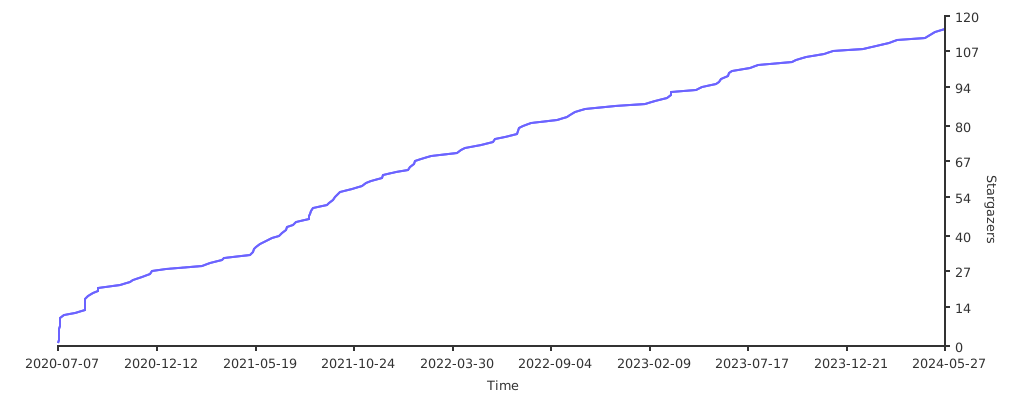
If you find this library useful, please leave a [star](https://github.com/sasjs/core/stargazers) and help us grow our star graph!
|
|
|
|
|
|
|
|
|
|
|